PointGeometry
Summary
A PointGeometry object is a shape that has neither length nor area at a given scale.
Discussion
In many geoprocessing workflows, you may need to run a specific operation using coordinate and geometry information but don't necessarily want to go through the process of creating a new (temporary) feature class, populating the feature class with cursors, using the feature class, then deleting the temporary feature class. Geometry objects can be used instead for both input and output to make geoprocessing easier. Geometry objects can be created from scratch using Geometry, Multipoint, PointGeometry, Polygon, or Polyline classes.
During the creation of a geometry object, a simplification process is performed to make the geometry topologically consistent according to its geometry type. For instance, it rectifies polygons that may be self-intersecting or contain incorrect ring orientations. Coordinates may move within the resolution of the geometry's spatial reference.
The following operators can be used in place of geometry methods:
|
Python operator |
Geometry method |
|---|---|
|
|
|
|
|
|
|
|
|
|
|
|
|
|
|
|
|
|
For example, to union two geometry objects, g3 = g1 | g2 is equivalent to g3 = g1.union(g2).
The + operator will use the geometry type (dimension) of the first geometry to determine the geometry type of the output.
Syntax
PointGeometry(inputs, {spatial_reference}, {has_z}, {has_m}, {has_id})
| Name | Explanation | Data type |
|---|---|---|
|
inputs |
A |
Point |
|
spatial_reference (Optional) |
The spatial reference of the new geometry. The default value is None. |
SpatialReference |
|
has_z (Optional) |
Specifies whether the geometry will be z-enabled. The default value is False. |
Boolean |
|
has_m (Optional) |
Specifies whether the geometry will be m-enabled. The default value is False. |
Boolean |
|
has_id (Optional) |
Specifies whether the geometry will support point IDs. The default value is False. |
Boolean |
Properties
| Name | Explanation | Data type |
|---|---|---|
|
JSON (Read only) |
An Esri JSON representation of the geometry as a string. Tip:The returned string can be converted to a dictionary using the |
String |
|
WKB (Read only) |
The well-known binary (WKB) representation for OGC geometry. This property provides a portable representation of a geometry value as a contiguous stream of bytes. |
Bytearray |
|
WKT (Read only) |
The well-known text (WKT) representation for OGC geometry. This property provides a portable representation of a geometry value as a text string. Any true curves in the geometry will be densified into approximate curves in the WKT string. |
String |
|
area (Read only) |
The area of a polygon feature. The area is zero for all other feature types. |
Double |
|
centroid (Read only) |
The true centroid if it is within or on the feature; otherwise, it is the label point. |
Point |
|
extent (Read and Write) |
The extent of the geometry. |
Extent |
|
firstPoint (Read only) |
The first coordinate point of the geometry. |
Point |
|
hasCurves (Read only) |
Specifies whether the geometry has a curve. |
Boolean |
|
hullRectangle (Read only) |
A space-delimited string of the coordinate pairs of the convex hull rectangle. |
String |
|
isMultipart (Read only) |
Specifies whether the number of parts for the geometry is more than one. |
Boolean |
|
labelPoint (Read only) |
The point at which the label is located. This point is always located within or on a feature. |
Point |
|
lastPoint (Read only) |
The last coordinate of the feature. |
Point |
|
length (Read only) |
The length of the linear feature. The calculation uses 2D Cartesian mathematics. For point and multipoint geometry, the length will be zero. For polygon geometry, the length will be the 2D length of the boundary. |
Double |
|
length3D (Read only) |
The 3D length of the linear feature. The calculation uses 3D Cartesian mathematics. For point and multipoint geometry, the length will be zero. For polygon geometry, the length will be the 3D length of the boundary. Caution:The operation does not perform unit conversion between the horizontal and the vertical coordinate systems. The x, y, and z coordinates are assumed to be in the same linear unit. Caution:This property is only available for projected data. |
Double |
|
partCount (Read only) |
The number of geometry parts for the feature. |
Integer |
|
pointCount (Read only) |
The total number of points for the feature. |
Integer |
|
spatialReference (Read only) |
The spatial reference of the geometry. |
SpatialReference |
|
trueCentroid (Read only) |
The center of gravity for a feature. |
Point |
|
type (Read only) |
The geometry type: |
String |
Methods
angleAndDistanceTo(other, {method})
Returns a tuple of angle and distance to a point or polygon.
| Name | Explanation | Data type |
|---|---|---|
|
other |
The second geometry. If the geometry is a polygon, the distance is measured to the centroid of the polygon. |
PointGeometry |
|
method (Optional) |
Specifies the method that will be used to measure distance.
The default value is GEODESIC. |
String |
Return value
| Data type | Explanation |
|---|---|
|
tuple |
Returns a tuple of angle (in degrees) and distance (in meters) to another point. |
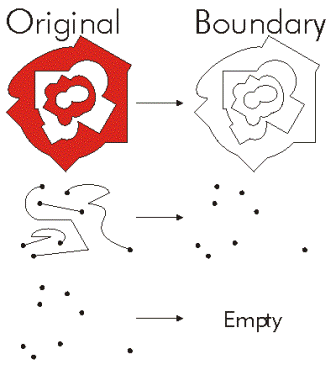
boundary()
Construct the boundary of the geometry.
Return value
| Data type | Explanation |
|---|---|
|
Object |
A polygon's boundary is a polyline. A polyline's boundary is a multipoint, corresponding to the endpoints of the line. A point or multipoint's boundary is an empty point or multipoint. |
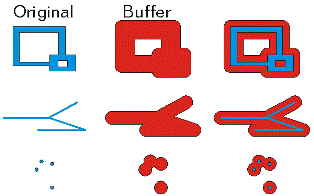
buffer(distance)
Construct a polygon at a specified distance from the geometry.
| Name | Explanation | Data type |
|---|---|---|
|
distance |
The buffer distance. The buffer distance is in the same units as the geometry that is being buffered. A negative distance can only be specified for a polygon geometry. |
Double |
Return value
| Data type | Explanation |
|---|---|
|
Polygon |
The buffered polygon geometry. |
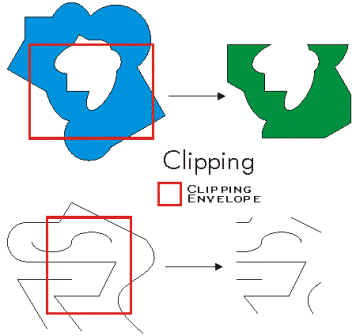
clip(envelope)
Constructs the intersection of the geometry and the specified extent.
| Name | Explanation | Data type |
|---|---|---|
|
envelope |
An |
Extent |
Return value
| Data type | Explanation |
|---|---|
|
Object |
An output geometry clipped to the specified extent. |
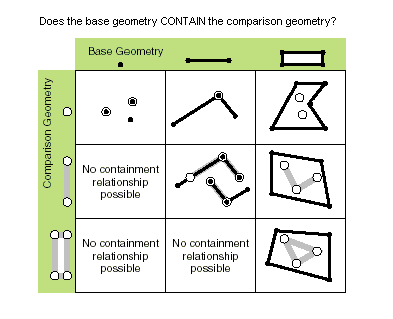
contains(second_geometry, {relation})
Specifies whether the base geometry contains the comparison geometry.
The contains method is the opposite of the within method.
Only True relationships are shown in this illustration.
| Name | Explanation | Data type |
|---|---|---|
|
second_geometry |
A second geometry. |
Object |
|
relation (Optional) |
Specifies the spatial relationship type that will be used.
The default value is None. |
String |
Return value
| Data type | Explanation |
|---|---|
|
Boolean |
Returns whether this geometry contains the second geometry. |
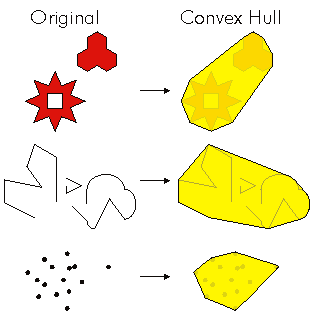
convexHull()
Constructs the geometry that is the minimal bounding polygon such that all outer angles are convex.
Return value
| Data type | Explanation |
|---|---|
|
Object |
The resulting geometry. The convex hull of a single point is the point itself. |
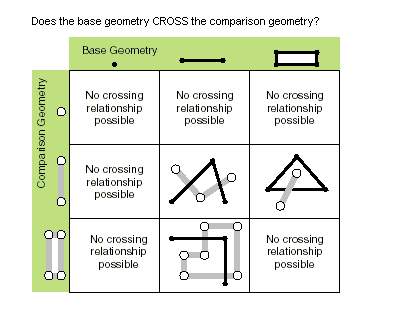
crosses(second_geometry)
Specifies whether the two geometries intersect in a geometry of a lesser shape type.
Two polylines cross if they share only points in common, at least one of which is not an endpoint. A polyline and a polygon cross if they share a polyline or a point (for a vertical line) in common on the interior of the polygon that is not equivalent to the entire polyline.
Only True relationships are shown in this illustration.
| Name | Explanation | Data type |
|---|---|---|
|
second_geometry |
A second geometry. |
Object |
Return value
| Data type | Explanation |
|---|---|
|
Boolean |
Returns whether the two geometries intersect in a geometry of a lesser shape type. |
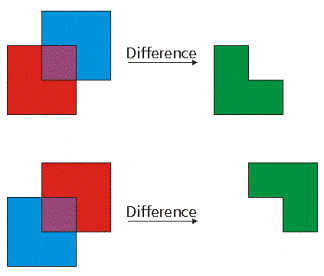
difference(other)
Construct the geometry that is composed only of the region unique to the base geometry but not part of the other geometry.
The following illustration shows the results when the red polygon is the source geometry:
| Name | Explanation | Data type |
|---|---|---|
|
other |
A second geometry. |
Object |
Return value
| Data type | Explanation |
|---|---|
|
Object |
The resulting geometry. |
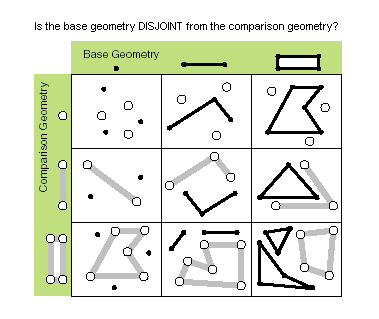
disjoint(second_geometry)
Specifies whether the base and comparison geometries have points in common.
Two geometries intersect when this method returns False.
Only True relationships are shown in this illustration.
| Name | Explanation | Data type |
|---|---|---|
|
second_geometry |
A second geometry. |
Object |
Return value
| Data type | Explanation |
|---|---|
|
Boolean |
Returns whether the two geometries have points in common. |
distanceTo(other)
Returns the minimum distance between two geometries. The distance is in the units of the geometry's spatial reference. If the geometries intersect, the minimum distance is 0.
Both geometries must have the same projection.
| Name | Explanation | Data type |
|---|---|---|
|
other |
A second geometry. |
Object |
Return value
| Data type | Explanation |
|---|---|
|
Double |
The distance between the two geometries. |
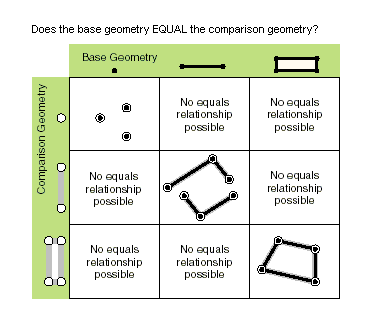
equals(second_geometry)
Specifies whether the base and comparison geometries are of the same shape type and define the same set of points in the plane. This is a 2D comparison only; m- and z-values are ignored.
Only True relationships are shown in this illustration.
| Name | Explanation | Data type |
|---|---|---|
|
second_geometry |
A second geometry. |
Object |
Return value
| Data type | Explanation |
|---|---|
|
Boolean |
Returns whether the two geometries are of the same shape type and define the same set of points in the plane. |
getGeohash(precision)
Converts a PointGeometry in geographic coordinate system coordinates of latitude and longitude to a geohash string that is accurate to an arbitrary precision within a bounding box in the geohash grid.
The spatial reference of the point geometry must be in a geographic coordinate system to return an accurate geohash.
| Name | Explanation | Data type |
|---|---|---|
|
precision |
The precision length of the hash string that will be returned for the The default value is 8. |
Integer |
Return value
| Data type | Explanation |
|---|---|
|
String |
Returns a geohash string based on the input point geometry latitude and longitude coordinates and the length of precision. |
import arcpy

# Spatial reference set to GCS_WGS_1984
spatial_reference = arcpy.SpatialReference(4326)
pnt = arcpy.Point(-88.236, 40.096)
pnt_geometry = arcpy.PointGeometry(pnt, spatial_reference)
print(pnt_geometry.getGeohash(6))  # dp1k05
getPart({index})
Returns an Array object of Point objects for a particular part of the geometry if an index is specified. If an index is not specified, an Array object containing an Array of Point objects for each geometry part is returned.
The getPart method is equivalent to indexing an object; that is, obj.getPart(0) is equivalent to obj[0].
| Name | Explanation | Data type |
|---|---|---|
|
index (Optional) |
The index position of the geometry. |
Integer |
Return value
| Data type | Explanation |
|---|---|
|
Array |
The resultant |
intersect(other, dimension)
Constructs a geometry that is the geometric intersection of the two input geometries. Different dimension values can be used to create different shape types.
The intersection of two geometries of the same shape type is a geometry containing only the regions of overlap between the original geometries.
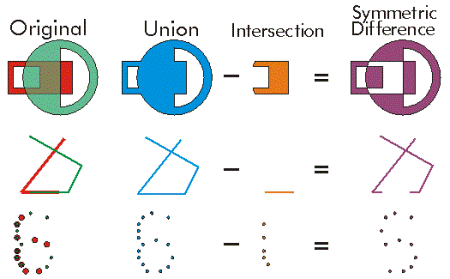
For faster results, test whether the two geometries are disjoint before calling intersect.
| Name | Explanation | Data type |
|---|---|---|
|
other |
The second geometry. |
Object |
|
dimension |
Specifies the topological dimension (shape type) of the resulting geometry.
|
Integer |
Return value
| Data type | Explanation |
|---|---|
|
Object |
A new geometry (point, multipoint, polyline, or polygon) that is the geometric intersection of the two input geometries. |
move({dx}, {dy}, {dz})
Moves a geometry by specified distances along the x-, y-, and z-axes to create a new geometry.
| Name | Explanation | Data type |
|---|---|---|
|
dx (Optional) |
The distance the geometry will be moved along the x-axis. The default value is 0.0. |
Double |
|
dy (Optional) |
The distance the geometry will be moved along the y-axis. The default value is 0.0. |
Double |
|
dz (Optional) |
The distance the geometry will be moved along the z-axis. The geometry must be z-aware and have z-values. The default value is 0.0. |
Double |
Return value
| Data type | Explanation |
|---|---|
|
Geometry |
An output geometry, moved by the specified distances along the x-, y-, and z-axes. |
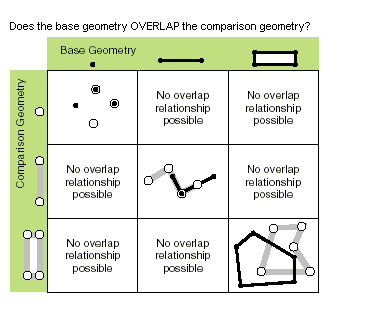
overlaps(second_geometry)
Specifies whether the intersection of the two geometries has the same shape type as one of the input geometries and is not equivalent to either of the input geometries.
Only True relationships are shown in this illustration.
| Name | Explanation | Data type |
|---|---|---|
|
second_geometry |
A second geometry. |
Object |
Return value
| Data type | Explanation |
|---|---|
|
Boolean |
Returns whether the intersection of the two geometries has the same dimension as one of the input geometries. |
pointFromAngleAndDistance(angle, distance, {method})
Returns a point at a given angle in degrees and distance in the units of the geometry's spatial reference using the specified measurement type.
| Name | Explanation | Data type |
|---|---|---|
|
angle |
The angle in degrees to the returned point. |
Double |
|
distance |
The distance in the units of the geometry's spatial reference to the returned point. |
Double |
|
method (Optional) |
Specifies the method that will be used to measure distance.
The default value is GEODESIC. |
String |
Return value
| Data type | Explanation |
|---|---|
|
PointGeometry |
Returns a point at a given angle and distance in degrees and meters. |
projectAs(spatial_reference, {transformation_name})
Projects a geometry from one spatial reference to another.
When the geometry object and the destination spatial reference do not have a common datum, specify a transformation_name parameter value. For more information, see Geographic datum transformations and ListTransformations.
A vertical transformation will be performed when the following criteria are met:
The geometry object has z-coordinates.
The geometry object's spatial reference and the
spatial_referenceparameter values both have a vertical coordinate system.The
transformation_nameparameter value is a vertical transformation.
When the transformation_name parameter value is a vertical transformation, and neither the geometry object nor the destination spatial reference have a vertical coordinate system, the function will fail with a ValueError exception.
If either the geometry object or the spatial_reference parameter value have an unknown spatial reference, the output geometry's spatial reference will be that of the spatial_reference parameter value. Use of unknown spatial reference is not recommended for analysis.
The projectAs method will not modify m-values, if present.
| Name | Explanation | Data type |
|---|---|---|
|
spatial_reference |
The spatial reference to which the geometry will be projected. The value can be a |
SpatialReference |
|
transformation_name (Optional) |
The geotransformation name. With ArcGIS Pro, if you do not specify a transformation, none will be applied. With ArcGIS Server, if you do not specify a transformation, a fallback transformation will be applied. |
String |
Return value
| Data type | Explanation |
|---|---|
|
Object |
The projected geometry. |
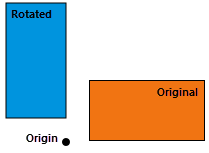
rotate({origin}, {rotation_angle})
Rotates a geometry around a specified origin by the degrees given in radians.
The rotation is applied relative to the origin, so that the geometry rotates around the origin. The position of the rotated geometry is significantly affected by the choice of origin.
Rotate does not apply to the z-direction.
The following describes a few possible choices for the origin and its affect on the output:
The origin is outside the geometry (not within or touching the geometry)—The location of the geometry will change, but the geometry will maintain relative positions to other geometries rotated in the same way. Positions will rotate around the origin.
The origin is at the centroid of the geometry (the centroid is within or touching geometry)—The geometry will rotate (spin) in place around its centroid.
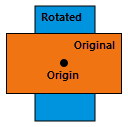
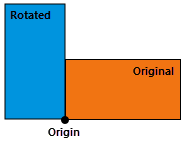
The origin is on a vertex of the geometry—The geometry will rotate around the chosen vertex.
| Name | Explanation | Data type |
|---|---|---|
|
origin (Optional) |
The origin of the transformation. The argument can be either an The default origin, The default value is arcpy.Point(0.0, 0.0.) |
Point |
|
rotation_angle (Optional) |
The angle, in radians, to rotate the geometry around its origin. The default rotation angle is 0.0 radians (no rotation). The default value is 0.0. |
Float |
Return value
| Data type | Explanation |
|---|---|
|
Geometry |
An output geometry rotated by the specified angle around the specified origin. |
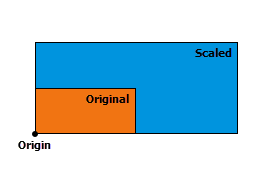
scale({origin}, {sx}, {sy}, {sz})
Scales a geometry from a specified origin by specified factors along the x-, y-, and z-axes to create a new geometry. The position of a transformed point (or vertex) is given by
\(( \space (x \space - \space origin_x) \space * \space scale_x \space + \space origin_x, \space (y \space - \space origin_y) \space * \space scale_y \space + \space origin_y, \space (z \space - \space origin_z) \space * \space scale_z \space + \space origin_z \space )\)
The transformation is applied relative to the origin, so that the origin remains stationary while the geometry expands or contracts around it. The position and the direction of the expansion or contraction for the resulting geometries is significantly affected by the origin.
The following describes a few possible choices for the origin and its affect on the output:
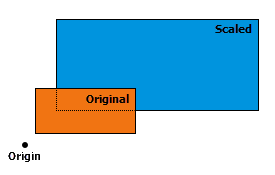
The origin is outside the geometry (not within or touching the geometry)—The size and location of the geometry will change, but the geometry will maintain relative positions to other geometries scaled in the same way. Positions will expand away from or contract toward the origin point.
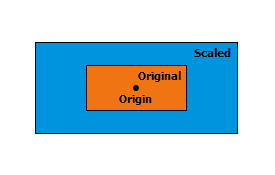
The origin is at the centroid of the geometry (if the centroid is within or touching geometry)—The size of the geometry will change, but the geometry's location will remain anchored at the centroid. The geometry will grow or shrink in place around the centroid.
The origin is on a vertex of the geometry—The size of the geometry will change, but the position of the geometry will remain anchored at the chosen vertex. The geometry will grow from or shrink toward the chosen vertex.
| Name | Explanation | Data type |
|---|---|---|
|
origin (Optional) |
The origin of the transformation. The argument can be either an The default origin, The default value is arcpy.Point(0.0, 0.0, 0.0.) |
Point |
|
sx (Optional) |
The factor that will be used to scale the geometry along the x-axis. The default value is 1.0. |
Double |
|
sy (Optional) |
The factor that will be used to scale the geometry along the y-axis. The default value is 1.0. |
Double |
|
sz (Optional) |
The factor that will be used to scale the geometry along the z-axis. The geometry must be z-aware and have z-values. The default value is 1.0. |
Double |
Return value
| Data type | Explanation |
|---|---|
|
Geometry |
An output geometry scaled from the specified origin and by specified factors along the x-, y-, and z-axes. |
symmetricDifference(other)
Constructs the geometry that is the union of two geometries minus the intersection of those geometries.
The two input geometries must be the same shape type.
| Name | Explanation | Data type |
|---|---|---|
|
other |
A second geometry. |
Object |
Return value
| Data type | Explanation |
|---|---|
|
Object |
The resulting geometry. |
toCoordString(notation)
Converts a PointGeometry to the selected coordinate system notation.
| Name | Explanation | Data type |
|---|---|---|
|
notation |
The coordinate system notation to be generated.
|
None |
Return value
| Data type | Explanation |
|---|---|
|
String |
The point in the specified coordinate system notation. |
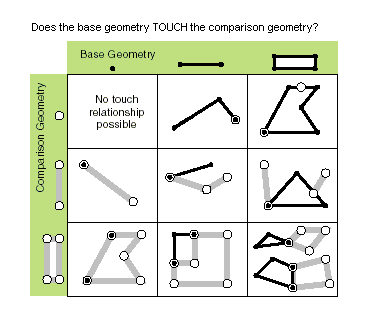
touches(second_geometry)
Specifies whether the boundaries of the geometries intersect.
Two geometries touch when the intersection of the geometries is not empty, but the intersection of their interiors is empty. For example, a point touches a polyline only if the point is coincident with one of the polyline end points.
Only True relationships are shown in this illustration.
| Name | Explanation | Data type |
|---|---|---|
|
second_geometry |
A second geometry. |
Object |
Return value
| Data type | Explanation |
|---|---|
|
Boolean |
Returns whether the boundaries of the geometries intersect. |
union(other)
Constructs the geometry that is the set-theoretic union of the input geometries.
The two geometries must have the same shape type.
The result is a single geometry that is the combination of both input geometries. Anything within either of the input geometries will be part of the result. However, anything that is common to both geometries will only exist once in the result.
The order of the input geometries has no effect on the output.
| Name | Explanation | Data type |
|---|---|---|
|
other |
The second geometry. |
Object |
Return value
| Data type | Explanation |
|---|---|
|
Object |
The resulting geometry. |
within(second_geometry, {relation})
Specifies whether the base geometry is within the comparison geometry.
The within method is the opposite operator of the contains method.
Only True relationships are shown in this illustration.
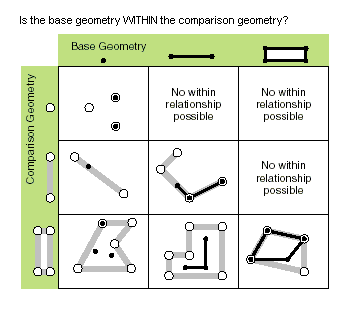
The base geometry is within the comparison geometry if the base geometry is the intersection of the geometries, and the intersection of their interiors is not empty. The within method is a Clementini operator, except in the case of an empty base geometry.
| Name | Explanation | Data type |
|---|---|---|
|
second_geometry |
A second geometry. |
Object |
|
relation (Optional) |
Specifies the spatial relationship type that will be used.
The default value is None. |
String |
Return value
| Data type | Explanation |
|---|---|
|
Boolean |
Returns whether the base geometry is within the comparison geometry. |
Code sample
Create a point feature class from scratch.
import arcpy

# Create a spatial reference from a wkid
spatial_ref = arcpy.SpatialReference(32145)

# A list of coordinate pairs
feature_info = [[1, 2], [3, 5], [7, 3]]

# A list to hold the PointGeometry objects
features = []

# For each coordinate pair, create a PointGeometry object
for pt in feature_info:
    point = arcpy.Point(*pt)

    point_geometry = arcpy.PointGeometry(point, spatial_ref)
    features.append(point_geometry)

# Persist a copy of the PointGeometry objects using CopyFeatures
arcpy.management.CopyFeatures(features, "c:/geometry/f.gdb/points")