NbrWeight
汇总
定义一个权重邻域,该邻域是使用核文件创建的,该核文件指定了邻域内要乘以像元的值。
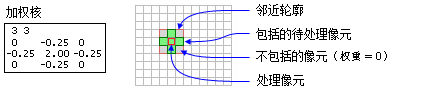
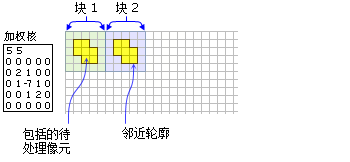
讨论
许可:
如果您拥有 Image Analyst 扩展模块许可,也可以使用该类,但仅限于 焦点统计 工具。
将使用核文件指定权重邻域。 核文件将标识应包含在邻域内的像元位置,以及输入栅格上将用于乘以像元值的权重。
对于焦点工具,邻域范围内待处理像元相对于邻域左上角的 x,y 位置可通过以下方程式来确定:
\(x \space = \space (宽度 \space + \space 1)/2 \space y \space = \space (高度 \space + \space 1)/2\)
如果输入像元数为偶数,则将使用截断来计算 x 和 y 坐标。
核文件:
核文件是一个 ASCII 文本文件,用于定义权重邻域的值和形状。
第一行指定了邻域的宽度和高度(x 方向的像元数,后跟一个空格,以及 y 方向的像元数)。
随后的几行将提供邻域中每个位置的权重值。 这些值的输入配置与其所代表的邻域中显示的配置相同。 正值、负值和小数值均可用作权重。 每个值之间必须存在一个空格。
对于不属于计算范围的邻域中的位置,请在核文件中的相应位置处使用值 0。
语法
NbrWeight(inKernelFile)
| 名称 | 说明 | 数据类型 |
|---|---|---|
|
inKernelFile |
An ASCII text file that defines the shape of the neighborhood and the weight of each cell in that neighborhood. A value of 0 for a cell position indicates that the cell is not a member of the neighborhood, and a number at a corresponding cell's position indicates that the cell value be included as a member of the neighborhood. The nonzero value will also serve as the weight to multiply the corresponding cell value. |
File |
属性
| 名称 | 说明 | 数据类型 |
|---|---|---|
|
inKernelFile (读取和写入) |
|
String |
代码示例
演示如何创建 NbrWeight 类以及如何在 Python 窗口的 BlockStatistics 工具中使用该类。
import arcpy
from arcpy import env
from arcpy.sa import *
env.workspace = "C:/sapyexamples/data"
outNbrWF = BlockStatistics("block", NbrWeight("weight.txt"))
outNbrWF.save("C:/sapyexamples/output/blstatsnbrwf2")
使用 NbrWeight 类执行 BlockStatistics 工具。
# Name: NbrWeight_Ex_02.py
# Description: Uses the NbrWeight object to run BlockStatistics tool.
# Requirements: Spatial Analyst extension

# Import system modules
import arcpy
from arcpy import env
from arcpy.sa import *

# Set environment settings
env.workspace = "C:/sapyexamples/data"

# Set local variables
inRaster = "block"

# Create the Neighborhood Object
inWeightFile = "C:/data/weight.txt"
myNbrWeight = NbrWeight(inWeightFile)

# Run BlockStatistics
outBlStats =  BlockStatistics(inRaster, myNbrWeight, "MINIMUM", "DATA")

# Save the output
outBlStats.save("C:/sapyexamples/output/blstat_wght3")