机场指示牌
机场指示牌标注可以使用背景格式化标签进行格式化。 此标签对于更改机场指示牌文本背景的外观具有独特的灵活性。
下图显示的机场指示牌由两个不同的背景组成,一个具有轮廓,另一个则没有轮廓。
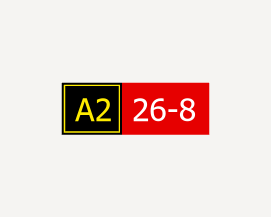
要创建机场指示牌标注,请按照以下步骤操作:
确保图层标注已启用。
使用默认字体 Tahoma Regular。 将标注大小更改为 24 磅。
使用格式化标签为标注创建背景。
- 一个简单的示例标注表达式,用于在文本周围放置格式化标签。 标注为 A2 26-8。
"<CLR red='255' green='236' blue='0' alpha='100'><BGD red='0' green='0' blue='0' alpha='100' outline_red='255' outline_green='236' outline_blue='0' outline_alpha='100' width='1' padding='-2'>" + "A2 " + "</BGD></CLR><CLR red='255' green='255' blue='255' alpha='100'><BGD red='230' green='0' blue='0' alpha='100'>" + " 26-8" + "</BGD></CLR>"一个更为复杂的示例标注表达式,包含从数据中的字段提取标注并根据该信息确定背景和轮廓颜色的逻辑。
此表达式依靠的数据按照以下示例进行格式化。 括号 ([ ]) 中的数字指定了文本所使用的格式。 值为 [3] 表示使用黄色文本和黑色背景。
[4]9-27[3]B10
[7]5
[12]
[4]9-27[3]B4[0]56
[0]←B4
Arcade 标注表达式
var yellow = [255,236,0,100] var red = [230,0,0,100] var blue = [0,180,230,100] var black = [0,0,0,100] var white = [255,255,255,100] var none = [0,0,0,0] var textFontName = "Frutiger"; var textFontStyle = "65 Bold"; var signFontName = "Esri Airport Sign" var signFontStyle = "" function FormatBO(background, outline, width, padding, txt){ var attr = "" if(background != none && count(background) == 4){ attr += " red='" + background[0] + "'" attr += " green='" + background[1] + "'" attr += " blue='" + background[2] + "'" attr += " alpha='" + background[3] + "'" } if(outline != none && count(outline) == 4){ attr += " outline_red='" + outline[0] + "'" attr += " outline_green='" + outline[1] + "'" attr += " outline_blue='" + outline[2] + "'" attr += " outline_alpha='" + outline[3] + "'" attr += " width='" + width + "'" attr += " padding='" + padding + "'" } return "<BGD" + attr + ">" + txt + "</BGD>" } function SetTextColor(rgba, txt) { var r = rgba[0] var g = rgba[1] var b = rgba[2] var a = rgba[3] return "<CLR red='" + r + "' green='" + g + "' blue='" + b + "' alpha='" + a + "'>" + txt + "</CLR>"; } function FormatFont(label, name, style, size) { var tagName = iif(name=="", "", " NAME='"+name+"'") var tagStyle = iif(style=="", "", " STYLE='"+style+"'") var tagSize = iif(size==0, "", " SIZE='"+size+"'") return "<FNT" + tagName + tagStyle + tagSize + ">" + label + "</FNT>" } var testExpr = $feature.AIRPORTSIGNMSGFRONT // e.g. "[0]←D[3]F" var splitExpr = Split(testExpr,"[") // e.g. ["", "0]←D ", "3]F"] var typeTextPairArray = [["",""]] for (var index in splitExpr){ var pair = Split(splitExpr[index],"]") typeTextPairArray[index] = pair } // e.g. [[""], ["0","←D"], ["3","F"]] var expression = ""; var indices = [0] for (var index in typeTextPairArray){ indices[index] = index; var pairCount = count(typeTextPairArray[index]) if(pairCount != 2){ expression += iif(pairCount >= 1, typeTextPairArray[index][0], "") continue; } var type = number(typeTextPairArray[index][0]) var newText = typeTextPairArray[index][1] if(type == 0) // "DIRECTION") expression += SetTextColor(black, FormatBO(yellow, none, 0, 0, newText)); else if(type == 1) // "INFO_ACFT") expression += SetTextColor(black, FormatBO(yellow, none, 0, 0, FormatFont(newText, textFontName, textFontStyle, 0))); else if(type == 2) //"INFO_VEH") expression += SetTextColor(black, FormatBO(yellow, none, 0, 0, FormatFont(newText, textFontName, textFontStyle, 5))); else if(type == 3) // "LOCATION") expression += SetTextColor(yellow, FormatBO(black, yellow, 1, -2, FormatFont(" " + newText + " ", textFontName, textFontStyle, 0))); else if(type == 4) // "MANDATORY") expression += SetTextColor(white, FormatBO(red, none, 0, 0, FormatFont(newText, textFontName, textFontStyle, 0))); else if(type == 5) // "NO_ENTRY") expression += SetTextColor(red, FormatBO(white, none, 0, 0, FormatFont("O", signFontName, "", 16))); else if(type == 6) // "RWY_CRITICAL") expression += SetTextColor(black, FormatBO(yellow, none, 0, 0, FormatFont("IIIII", signFontName, "", 0))); else if(type == 7) // "RWY_DIST_REMAIN") expression += SetTextColor(white, FormatBO(black, none, 0, 0, FormatFont(newText, textFontName, textFontStyle, 0))); else if(type == 8) //"RWY_SAFETY") expression += SetTextColor(black, FormatBO(yellow, none, 0, 0, FormatFont("RRRRR", signFontName, "", 0))); else if(type == 9) //"TAXIWAY_END") expression += SetTextColor(black, FormatBO(yellow, none, 0, 0, FormatFont("TTT", signFontName, "", 0))); else if(type == 10) //"TERMINAL") expression += SetTextColor(white, FormatBO(blue, none, 0, 0, FormatFont(newText, textFontName, textFontStyle, 0))); else if(type == 11) //"VEH_STOP") expression += SetTextColor(red, FormatBO(white, none, 0, 0, FormatFont("S", signFontName, "", 16))); else if(type == 12) //"VEH_YIELD") expression += SetTextColor(red, FormatBO(white, none, 0, 0, FormatFont("Y", signFontName, "", 16))); else expression += newText } return expression设置背景注释边距。
在标注选项卡的标注放置组中,单击标注放置属性启动器
 。
。在标注窗格中,单击符号,然后单击常规选项卡
 。
。展开注释。
单击注释下拉菜单,然后选择背景。
设置如下边距:
左边距 - 10 磅
右边距 - 10 磅
上边距 - 5 磅
下边距 - 5 磅