Topographic Production Service
License:
To use this resource, an ArcGIS GIS Server Advanced license and an ArcGIS Topographic Mapping server extension license are required.
The Topographic Production Service is a server object extension (SOE) to a map service. It allows topographic production capabilities to be performed on the map service such as producing topographic maps based on industry standard map product specifications.
Learn more about the Topographic Production Service
Learn more about the ArcGIS Server Services Directory
Publish the service
The Topographic Mapping extension in ArcGIS Pro allows you to publish the Topographic Production Service.
Configuration in ArcGIS Server
You can configure the operations that the service can perform and other properties in ArcGIS Server Manager after the service is published. These settings appear when you check the Topographic Production check box or click Topographic Production, and are only applied if the check box is checked..
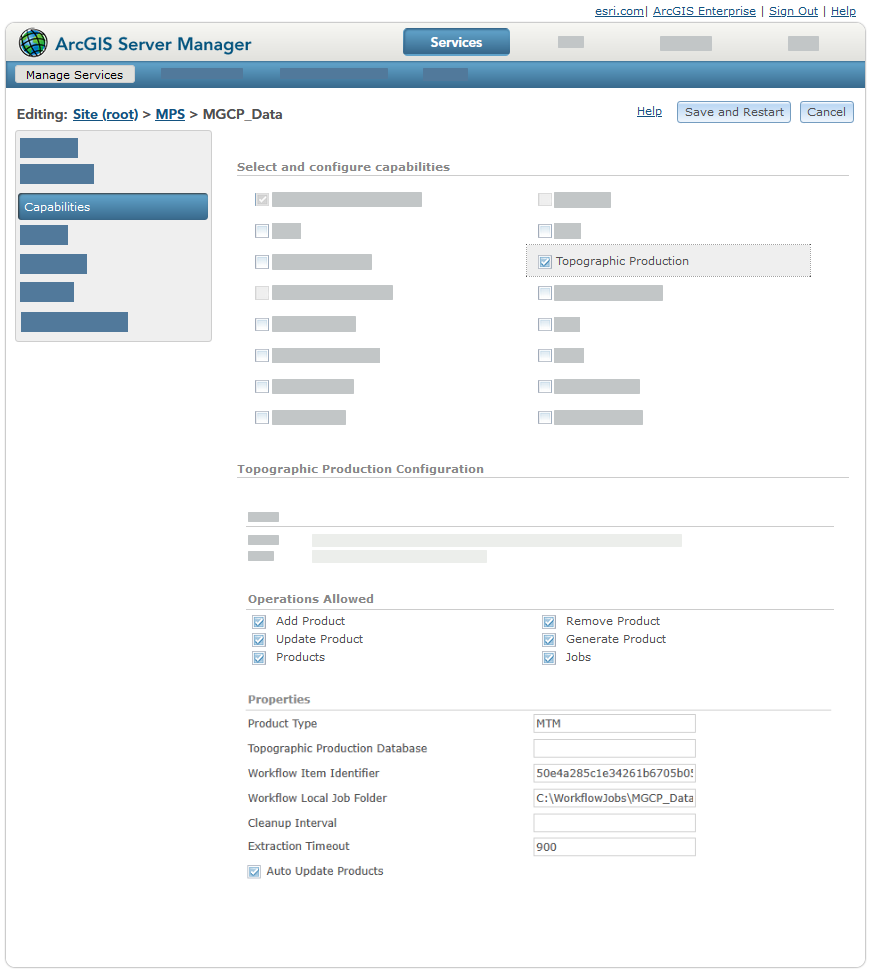
Operations
The following resources and operations are supported in the SOE:
addProduct—Adds a definition of a map product to the service that can be used to generate a map.calculateExtent—Calculates a custom area of interest (AOI) for a given product and version.delete—Deletes jobs that have been run or were canceled so that they no longer appear in queries or occupy server space.generateProduct—Automates the process of producing a layout or map based on an existing map product definition.removeProduct—Removes a map product from the Topographic Production Service.updateProduct—Updates the properties of an existing map product.products—Gets the map products that the Topographic Production Service supports.product—Gets a single map product from the products that the Topographic Production Service supports.
jobs—Contains the operations involving jobs that are run.cancel—Cancels a job submitted through thegenerateProductendpoint.job—Tracks the status of a job run by thegenerateProductendpoint. Returns the status, start date, last modified date, and messages for the job.query—Tracks the status of jobs run by thegenerateProductendpoint. Returns the status, start date, last modified date, and messages for a set of jobs.
workflows—Contains the resources and operations involving topographic production workflows that use ArcGIS Workflow Manager.taskGroups—Contains the operations involving SOE task groups.addTaskGroup—Combines a workflow definition with specifics required by an organization into an SOE task group that can be used by the createTaskGroupJob operation to create SOE jobs.createTaskGroupJob—Uses an SOE task group to create an SOE task group job that results in a Workflow Manager parent job and its child jobs.getTaskGroups—Returns details about an SOE task group.insertTasks—Inserts a set of tasks into an existing SOE task group production job.removeTaskGroup—Removes an SOE task group.updateTaskGroup—Updates an SOE task group.
tasks—Contains the operations that involve task group jobs.updateTask—Updates the parameter values of a task in a task group job.executeTaskJob—Runs the SOE task group job created by thecreateTaskGroupJoboperation.getTask—Returns the details about an SOE task job
projects—Contains the operations that enable the integration between the topographic production server with Workflow Manager service-based workflows.addProject—Single-parameter operation that accepts the JSON object that defines the project and all of its phases.queryProject—Returns a JSON object array that represents projects.removeProject—Removes a project.updateProject—Updates the properties defined in the JSON of a project.
Topographic Production Database
A geodatabase is used by the Topographic Production Service to store data. The geodatabase type that is used is determined by a spatial database engine (SDE) connection file. In Server Manager, the path to an SDE connection file must be specified in the Topographic Production Database text box. The ArcGIS Server account must have read access to location of the .sde connection file.
Tip:
The path to this file can also be specified when the Topographic Production Service is published in ArcGIS Pro using the tmserverDatabase text box.
Learn more about publishing the Topographic Production Service in ArcGIS Pro
The topographic server geodatabase contains multiple tables. The TPS_Property table contains the properties that are defined when the service is published from ArcGIS Pro and can be accessed from ArcGIS Server Manager after the service is published. The table also stores properties for each service that is published with the topographic production SOE enabled. At ArcGIS Enterprise 11.2, the table contains the following properties: ObjectID, ServiceIdentifier, Name, and Value.
Note:
The ServiceIdentifier column contains the service's unique ID. If the value of the ID is -1, the property is a global property that applies to all services.
Each row in the TPS_Property table is a property. The following table describes each property:
|
Property |
Description |
|---|---|
|
|
|
|
|
A global property that allows a group of users to cancel or delete jobs in the web apps included with the ArcGIS Topographic Mapping server extension. To provide a group with these privileges, update the In a stand-alone ArcGIS Server deployment, you can assign these privileges to a group by providing the role name value of a user with an ArcGIS Server administrator role type as the value for this property. |
|
|
The SDE authentication mode that is allowed. The following are supported: Caution:Changing the mode by updating this value poses a security risk. Changing this setting is not recommended.
|
|
|
A list of services that are outside of the federated environment that an organization has deemed safe. This list should only contain public services and can be comma-separated values. The service URL structure impacts which services are allowed. For example:
|
|
|
Specifies whether updates to the map product definitions—made in the
|
|
|
The number of hours before temporary data used to produce a map product and the output map products are deleted from the server. The default value is |
|
|
The date and time format when a token involving date or time is used in a job output file name. |
|
|
This property is reserved for use at a future release and is not currently supported. |
|
|
This property is reserved for use at a future release and is not currently supported. |
|
|
Specifies whether a job's progress is updated while data is extracted for the job. The default value is Tip:When working with high-volume deployments, a value of |
|
|
The amount of time in seconds that the data extraction can run before timing out. |
|
|
Note:This is a global property, set the The following are supported file types:
The following tokens can be used to define a job output file name:
If the format is missing the file type extension, it is automatically appended. Caution:Include the [JobId] token, [JobStartDate] token, or both to help avoid file name conflicts. |
|
|
The number of days that data related to map production jobs is stored in the database. The default value is |
|
|
The date and time that the temporary data for a job was last deleted from the server. |
|
|
The map product types supported by the service. Multiple values must be separated by a comma, for example: TM, JOG. Map product definitions have a |
|
|
The amount of time between checks to see whether the resource thresholds that have been set for cleanups to be triggered are met. Resources include disk space. The default value is |
|
|
The disk usage percentage that triggers a mandatory cleanup starting from the oldest job. The default value is |
|
|
The disk usage percentage to reach when a mandatory SOE cleanup is triggered due to a high disk usage percentage. The default value is |
|
|
A global property that specifies whether the default value output folder for a job will be named based on the job ID. The default value is If the value is set to |
|
|
The version of the topographic server geodatabase. Note:Starting with ArcGIS Enterprise 12.1, this value matches the current version of Enterprise. |
|
|
The ID string associated with a topographic production workflow item. |
|
|
The path to the location of a folder that contains the data for local jobs. |