Assign weights through pairwise comparison
 Available with Spatial Analyst license.
With pairwise comparison, you can evaluate criteria in pairs to calculate weights from a series of input criteria. On the Suitability tab, click the Pairwise Weighting button to open a dialog that will show the pairs automatically created from the input criteria. Each pair has an accompanying slider you can adjust to specify which of the criteria are more important and by how much. A comparison matrix created from the pairwise evaluations will show how the weights are affected with each change in the slider.
When you have completed the evaluation, you can then apply the weights to the model criteria.
General pairwise comparison workflow
The main steps in the pairwise comparison workflow are as follows:
Specify the comparisons for the criteria pairs.
Calculate the weights from the comparison matrix.
Check the consistency ratio to ensure the pairwise comparisons are logically consistent.
Apply the weights to the criteria in the Suitability tab.
The following section contains more information about the process.
Pairwise comparison steps
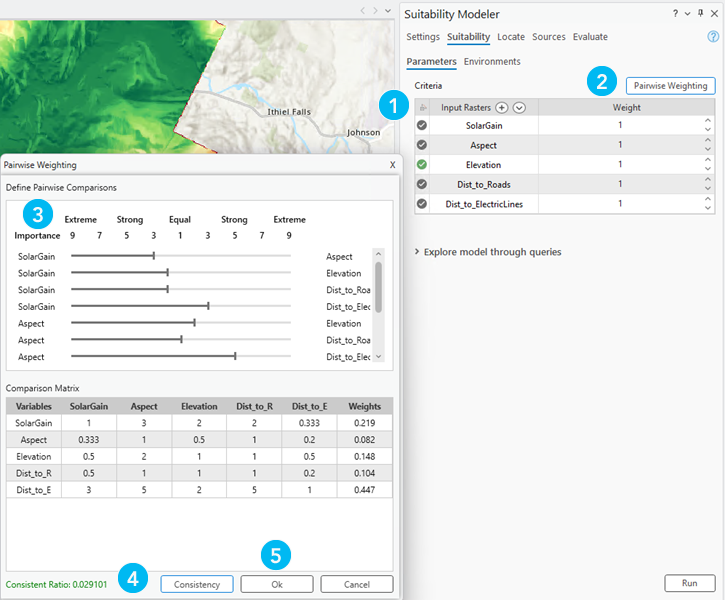
The general workflow for doing a pairwise comparison in the Suitability Modeler is illustrated below. The numbered steps of the example shown correspond to the additional details in the section that follows.
To perform the workflow, follow these steps:
In the Suitability tab, identify the model criteria.
Click the Pairwise Weighting button.
The Pairwise Weighting dialog appears containing the pairwise comparison sliders and the Comparison Matrix.
Adjust the pairwise comparisons by moving the sliders for each pair.
Click the Consistency button to ensure that the pairwise comparisons are consistent and to see what the overall consistency ratio is.
Click Ok when done.
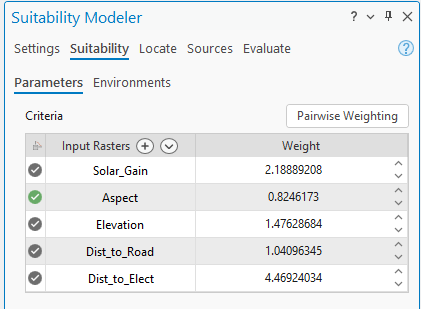
The weights are automatically assigned to the criteria table in the Suitability tab.
Pairwise weighting methods
Pairwise weighting supports two weighting methods, Multiplier and Percent.
On the Setting tab, if the Weight by parameter is set to Multiplier, the weights in the Comparison Matrix are multiplied by 10 before assigning them as the weights for the criteria.
If Percent is selected, the weights in the Comparison Matrix are multiplied by 100 before assigning them as the weights to the criteria.
See the following example of applying the Multiplier weighting method:
See How Assign Weights by Pairwise Comparison Works to learn more about pairwise comparison.
Comparison scale
The pairwise comparison uses a 1 to 9 scale developed by Saaty (2008). The scale, their definitions, and explanations of each value in the scale are identified in the table below.
| Intensity of Importance | Definition | Explanation |
|---|---|---|
| 1 | Equal importance | Two activities contribute equally to the objective. |
| 2 | Weak or slight | |
| 3 | Moderate importance | Experience and judgement slightly favor one activity over the another |
| 4 | Moderate plus | |
| 5 | Strong importance | Experience and judgement strongly favor one activity over another. |
| 6 | Strong plus | |
| 7 | Very strong or demonstrated importance | An activity is favored very strongly over another; its dominance is demonstrated in practice. |
| 8 | Very, very strong | |
| 9 | Extreme importance | The evidence favoring one activity over another is of the highest possible order of affirmation. |
References
Saaty, T. L. 2008. "Decision making with the analytic hierarchy process". International Journal of Services Sciences, 1(1), 83-98.