Archive history
Archiving your data in ArcGIS Pro preserves a record of feature-level changes to all or a subset of data in an enterprise geodatabase. Geodatabase archiving is the mechanism for capturing, managing, and analyzing data changes for historical reference.
Archiving can be enabled for a variety of reasons, including answering questions about past events and tracking changes over time, such as the following:
Preservation of edits over time to support time-sensitive querying of historical changes.
- Example: How have features such as a wastewater network changed shape over time to accommodate a city's continued growth?
Compliance purposes in which a historical record of edits must be retained for legal reasons.
- Example: When did the zoning for a nearby parcel change from agricultural to commercial?
Support services-based and offline editing workflows.
Determine if archiving is enabled
Follow these steps to determine if archiving is enabled on a dataset by accessing the dataset properties:
Start ArcGIS Pro.
In the Catalog pane, in the Databases folder, click the geodatabase connection to expand its contents.
Right-click the feature class or table and select Properties.
If archiving is enabled, the Archiving property on the Source tab reflects the date and time, in coordinated universal time (UTC), archiving was enabled, and the Archive Name property is populated.
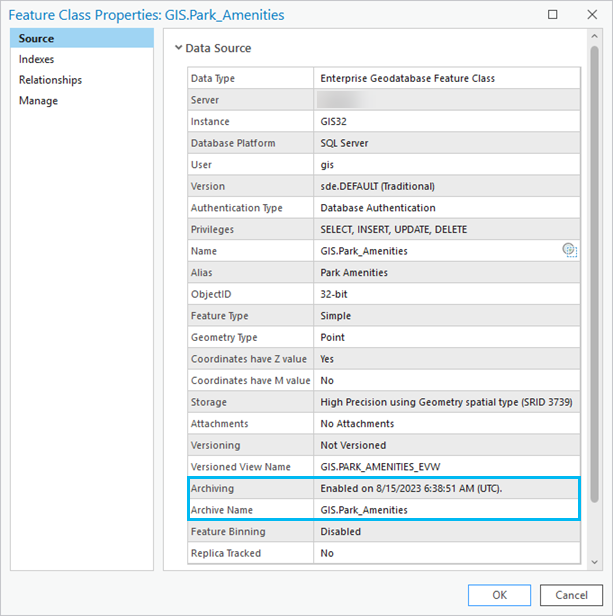
Note:
If archiving is not enabled, you can enable it on versioned or nonversioned data by right-clicking the dataset in the Catalog pane and click Manage. From the feature class properties dialog, click the Manage tab, under Manage geodatabase functionality, click Archiving.
Archive edits
When enabling archiving on nonversioned data, the geodatabase creates three attribute fields directly in the base table for that dataset.
Note:
The base table is the core table of a feature class. It contains all the nonspatial attributes and, if you're using an SQL geometry type, the spatial attributes as well. When you look at a feature class through your database management system's user interface, you can see the base table.
These new attribute fields in the base table are as follows:
GDB_FROM_DATE—The exact date and time the feature was created.GDB_TO_DATE—The exact date and time the feature was retired. Any time an attribute in thisGDB_TO_DATEfield is set to a 9999-12-31 value, it is the current representation of the object.GDB_ARCHIVE_OID—The global identifier to track multiple representations of archived records.
When editing nonversioned data in ArcGIS Pro, each edit transaction (insert, update, or delete) is automatically committed to the geodatabase without needing to save the edits. As edits to the dataset are committed, the geodatabase automatically updates these three attribute fields to maintain a historical record of changes over time.
The following are examples of how edit modifications are handled in the base table when archiving is enabled:
Insert—In ArcGIS Pro, a new feature is added to the Park_Amenities feature class. The
GDB_FROM_DATEfield records the date and time (UTC) the feature was created. TheGDB_TO_DATEfield records 9999-12-31 23:59:59.0000, which means this is the current representation of the object.
Update—In ArcGIS Pro, in the attribute editor, an update is made to the
AmenityTypefield, in which the value is changed from NULL to Restroom. This update results in the following changes to the base table:A new row is inserted with the same
OBJECTID1, and theGDB_FROM_DATEfield records the same time stamp as the archive operation, theGDB_TO_DATEfield records 12/31/9999, and theAmenityTypefield records the update from NULL to Restroom.
Delete—In ArcGIS Pro, the Restroom amenity feature was selected and deleted. When features are deleted in an edit session, their record remains in the base table, the associated row is updated in the base table, and the
GDB_TO_DATEattribute value is set to be equal to the time stamp of the archive operation in which the feature is retired.
Manage archive history
Geodatabase archiving preserves the edit transactions of enabled classes. In the case of nonversioned archiving, archive records are stored in the same tables as all the current records. Over time, particularly in a heavily edited environment, a nonversioned archive dataset can grow as the history of all edit modifications accumulates.
You may decide that some or all of the historical records should be removed, as the records are no longer needed or relevant. Or you may decide to trim historical records to improve database administration tasks such as the following:
Data transaction processing
File system storage
Table and index management
Backup and restore procedures
One option for removing historical records is to disable archiving; however, there is no option to retain a portion of the history in the base table. Disabling archiving is not always a useful solution because archiving is required to support services-based and offline editing workflows. In addition, disabling archiving occurs in a single transaction, and for very large tables, the database transaction logs must be properly sized and monitored to avoid errors.
Another option is to use the Trim Archive History geoprocessing tool. This tool allows you to delete retired rows from nonversioned archived datasets without disabling archiving and disrupting sync workflows.
For details on how this tool is applied, see Trim archive history.