Configure continuous measure networks and events to update with an engineering network
 Available with the Linear Referencing license.
As you configure your LRS and load data for ArcGIS Linear Referencing, you can maintain a network and events with both engineering and continuous measures.
ArcGIS Linear Referencing supports an engineering network, called a line network, and a continuous measure network based on the line network, called a derived network, in the same LRS. When you configure both line and derived networks, you can edit the line network and apply those edits to the derived network by using the Generate Routes tool.
With this configuration, route edits on the line network are automatically applied to the derived network. Configuring your continuous measure network as a derived network is optional; you can register and manage the two networks separately in the LRS.
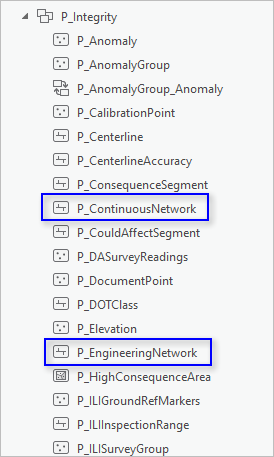
The following image shows the Catalog pane view of P_ContinuousNetwork, a derived network in the LRS, and P_EngineeringNetwork, a line network in the LRS:
You can also configure events to store the route and measure for both line and derived networks. When you apply event behaviors, event shapes and measures are updated. Use the Derive Event Measures tool to update derived network measures on the event. This process lets you view measures for both networks in a single event record.
Using derived event measures lets you store a single event for both line and derived networks. This reduces the number of records and the amount of data managed in your geodatabase. Configuring derived measures on events is optional. You can configure a derived network in an LRS without storing derived measures on events.
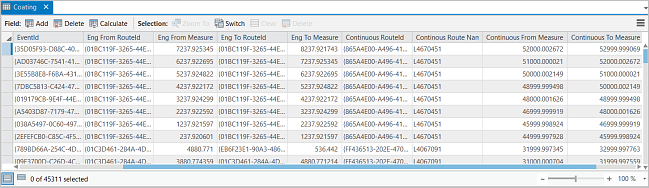
The following image shows the attribute table of the Coating event layer with both line and derived network measures configured:
Configure a continuous (derived) network that can be updated based on edits to an engineering (line) network
You must configure a derived network from a line network. When route edits occur in the line network, you can apply those edits to the derived network so shape, date, and measure changes remain aligned between the two networks.
Note:
The derived network is based on the line network, which must be present before configuring the derived network with the LRS.
To configure a derived network, complete the following steps:
Follow the steps in Create and modify an LRS Network to create and configure a line network in your LRS.
Open either the Create LRS Network or the Create LRS Network From Existing Dataset tool.
Check the Derive From Line Network check box.
Choose the line network that the derived network is based on from the Line Network Name drop-down arrow.
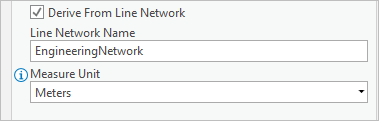
Optionally, if you chose the Create LRS Network tool in step 2, click the Measure Unit drop-down arrow and choose a unit of measure for the derived network.
Click Run to run the chosen tool.
The derived network is configured.
Note:
Route edits can only be applied to the line network in an LRS when a derived network is configured.
Configure events to store both engineering (line) and continuous (derived) measures
Register events that store both engineering and continuous measures with the engineering (line) network. Route edits are applied to the line network before the derived network is updated, so register events with the line network to apply event behaviors before derived measures are updated.
To configure events to store both engineering and continuous measures, complete the following steps:
Configure a line and derived network in your LRS using the steps in the previous section.
Create your event feature class.
See Create and modify LRS events for steps.
After creating an event feature class, add the required derived network event fields.
Run the Enable Derived Measure Fields tool to configure the derived network event fields.
The configuration is complete.
Update a derived (continuous) network and events
Use geoprocessing tools to update a derived network and derived event measures. You can run these tools one by one or combine them with the Apply Event Behaviors tool in a model or Python script. Run the model or script on demand or at scheduled intervals to apply event behaviors based on route edits and update the derived network and derived event measures.
To update a derived network and derived events, complete the following steps:
Complete any route edits in the line network.
Run the Apply Event Behaviors tool and choose the line network for the Input Route Features parameter.
This process updates the event shapes and line network measures.
Run the Generate Routes tool and choose the derived network for the Input Route Features parameter.
This process updates the derived network's shapes and measures.
Run the Derive Event Measures tool and choose the line network for the Input Route Features parameter.
You can choose to run the tool on all or some events registered to the line network. This process updates the derived network measures on the events.
The line and derived networks along with events and their measures remain updated and in sync as route edits are made.
This topic applies only to the pipeline industry.