Retire routes
 Available with the Linear Referencing license.
During the lifespan of a pipeline or roadway, major changes such as environmental concerns, age, erosion, or repair work can require route retirement.
Use the Retire Route tool to retire a route segment, an entire route, or multiple adjoining routes that belong to the same line for a specific time frame.
Use the Retire Route tool to retire a route segment or an entire route for a specific time frame.
When you specify a section of a route to retire, that section is removed from the route for the specified time frame for a particular linear referencing system (LRS) Network. When a route is retired, its end date field is populated with the retirement date.
When sections of a route are retired, the centerline features are split to accommodate the precise location of the retire operation. Calibration points are also added to ensure that the remainder of the route is calibrated properly.
Before using this tool to edit a feature service, you must share branch versioned LRS data as a web layer. If the feature service is not yet published, see Share as web layers. If you are using a file geodatabase LRS dataset, this tool provides limited functionality.
Route retirement follows gap calibration rules.
Beta:
You can use the ArcGIS Pro Assistant (Beta) to perform route retirement and to guide you through the workflow.
The following table lists parameters used for line networks in the Retire Route tool:
| Parameter | Description |
|---|---|
| Network | The network that supports lines in which the routes exist. |
| Retire Date | The date when the retirement takes place on the ground. |
| From Route Name | The route where the retirement starts. |
| From Measure | The measure on the source route where the retirement starts; shown by the green point. |
| Use route start measure | The starting measure of the source route. |
| To Route Name | The route where the retirement ends. For example, if the retirement takes place on a single route, the source route and target route are the same. |
| To Measure | The measure on the target route where the retirement ends; shown by the red point. |
| Use route end measure | The end measure of the target route. |
| Recalibrate route downstream | Remove the length of the retired route from the overall set of measures. |
The following table lists parameters used for nonline networks in the Retire Route tool:
| Parameter | Description |
|---|---|
| Network | The network in which the routes exist. |
| Retire Date | The date when the retirement takes place on the ground. |
| Route Name/ID | The route where the retirement takes place. |
| From Measure | The measure on the source route where the retirement starts; shown by the green point. |
| Use route start measure | The start measure of the source route. |
| To Measure | The measure on the source route where the retirement ends; shown by the red point. |
| Use route end measure | The end measure of the target route. |
| Recalibrate route downstream | Remove the length of the retired route from the overall set of measures. |
Retire a route
To retire a route, complete the following steps:
Start ArcGIS Pro and add the centerline and LRS Network feature classes to a map.
You can also open a map in which the centerline and LRS Network layers are present.
Note:
In the LRS data model, only one centerline feature is expected at any given location. Ensure that the centerlines used for your edit do not overlap other centerlines in the LRS.
Branch versioned LRS Networks, including any network configured with a user-generated route ID, must be edited through a feature service.
Zoom to the location where you want to retire a route.
On the Linear Referencing tab, in the Route Editing group, click Retire
 .
The Retire Route pane appears.
Click the Network drop-down arrow and choose the LRS Network that contains the route to retire.
Click the Calendar
 next to the Retire Date text box and choose a retirement date.
You can also double-click the Retire Date text box to insert the current date or enter a date in the box.
Click the Choose route from map button
 to choose a route to retire for the From Route Name parameter.
If multiple routes exist at the edit location, select one of the routes in the Select a Route dialog box.
Tip:
After clicking the Choose route from map button
or the Choose measure from map button  , you can hover over the routes to see the route and measure at the location of the pointer. You can set map scale options for display of route and measure information in the Linear Referencing options.
When hovering near a feature, you can turn snapping on to improve the accuracy of the pointer.
Click the Choose route from map button
to choose a route to retire for the Route ID parameter.If multiple routes exist at the edit location, select one of the routes in the Select a Route dialog box.
Tip:
After clicking the Choose route from map button
or the Choose measure from map button , you can hover over the routes to see the route and measure at the location of the pointer. You can set map scale options for display of route and measure information in the Linear Referencing options.When hovering near a feature, you can turn snapping on to improve the accuracy of the pointer.
Provide a start measure for the route by doing one of the following:
Enter a value in the From Measure text box.
Click Choose measure from map
and click a measure location on the map.Check the Use route start measure check box.
Note:
For a line network, you can provide measures as station values in the 00+00.00 or 00+00.000 format.
A green point is placed at the location. The retirement starts from this location.
Click the Choose route from map button
to choose a route to retire for the To Route Name parameter.If the retirement is limited to one route, the From Route Name and To Route Name values are the same.
Provide an end measure by doing one of the following:
Enter a value in the To Measure text box.
Click Choose measure from map
and click a measure location on the map.Check the Use route end measure check box.
A red point is placed on the end measure location of the route.
Optionally, check the Recalibrate route downstream check box to remove the length of the retired route from the overall set of measures.
If the Recalibrate route downstream check box is unchecked, a measure gap may be created on the route if the retirement is not at the endpoint of the route.
If the Recalibrate route downstream check box is unchecked, the start measure of the modified route is the end measure of the retired section, and the end measure of the modified route remains unchanged.
You cannot retire a route when the From Measure value equals the To Measure value for the same route.
Click Run.
The selected section of the route is retired. Only routes or sections of a route are retired; centerlines are not retired.
Note:
If the route edit introduces one or more physical gaps on the route, a prompt appears before the tool runs. If you don't plan to create a gapped route, click No. You can disable this warning by unchecking the Warn before allowing route edits that can create physical gaps check box in the Linear Referencing options.
If the route already has one or more physical gaps and the edit does not introduce more, no prompt appears.
If a message about acquiring locks appears, it means that conflict prevention is enabled. After you select a route, the tool attempts to release the route lock if the active user acquires the route lock in a different named version and the releasable status value is Yes.
In a combined LRS and utility network dataset, if the centerline is split because of this edit activity, the route ID, start measure, and end measure fields are updated for the split centerlines.
Route retirement scenarios
The following sections describe route retirement scenarios.
Retirement on a route without recalibration
In the following example, retirement is from the start of the route to the middle portion of the route.
The following diagram shows the route before retirement:


The following table shows the inputs used for the Retire Route tool:
| Parameter | Value |
|---|---|
| From route | RouteX |
| From measure | 0 |
| To measure | 5 |
| Recalibrate route downstream | No |
After retirement, the route is not recalibrated, leaving the downstream measures intact.
The line order remains unchanged, as the retirement is limited to a single route.
The following diagram shows the route after retirement:


Retirement on a route with downstream recalibration
In the following example, retirement is from the start of the route to the middle portion of the route. The route is recalibrated downstream and the downstream measures are updated.
The following diagram shows the route before retirement:

The following table shows the inputs used for the Retire Route tool:
| Parameter | Value |
|---|---|
| From route | RouteX |
| From measure | 0 |
| To measure | 5 |
| Recalibrate route downstream | Yes |
The start measure of the remaining route is updated to the same value as the start measure of the route before its retirement.
The line order remains unchanged, as the retirement is limited to a single route.
The following diagram shows the route after retirement:


Retirement between routes without downstream recalibration
In the following example, the retirement takes place between two routes (Route X and Route Y) that belong to the same line. The route is not recalibrated downstream of the retirement, so the downstream measures remain intact.
The following diagram shows routes before retirement:
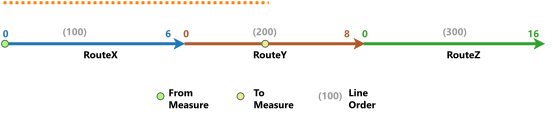
The following table shows the inputs used for the Retire Route tool:
| Parameter | Value |
|---|---|
| From route | RouteX |
| From measure | 0 |
| To route | RouteY |
| To measure | 4 |
| Recalibrate route downstream | No |
Route X is completely retired, so the line order of the downstream routes is updated.
The following diagram shows routes after retirement:

Retirement between routes with downstream recalibration
In the following example, the retirement takes place between two routes (Route X and Route Y) that belong to the same line.
The following diagram shows routes before retirement:

The following table shows the inputs used for the Retire Route tool:
| Parameter | Value |
|---|---|
| From route | RouteX |
| From measure | 0 |
| To route | RouteY |
| To measure | 4 |
| Recalibrate route downstream | Yes |
The route is recalibrated downstream of the retirement, so the downstream measures are updated until the end of the target route (Route Y). Route X is completely retired, so the line order of the downstream routes is updated.
The following diagram shows routes after retirement:

Route retirement in a line network
The examples below demonstrate how routes in a line network can be retired. Line orders are updated if needed.
Route retirement at the beginning of a line
In the following example, the first part of Route X, which is at the beginning of a line, is retired.
The following table shows routes before retirement:
| Route ID | Line Order |
|---|---|
| RouteX | 100 |
| RouteA | 200 |
| RouteY | 300 |
The following diagram shows routes before retirement:

After retirement of the first part of Route X, the line order is updated. Route A now has line order 100, while Route X is now 200.
The following table shows routes after retirement:
| Route ID | Line Order |
|---|---|
| RouteA | 100 |
| RouteX | 200 |
| RouteY | 300 |
The following diagram shows routes after retirement:

Route retirement at the end of a line
In the following example, the second part of Route Y is retired.
The following table shows routes before retirement:
| Route ID | Line Order |
|---|---|
| Route X | 100 |
| Route Y | 200 |
The following diagram shows routes before retirement:

The following table shows routes after retirement:
| Route ID | Line Order |
|---|---|
| Route X | 100 |
| Route Y | 200 |
The line order is unaffected when retiring a route or part of a route at the end.
The following diagram shows routes after retirement:

Complex route retirement scenarios
The following sections describe route retirement scenarios for complex routes including loop, lollipop, branch, alpha, and infinity routes.
Retirement on a loop route
In the following example, Route X has a start measure of 0 and an end measure of 12. Retirement takes place from the middle to the end of a loop route.
The following diagram shows the route before retirement:
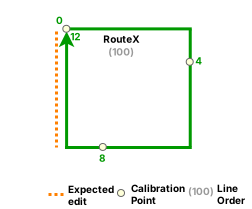
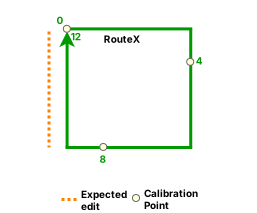
The following table shows the inputs used for the Retire Route tool:
| Parameter | Value |
|---|---|
| From route | RouteX |
| From measure | 9 |
| To measure | 12 |
| Recalibrate route downstream | No |
| Parameter | Value |
|---|---|
| From route | RouteX |
| From measure | 9 |
| To measure | 12 |
| Recalibrate route downstream | Yes |
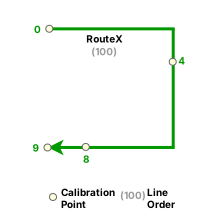
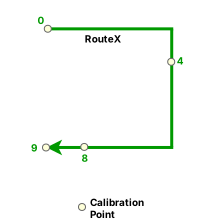
After retirement, Route X becomes a simple route.
The following diagram shows the route after retirement:
Retirement on a lollipop route
In the following example, retirement takes place in the middle of the lollipop route. Route X has a start measure of 0 and an end measure of 15.
The following diagram shows the route before retirement:
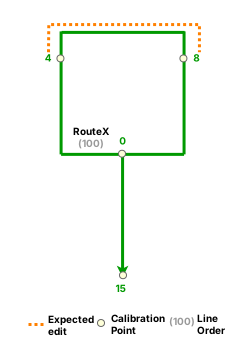
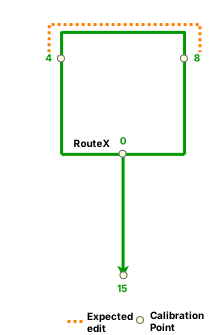
The following table shows the inputs used for the Retire Route tool:
| Parameter | Value |
|---|---|
| From route | RouteX |
| From measure | 4 |
| To measure | 8 |
| Recalibrate route downstream | No |
| Parameter | Value |
|---|---|
| From route | RouteX |
| From measure | 4 |
| To measure | 8 |
| Recalibrate route downstream | Yes |
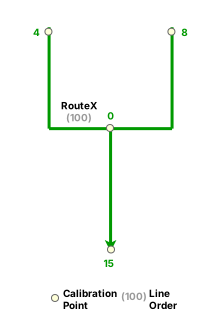
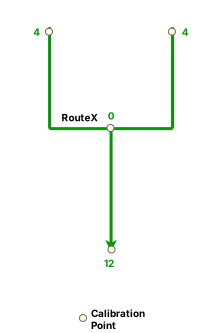
After retirement, Route X becomes a branch route.
The line order remains unchanged, as the retirement is limited to a single route.
The following diagram shows the route after retirement:
In the following second example, retirement takes place from the middle to the end of the lollipop route.
The following diagram shows the route before retirement:
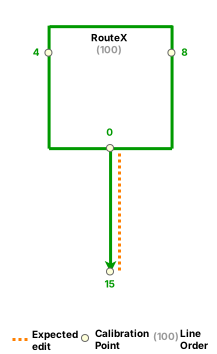
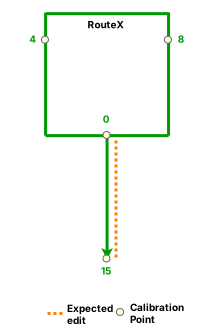
The following table shows the inputs used for the Retire Route tool:
| Parameter | Value |
|---|---|
| From route | RouteX |
| From measure | 12 |
| To measure | 15 |
| Recalibrate route downstream | No |
| Parameter | Value |
|---|---|
| From route | RouteX |
| From measure | 12 |
| To measure | 15 |
| Recalibrate route downstream | Yes |
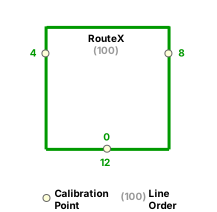
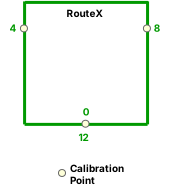
After retirement, Route X becomes a loop route.
The line order remains unchanged, as the retirement is limited to a single route.
The following diagram shows the route after retirement:
Retirement on a branch route
In the following example, Route X has a start measure of 0 and an end measure of 9. Retirement takes place from the beginning to the middle of the branch route.
The following diagram shows the route before retirement:
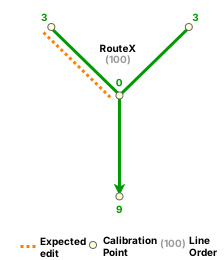
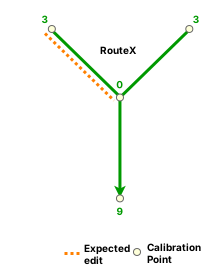
The following table shows the inputs used for the Retire Route tool:
| Parameter | Value |
|---|---|
| From route | RouteX |
| From measure | 0 |
| To measure | 3 |
| Recalibrate route downstream | No |
| Parameter | Value |
|---|---|
| From route | RouteX |
| From measure | 0 |
| To measure | 3 |
| Recalibrate route downstream | Yes |
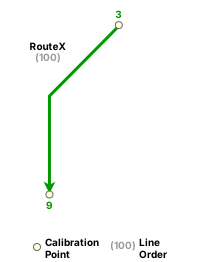
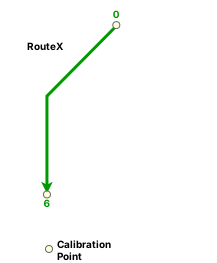
After retirement, Route X becomes a simple route.
The line order remains unchanged, as the retirement is limited to a single route.
The following diagram shows the route after retirement:
In the following second example, retirement takes place from the middle to the end of the branch route.
The following diagram shows the route before retirement:
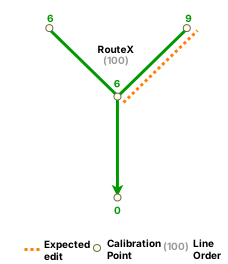
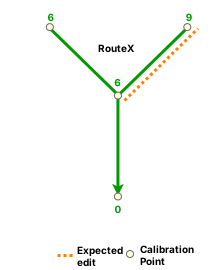
The following table shows the inputs used for the Retire Route tool:
| Parameter | Value |
|---|---|
| From route | RouteX |
| From measure | 6 |
| To measure | 9 |
| Recalibrate route downstream | No |
| Parameter | Value |
|---|---|
| From route | RouteX |
| From measure | 6 |
| To measure | 9 |
| Recalibrate route downstream | Yes |
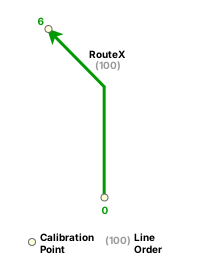
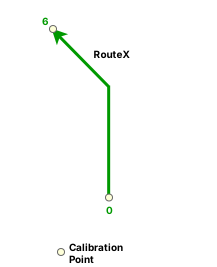
After retirement, Route X becomes a simple route.
The line order remains unchanged, as the retirement is limited to a single route.
The following diagram shows the route after retirement:
Retirement on an alpha route
In the following example, retirement takes place from the start to the middle portion of the alpha route. Route X has a start measure of 0 and an end measure of 18.
The following diagram shows the route before retirement:
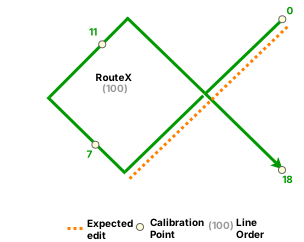
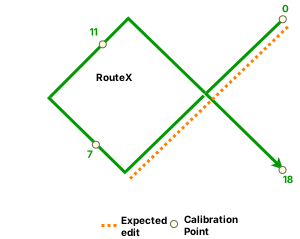
The following table shows the inputs used for the Retire Route tool:
| Parameter | Value |
|---|---|
| From route | RouteX |
| From measure | 0 |
| To measure | 6 |
| Recalibrate route downstream | No |
| Parameter | Value |
|---|---|
| From route | RouteX |
| From measure | 0 |
| To measure | 6 |
| Recalibrate route downstream | Yes |
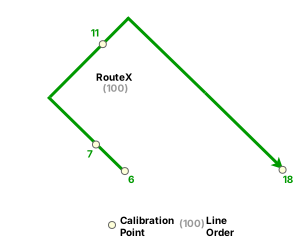
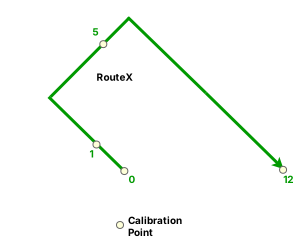
After retirement, Route X becomes a simple route.
The line order remains unchanged, as the retirement is limited to a single route.
The following diagram shows the route after retirement:
Retirement on an infinity route
In the following example, retirement takes place from the middle to the end of the infinity route. Route X has a start measure of 0 and an end measure of 24.
The following diagram shows the route before retirement:
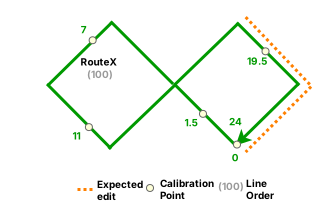
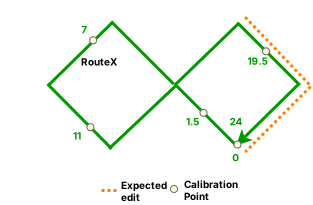
The following table shows the inputs used for the Retire Route tool:
| Parameter | Value |
|---|---|
| From route | RouteX |
| From measure | 18 |
| To measure | 24 |
| Recalibrate route downstream | No |
| Parameter | Value |
|---|---|
| From route | RouteX |
| From measure | 18 |
| To measure | 24 |
| Recalibrate route downstream | Yes |
After retirement, Route X becomes an alpha route.
The line order remains unchanged, as the retirement is limited to a single route.
The following diagram shows the route after retirement: