Error results and their life cycle
 Available with Data Reviewer license.
Features or rows in your GIS data identified as not meeting data quality requirements are stored as an error result. Error results are created using the Data Reviewer automated and semi-automated tools within your quality control workflow. Each error result includes metadata describing the issue and, depending on the data, a geometry.
Feature error results follow a standard quality control life cycle process that passes through three distinct phases:
|
Phase |
Icon |
Description |
|---|---|---|
|
Review |
|
Error result is awaiting further review after discovery. |
|
Correction |
|
Error result has been addressed either through corrective editing of the related feature or marked as an exception. |
|
Verification |
|
Actions performed on the related feature are acceptable or the feature should be marked an exception. |


Ideally, an error result progresses through each phase, with multiple participants reviewing and correcting it. The following example workflow uses the Browse Features tool:
First, a GIS technician identifies an issue with a feature and reports it as an error result using the Browse Features tool. The error result then appears in the Error Inspector pane in the Review phase.
Next, during the Correction phase, a technician assesses the issue and resolves it by correcting the feature using ArcGIS Pro tools or marks it as an exception.
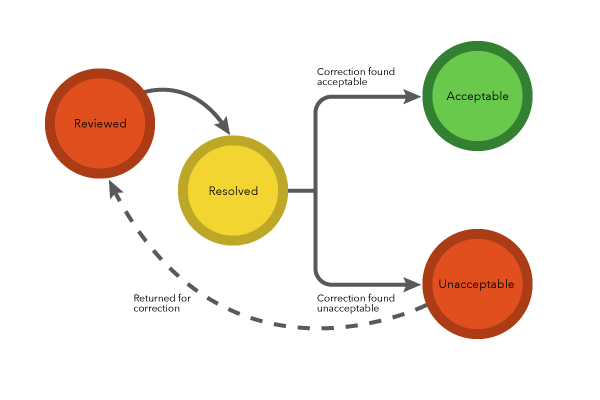
Lastly, in the Verification phase, an analyst assesses how the issue was resolved to determine whether the action is acceptable or unacceptable. If the fix is determined as unacceptable, the error is returned to the Review phase for more work.
Feature results
Error results in your GIS data follow a three-phase workflow that tracks correction and verification tasks. The information collected during this workflow helps to communicate how the error was corrected, who corrected and verified the error, and when the correction and verification was completed.
Review phase
A feature error's initial life cycle phase is Review, where it awaits evaluation to determine whether corrective action is required. The status value is automatically assigned by the tool that created the error result. Status values applicable to the Review phase include the following:
|
Status |
Code |
Description |
Next valid status |
|---|---|---|---|
|
Reviewed |
1 |
Initial status for all feature error results |
Mark as Exception |
|
Resolved |
|||
|
Unacceptable |
6 |
Error marked as Unacceptable in the Verification phase |
Mark as Exception |
|
Resolved |
Correction phase
The next phase in an error result's life cycle is the Correction phase. This is when the feature is either edited to fix the error or marked as an exception. The error result provides the editor with details about the error, including its severity and, optionally, a geometry indicating the error's location. Once the edits are complete, a correction status is applied to the error result. Status values applicable to the Correction phase include the following:
|
Status |
Code |
Description |
Next valid status |
|---|---|---|---|
|
Resolved |
2 |
Corrective action is taken to resolve the issue (as described in the Correction Notes). |
Acceptable |
|
Unacceptable |
|||
|
Mark as Exception |
3 |
Error results are marked as an exception case. |
Exception |
|
Unacceptable |
Verification phase
The last phase in an error result's life cycle is the Verification phase. In this phase, any edits or exceptions applied to the feature to resolve the error result are verified. Status values applicable to the Verification phase include the following:
|
Status |
Code |
Description |
Next valid status |
|---|---|---|---|
|
Acceptable |
4 |
The action performed (as described in the Correction Notes) on the issue is acceptable. |
Unacceptable |
|
Exception |
9 |
The error result is verified as an exception. |
Unacceptable |
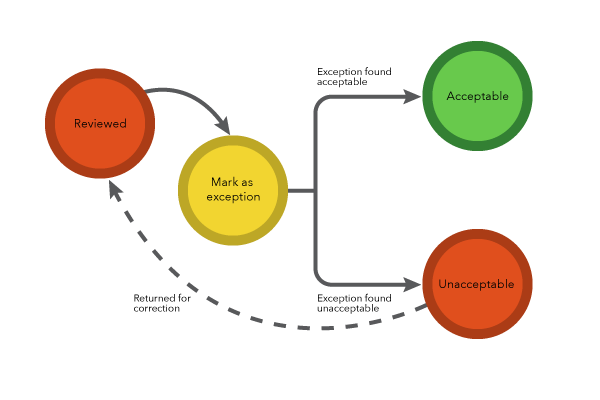
Exceptions
Exceptions are typically identified during the Correction phase. These are features flagged as an error result by an automated check or by a visual review tool and initially thought to be errors; however, during correction they are determined to be acceptable and require no changes. Labeling an error result as an exception ensures that the feature is not marked as a new error in the future.