Intersection tools
The editing intersection tools use analytic geometry to locate and snap the pointer to computed locations, for example, where two overlapping distances intersect. Intersection tools are available on the construction toolbar when you draw a feature using a feature construction tool.
The following diagram illustrates how the intersection tools locate and highlight where specified directions and distances intersect when measured from two known locations shown as points A and B:
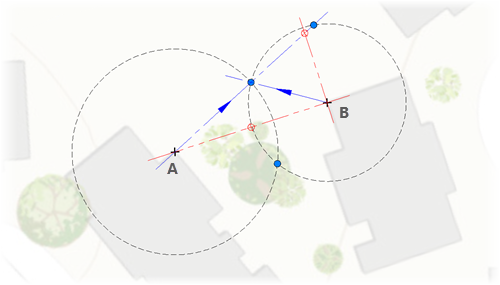
When ground to grid correction is on, the ground to grid-aware intersection tools compute your input values as ground measurements. An offset angle is applied to directions, and a distance factor multiplies distances. This occurs in real time as you specify construction measurements.
|
Tool |
Description |
Ground to grid distance factor |
Ground to grid direction offset |
|---|---|---|---|
|
Distance Distance |
|
||
|
Direction Distance |
Create a point or vertex where a direction and a distance intersect |
|
|
|
Direction Direction |
|
|
|
|
Intersection |
|||
|
Midpoint |


