Process route edits
You can use the Process Edits tool  to run common post route editing tools. This tool updates events, intersections, or routes impacted by LRS route edits and supports undo and redo operations using the tools in ArcGIS Pro. You can run this tool inside or outside an edit session.
If conflict prevention is enabled, existing locks on the intersecting routes will be bypassed when the Generate intersections even if there are conflict prevention locks option is checked in the Location Referencing options.
Caution:
Bypassing conflict prevention locks may result in data corruption or unexpected behavior. Consider the potential consequences and create a database backup before running this tool with the Generate intersections even if there are conflict prevention locks option checked.
For a line network configured with a derived network, the Process Edits tool runs the following tools in the order listed:
Generate Intersections—Creates or updates intersections based on edited routes.
Note:
You can enable or disable this tool in the Location Referencing options.
Apply Event Behaviors—Applies event behaviors to edited routes.
Generate Routes—Generates the derived network based on edited routes.
Derive Event Measures—Updates the derived event measures on events whose parent route or routes have been edited.
For a nonline network or a line network configured without a derived network, the Process Edits tool runs the following tools in the order listed:
Generate Intersections—Creates or updates intersections based on edited routes.
Note:
You can enable or disable this tool in the Location Referencing options.
Apply Event Behaviors—Applies event behaviors to edited routes.
Edits processed on a line network
When using the Process Edits tool on a line network, it runs the Generate Intersections, Apply Event Behaviors, Generate Routes, and Derive Event Measures tools sequentially on all routes in LRS Networks that have unprocessed edits.
Before route edit
In the following scenario, the last route on a line is about to be retired. There is a spanning line event, point event, and intersection along the line. The two event layers are both configured with the Stay Put event behavior for route retirement operations.
The following diagram shows the state of the LRS data before the route retirement:
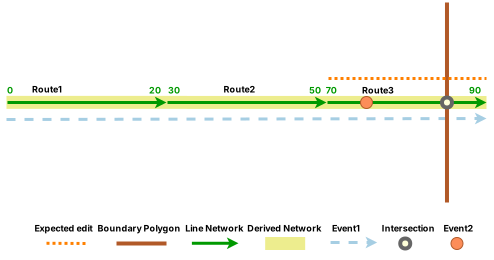
The following table shows the route information before the route retirement:
|
Network |
Line Name |
Route Name |
From Date |
To Date |
From Measure |
To Measure |
|---|---|---|---|---|---|---|
|
Line Network |
Line1 |
Route1 |
1/1/2000 |
<Null> |
0 |
20 |
|
Line Network |
Line1 |
Route2 |
1/1/2000 |
<Null> |
30 |
50 |
|
Line Network |
Line1 |
Route3 |
1/1/2000 |
<Null> |
70 |
90 |
|
Derived Network |
N/A |
Line1 |
1/1/2000 |
<Null> |
0 |
60 |
The following table shows the line event information before the route retirement:
|
Event ID |
From Route Name |
To Route Name |
From Date |
To Date |
From Measure |
To Measure |
Derived Route Name |
Derived From Measure |
Derived To Measure |
|---|---|---|---|---|---|---|---|---|---|
|
LineEvent1 |
Route1 |
Route3 |
1/1/2000 |
<Null> |
0 |
90 |
Line1 |
0 |
60 |
The following table shows the point event information before the route retirement:
|
Event ID |
Route Name |
From Date |
To Date |
Measure |
Derived Route Name |
Derived Measure |
|---|---|---|---|---|---|---|
|
PointEvent1 |
Route3 |
1/1/2000 |
<Null> |
75 |
Line1 |
45 |
The following table shows the intersection information before the route retirement:
|
Intersection Name |
Route Name |
From Date |
To Date |
Measure |
|---|---|---|---|---|
|
Route3, Boundary1 |
Route3 |
1/1/2000 |
<Null> |
85 |
After route edit
Route3 was retired as of 1/1/2010. The line network has been updated; however, the intersection, event, and derived network layers have not been updated.
The following diagram shows the updated routes after retirement:
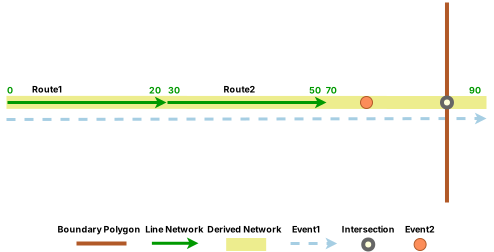
The following table shows the route information after the route retirement:
|
Network |
Line Name |
Route Name |
From Date |
To Date |
From Measure |
To Measure |
|---|---|---|---|---|---|---|
|
Line Network |
Line1 |
Route1 |
1/1/2000 |
<Null> |
0 |
20 |
|
Line Network |
Line1 |
Route2 |
1/1/2000 |
<Null> |
30 |
50 |
|
Line Network |
Line1 |
Route3 |
1/1/2000 |
1/1/2010 |
70 |
90 |
|
Derived Network |
N/A |
Line1 |
1/1/2000 |
<Null> |
0 |
60 |
Note:
The intersection, event, and derived network layers have not been updated after the route retirement.
After processing edits
The Process Edits tool completes the LRS workflow by running the tools sequentially to make the following updates to the edited route:
Updates intersections.
Applies event behaviors.
Generates routes, including the derived network.
Updates derived event measures.
The following diagram shows the fully updated LRS after running the Process Edits tool:
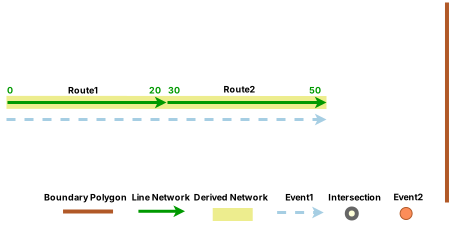
The derived network regenerated based on the route retirement. The following table shows the updated derived network information after running the Process Edits tool :
|
Network |
Line Name |
Route Name |
From Date |
To Date |
From Measure |
To Measure |
|---|---|---|---|---|---|---|
|
Line Network |
Line1 |
Route1 |
1/1/2000 |
<Null> |
0 |
20 |
|
Line Network |
Line1 |
Route2 |
1/1/2000 |
<Null> |
30 |
50 |
|
Line Network |
Line1 |
Route3 |
1/1/2000 |
1/1/2010 |
70 |
90 |
|
Derived Network |
N/A |
Line1 |
1/1/2000 |
1/1/2010 |
0 |
60 |
|
Derived Network |
N/A |
Line1 |
1/1/2010 |
<Null> |
0 |
40 |
The line event layer performs the Stay Put event behavior, and the derived measure information is updated based on the updated derived network. The following table shows the updated line event information after running the Process Edits tool :
|
Event ID |
From Route Name |
To Route Name |
From Date |
To Date |
From Measure |
To Measure |
Derived Route Name |
Derived From Measure |
Derived To Measure |
|---|---|---|---|---|---|---|---|---|---|
|
LineEvent1 |
Route1 |
Route3 |
1/1/2000 |
1/1/2010 |
0 |
90 |
Line1 |
0 |
60 |
|
LineEvent1 |
Route1 |
Route2 |
1/1/2010 |
<Null> |
0 |
50 |
Line1 |
0 |
40 |
The point event layer performs the Stay Put event behavior, and the derived measure information is updated based on the updated derived network. The following table shows the point event information after running the Process Edits tool:
|
Event ID |
Route Name |
From Date |
To Date |
Measure |
Derived Route Name |
Derived Measure |
|---|---|---|---|---|---|---|
|
PointEvent1 |
Route3 |
1/1/2000 |
1/1/2010 |
85 |
Line1 |
55 |
The intersections are regenerated, with the intersection retiring due to the route retirement. There are no longer any routes intersecting the boundary polygon along Line1. The following table shows the intersection information after running the Process Edits tool :
|
Intersection Name |
Route Name |
From Date |
To Date |
Measure |
|---|---|---|---|---|
|
Route3, Boundary1 |
Route3 |
1/1/2000 |
1/1/2010 |
85 |
Edits processed on a nonline network
When using the Process Edits tool on a nonline network, only the Generate Intersections and Apply Event Behaviors geoprocessing tools are run sequentially on all routes in LRS Networks that have unprocessed edits.
Note:
The Generate Routes and Derive Event Measures tools are not run because a nonline network cannot have a configured derived network.
Before route edit
In the following scenario, the second half of Route1 is about to be retired. There is a line event, point event, and intersection along the route. The two event layers are both configured with Stay Put event behavior for route retirement operations.
The following diagram shows the state of the LRS data before the route retirement:
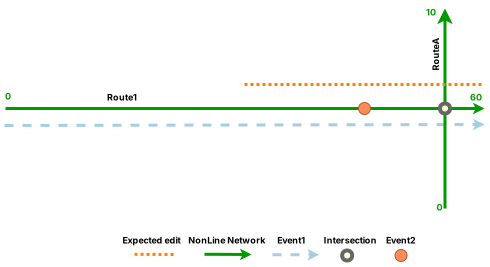
The following table shows the route information before the route retirement:
|
Route Name |
From Date |
To Date |
From Measure |
To Measure |
|---|---|---|---|---|
|
Route1 |
1/1/2000 |
<Null> |
0 |
60 |
|
RouteA |
1/1/2000 |
<Null> |
0 |
10 |
The following table shows the line event information before the route retirement:
|
Event ID |
Route Name |
From Date |
To Date |
From Measure |
To Measure |
|---|---|---|---|---|---|
|
LineEvent1 |
Route1 |
1/1/2000 |
<Null> |
0 |
60 |
The following table shows the point event information before the route retirement:
|
Event ID |
Route Name |
From Date |
To Date |
Measure |
|---|---|---|---|---|
|
PointEvent1 |
Route1 |
1/1/2000 |
<Null> |
45 |
The following table shows the intersection information before the route retirement:
|
Intersection Name |
Route Name |
From Date |
To Date |
Measure |
|---|---|---|---|---|
|
Route1, RouteA |
Route1 |
1/1/2000 |
<Null> |
55 |
After route edit
The second half of Route1 was retired as of 1/1/2010. The nonline network has been updated; however, the intersection and event layers have not been updated.
The following diagram shows the updated routes after retirement:
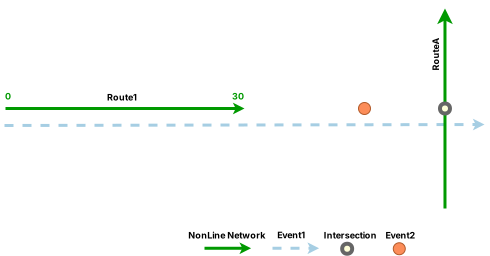
The following table shows the route information after the route retirement:
|
Route Name |
From Date |
To Date |
From Measure |
To Measure |
|---|---|---|---|---|
|
Route1 |
1/1/2000 |
1/1/2010 |
0 |
60 |
|
Route1 |
1/1/2010 |
<Null> |
0 |
30 |
|
RouteA |
1/1/2000 |
<Null> |
0 |
10 |
Note:
The intersection and event layers have not been updated after the route retirement.
After processing edits
The Process Edits tool completes the LRS workflow by running the tools sequentially to make the following updates to the edited route:
Updates intersections.
Applies event behaviors.
The following diagram shows the fully updated LRS after running the Process Edits tool :
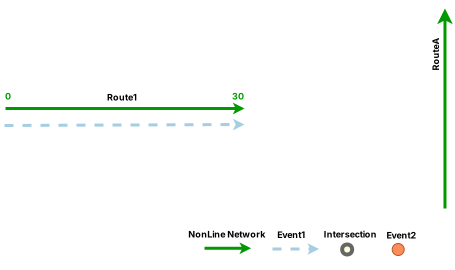
The line event layer performs the Stay Put event behavior. The following table shows the updated line event information after running the Process Edits tool :
|
Event ID |
Route Name |
From Date |
To Date |
From Measure |
To Measure |
|---|---|---|---|---|---|
|
LineEvent1 |
Route1 |
1/1/2000 |
1/1/2010 |
0 |
60 |
|
LineEvent1 |
Route1 |
1/1/2010 |
<Null> |
0 |
30 |
The point event layer also performs the Stay Put event behavior. The following table shows the updated point event information after running the Process Edits tool :
|
Event ID |
Route Name |
From Date |
To Date |
Measure |
|---|---|---|---|---|
|
PointEvent1 |
Route1 |
1/1/2000 |
1/1/2010 |
45 |
The intersection is regenerated, with the intersection retiring due to the route retirement. Route1 no longer intersects RouteA. The following table shows the intersection information after running the Process Edits tool :
|
Intersection Name |
Route Name |
From Date |
To Date |
Measure |
|---|---|---|---|---|
|
Route1, RouteA |
Route1 |
1/1/2000 |
1/1/2010 |
55 |
Process edits
To run the post route editing tools after you finish a route edit, such as realigning or extending routes, complete the following steps:
On the Location Referencing tab, in the Tools group, click Process Edits
.A dialog box appears that shows the progress of the tools. If you're not in an edit session, the tool starts one so that you can undo or redo resulting changes from this process.
Once the tools finish processing, click OK.
If one of the tools in the process fails, the Process Edits tool reverts all previous steps. You can fix the issues and run the Process Edits tool
again.