ArcGIS Pro 3.7 API Reference Guide
ArcGIS.Desktop.Mapping Namespace / SymbolFactory Class / ConstructGradientFill Method / ConstructGradientFill(CIMColorRamp,GradientFillMethod,Int32) Method
ArcGIS.Core.CIM.CIMColorRamp
ArcGIS.Core.CIM.GradientFillMethod. The default value is ArcGIS.Core.CIM.GradientFillMethod.Buffered
The interval.
Example

In This Topic
    ConstructGradientFill(CIMColorRamp,GradientFillMethod,Int32) Method
    In This Topic
    Constructs a gradient fill using the specififed color ramp.
    Syntax
    Public Overloads Function ConstructGradientFill( _
       ByVal colorRamp As CIMColorRamp, _
       Optional ByVal gradientFillMethod As GradientFillMethod, _
       Optional ByVal interval As Integer _
    ) As CIMFill

    Parameters

    colorRamp
    ArcGIS.Core.CIM.CIMColorRamp
    gradientFillMethod
    ArcGIS.Core.CIM.GradientFillMethod. The default value is ArcGIS.Core.CIM.GradientFillMethod.Buffered
    interval
    The interval.

    Return Value

    Example
    Gradient fill between two colors
    /// <summary>
    /// Create a polygon symbol using the ConstructGradientFill method. Constructs a gradient fill between two colors passed to the method. <br/>
    /// ![PolygonSymbolTwoColors](https://ArcGIS.github.io/arcgis-pro-sdk/images/Symbology/PolygonSymbolTwoColors.png)
    /// </summary>
    {
      //Note: Run withing QueuedTask
      //gradient fill between 2 colors
      var gradientFill = SymbolFactory.Instance.ConstructGradientFill(CIMColor.CreateRGBColor(235, 64, 52), CIMColor.NoColor(), GradientFillMethod.Linear);
      List<CIMSymbolLayer> symbolLayers = new List<CIMSymbolLayer>
        {
                  gradientFill
        };
      CIMPolygonSymbol gradientFillTwoColors = new CIMPolygonSymbol() { SymbolLayers = symbolLayers.ToArray() };
      //To apply the symbol to a polygon feature layer
      //var renderer = theLayer.GetRenderer() as CIMSimpleRenderer;
      //renderer.Symbol = gradientFillTwoColors.MakeSymbolReference();
      //theLayer.SetRenderer(renderer);
    }
    Gradient fill using Color ramp
    /// <summary>
    /// Create a polygon symbol using the ConstructGradientFill method. Constructs a gradient fill using the specified color ramp. <br/>
    /// ![PolygonSymbolColorRamp](https://ArcGIS.github.io/arcgis-pro-sdk/images/Symbology/PolygonSymbolColorRamp.png)
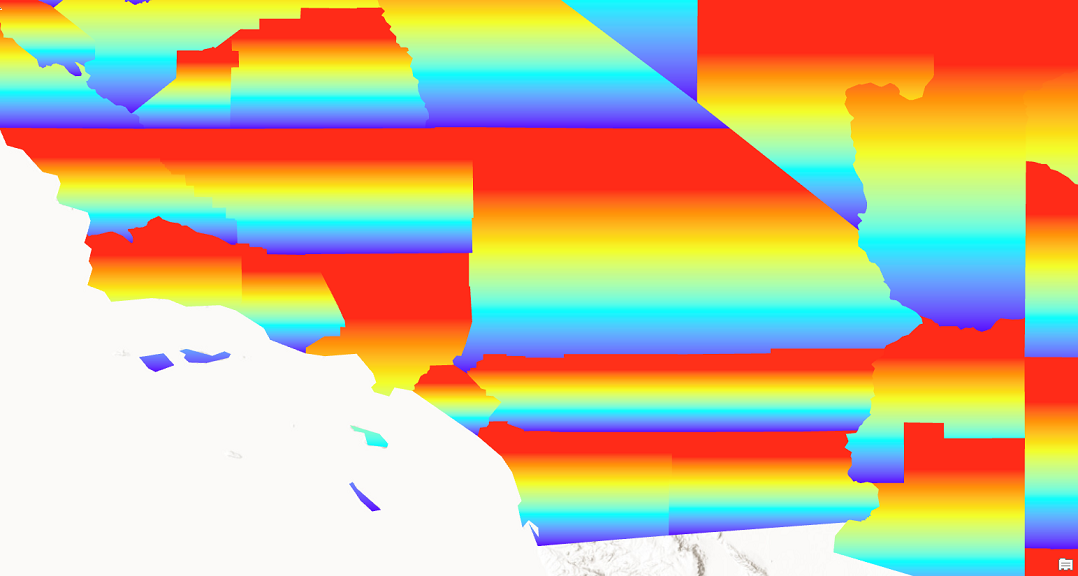
    /// </summary>
    {
      //Note: Run withing QueuedTask
      //outine
      CIMStroke outline = SymbolFactory.Instance.ConstructStroke(CIMColor.CreateRGBColor(49, 49, 49), 2.0, SimpleLineStyle.Solid);
    
      //gradient fill using a color ramp
      var gradientFill = SymbolFactory.Instance.ConstructGradientFill(GetColorRamp(), GradientFillMethod.Linear);
    
      List<CIMSymbolLayer> symbolLayers = new List<CIMSymbolLayer>
        {
                  outline,
                  gradientFill
        };
      CIMPolygonSymbol gradientColorRampSymbol = new CIMPolygonSymbol() { SymbolLayers = symbolLayers.ToArray() };
      //To apply the symbol to a polygon feature layer
      //var renderer = theLayer.GetRenderer() as CIMSimpleRenderer;
      //renderer.Symbol = gradientColorRampSymbol.MakeSymbolReference();
      //theLayer.SetRenderer(renderer);
    
      //Helper method to get a color ramp from the "ArcGIS Colors" style.
      static CIMColorRamp GetColorRamp()
      {
        //Get a ColorRamp
        StyleProjectItem style =
                Project.Current.GetItems<StyleProjectItem>().FirstOrDefault(s => s.Name == "ArcGIS Colors");
        var colorRampList = style.SearchColorRamps("Heat Map 4 - Semitransparent");
    
        CIMColorRamp colorRamp = colorRampList[0].ColorRamp;
        return colorRamp;
      }
    }
    Requirements

    Target Platforms: Windows 11 Home, Pro, Enterprise (64 bit)

    ArcGIS Pro version: 3.1 or higher.
    See Also