ArcGIS Pro 3.7 API Reference Guide
ArcGIS.Desktop.Mapping Namespace / SymbolFactory Class / ConstructHatchFill Method / ConstructHatchFill(CIMStroke,Double,Double,Double) Method
ArcGIS.Core.CIM.CIMStroke
The angle for the hatch pattern.
The separation for the hatch pattern.
The offset value. ArcGIS.Core.CIM.CIMHatchFill.OffsetX and ArcGIS.Core.CIM.CIMHatchFill.OffsetY will get set to this value.
Example

In This Topic
    ConstructHatchFill(CIMStroke,Double,Double,Double) Method
    In This Topic
    Constructs a hatch fill with the specified parameters.
    Syntax
    Public Overloads Function ConstructHatchFill( _
       ByVal lineStroke As CIMStroke, _
       ByVal angle As Double, _
       ByVal separation As Double, _
       Optional ByVal offset As Double _
    ) As CIMFill

    Parameters

    lineStroke
    ArcGIS.Core.CIM.CIMStroke
    angle
    The angle for the hatch pattern.
    separation
    The separation for the hatch pattern.
    offset
    The offset value. ArcGIS.Core.CIM.CIMHatchFill.OffsetX and ArcGIS.Core.CIM.CIMHatchFill.OffsetY will get set to this value.

    Return Value

    Example
    Cross hatch
    /// <summary>
    /// Create a polygon symbol using the ConstructHatchFill method . <br/>
    /// ![PolygonSymbolDiagonalCrossHatch](https://ArcGIS.github.io/arcgis-pro-sdk/images/Symbology/ConstructHatchFill.png)
    /// </summary>
    {
      CIMStroke lineStroke = SymbolFactory.Instance.ConstructStroke(CIMColor.CreateRGBColor(51, 51, 51, 60), 4, SimpleLineStyle.Solid);
      //gradient
      var hatchFill = SymbolFactory.Instance.ConstructHatchFill(lineStroke, 45, 6, 0);
    
      List<CIMSymbolLayer> symbolLayers = new()
      {
        hatchFill
      };
      //This is the polygon symbol with a diagonal cross hatch fill
      CIMPolygonSymbol crossHatchPolygonSymbol = new CIMPolygonSymbol() { SymbolLayers = symbolLayers.ToArray() };
      //To apply the symbol to a polygon feature layer
      //var renderer = theLayer.GetRenderer() as CIMSimpleRenderer;
      //renderer.Symbol = crossHatchPolygonSymbol.MakeSymbolReference();
      //theLayer.SetRenderer(renderer);
    }
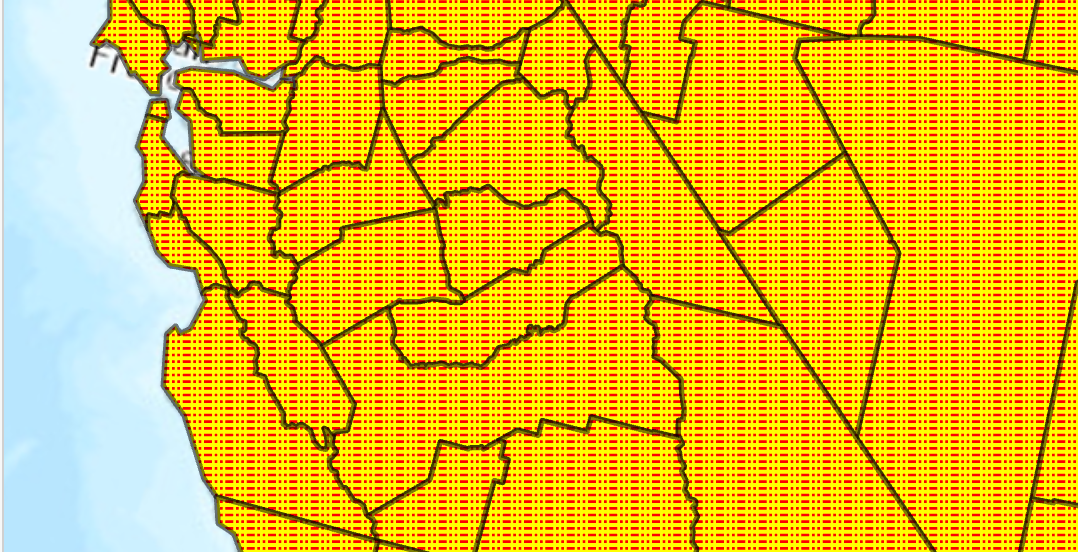
    Dash dot fill
    /// <summary>
    /// Create a polygon symbol with a dash dot fill. <br/>
    /// ![PolygonSymbolDashDot](https://ArcGIS.github.io/arcgis-pro-sdk/images/Symbology/polygon-dash-dot.png)
    /// </summary>
    {
      //Note: Run withing QueuedTask
      var trans = 50.0;//semi transparent
      CIMStroke outline = SymbolFactory.Instance.ConstructStroke(CIMColor.CreateRGBColor(0, 0, 0, trans), 2.0, SimpleLineStyle.Solid);
    
      //Stroke for the fill            
      var dashDot = SymbolFactory.Instance.ConstructStroke(ColorFactory.Instance.RedRGB, 1.0, SimpleLineStyle.DashDotDot);
      //Mimic cross hatch
      CIMFill[] solidColorHatch =
            {
    
               new CIMHatchFill()
              {
                  Enable = true,
                  Rotation = 0.0,
                  Separation = 2.5,
                  LineSymbol = new CIMLineSymbol(){SymbolLayers = new CIMSymbolLayer[1] {dashDot } }
              },
               new CIMSolidFill()
              {
                  Enable = true,
                  Color = ColorFactory.Instance.CreateRGBColor(255, 255, 0)
              },
    };
      List<CIMSymbolLayer> symbolLayers = [outline, .. solidColorHatch];
      //This is the polygon symbol with a dash dot fill
      CIMPolygonSymbol dashDotFillPolygon = new CIMPolygonSymbol() { SymbolLayers = symbolLayers.ToArray() };
      //To apply the symbol to a polygon feature layer
      //var renderer = theLayer.GetRenderer() as CIMSimpleRenderer;
      //renderer.Symbol = dashDotFillPolygon.MakeSymbolReference();
      //theLayer.SetRenderer(renderer);
    }
    Requirements

    Target Platforms: Windows 11 Home, Pro, Enterprise (64 bit)

    ArcGIS Pro version: 3.1 or higher.
    See Also