ArcGIS Pro 3.7 API Reference Guide
ArcGIS.Desktop.Mapping Namespace / SymbolFactory Class / ConstructLineSymbol Method / ConstructLineSymbol(CIMColor,Double,SimpleLineStyle) Method
ArcGIS.Core.CIM.CIMColor
The width of line symbol to construct.
SimpleLineStyle
Example

In This Topic
    ConstructLineSymbol(CIMColor,Double,SimpleLineStyle) Method
    In This Topic
    Constructs a line symbol of specific color, width and style.
    Syntax
    Public Overloads Function ConstructLineSymbol( _
       ByVal color As CIMColor, _
       ByVal width As Double, _
       ByVal lineStyle As SimpleLineStyle _
    ) As CIMLineSymbol

    Parameters

    color
    ArcGIS.Core.CIM.CIMColor
    width
    The width of line symbol to construct.
    lineStyle
    SimpleLineStyle

    Return Value

    Example
    How to construct a line symbol of specific color, size and line style
    {
        CIMLineSymbol lineSymbol = SymbolFactory.Instance.ConstructLineSymbol(ColorFactory.Instance.BlueRGB, 4.0, SimpleLineStyle.Solid);
    }
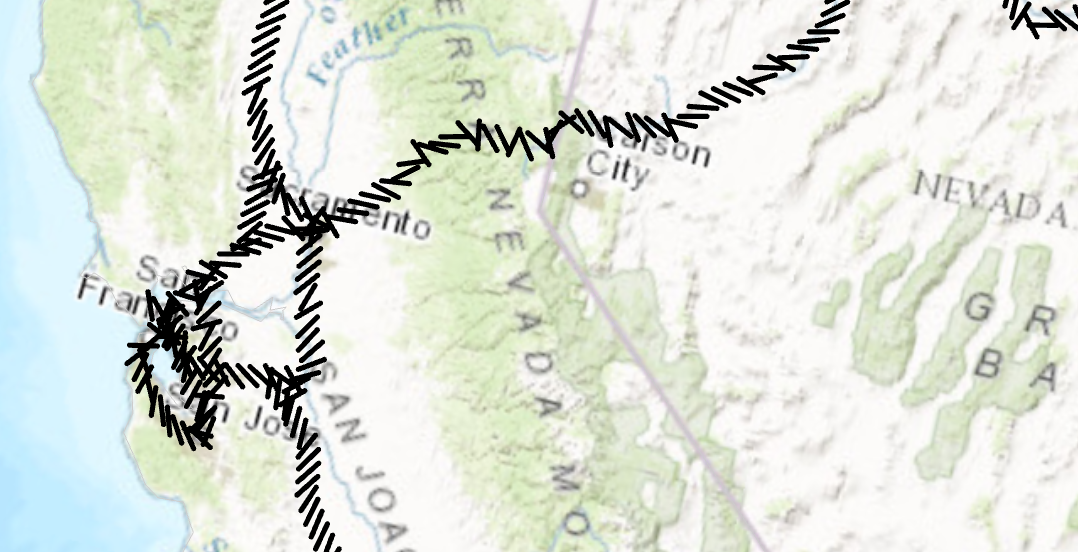
    Markers placed at a 45 degree angle
    /// <summary>
    /// Create a line symbol with the markers placed at a 45 degree angle. <br/>  
    /// ![LineSymbolAngleMarker](https://ArcGIS.github.io/arcgis-pro-sdk/images/Symbology/line-marker-angle.png)
    /// </summary>
    {
      //Create a line symbol with the markers placed at a 45 degree angle.
      //Create a marker from the "|" character.  This is the marker that will be used to render the line layer.
      //Note: Run withing QueuedTask
      var lineMarker = SymbolFactory.Instance.ConstructMarker(124, "Agency FB", "Regular", 12);
    
      //Default line symbol which will be modified 
      CIMLineSymbol lineSymbolWithMarkersAtAngle = SymbolFactory.Instance.ConstructLineSymbol(ColorFactory.Instance.BlackRGB, 2, SimpleLineStyle.Solid);
    
      //Modifying the marker to align with line
      //First define "markerplacement"
      CIMMarkerPlacementAlongLineSameSize markerPlacement = new CIMMarkerPlacementAlongLineSameSize()
      {
        AngleToLine = true,
        PlacementTemplate = new double[] { 5 }
      };
      //assign the markerplacement to the marker
      lineMarker.MarkerPlacement = markerPlacement;
      //angle the marker if needed
      lineMarker.Rotation = 45;
    
      //assign the marker as a layer to the line symbol
      lineSymbolWithMarkersAtAngle.SymbolLayers[0] = lineMarker;
    }
    Requirements

    Target Platforms: Windows 11 Home, Pro, Enterprise (64 bit)

    ArcGIS Pro version: 3.0 or higher.
    See Also