CIMLineSymbol Class
In This Topic
Represents a line symbol which is used to draw polyline features or graphics.
Object Model
Syntax
Public Class CIMLineSymbol
   Inherits CIMMultiLayerSymbol
   Implements System.ComponentModel.INotifyPropertyChanged, System.Xml.Serialization.IXmlSerializable
public class CIMLineSymbol : CIMMultiLayerSymbol, System.ComponentModel.INotifyPropertyChanged, System.Xml.Serialization.IXmlSerializable
Example
Create Lasso Line, Freehand Graphic Element
{
  //Note: Must be on QueuedTask.Run
  //Build geometry
  List<Coordinate2D> plCoords = new List<Coordinate2D>();
  plCoords.Add(new Coordinate2D(1.5, 10.5));
  plCoords.Add(new Coordinate2D(1.25, 9.5));
  plCoords.Add(new Coordinate2D(1, 10.5));
  plCoords.Add(new Coordinate2D(0.75, 9.5));
  plCoords.Add(new Coordinate2D(0.5, 10.5));
  plCoords.Add(new Coordinate2D(0.5, 1));
  plCoords.Add(new Coordinate2D(0.75, 2));
  plCoords.Add(new Coordinate2D(1, 1));
  Polyline linePl = PolylineBuilderEx.CreatePolyline(plCoords);

  //Set symbology, create and add element to layout
  CIMLineSymbol lineSym = SymbolFactory.Instance.ConstructLineSymbol(
            ColorFactory.Instance.BlackRGB, 2.0, SimpleLineStyle.Solid);
  //var graphic = GraphicFactory.Instance.CreateShapeGraphic(linePl, lineSym);

  var ge = ElementFactory.Instance.CreateGraphicElement(
                          layout, linePl, lineSym, "New Freehand");
}
Create line graphic with symbology
{
  //Create a simple 2D line graphic and apply an existing line
  //style item as the symbology.
  //Note: Must be on QueuedTask.Run
  //Build 2d line geometry
  List<Coordinate2D> plCoords = new List<Coordinate2D>();
  plCoords.Add(new Coordinate2D(1, 8.5));
  plCoords.Add(new Coordinate2D(1.66, 9));
  plCoords.Add(new Coordinate2D(2.33, 8.1));
  plCoords.Add(new Coordinate2D(3, 8.5));

  Polyline linePl = PolylineBuilderEx.CreatePolyline(plCoords);

  //(optionally) Reference a line symbol in a style
  StyleProjectItem lnStylePrjItm = Project.Current.GetItems<StyleProjectItem>()
                                .FirstOrDefault(item => item.Name == "ArcGIS 2D");
  SymbolStyleItem lnSymStyleItm = lnStylePrjItm.SearchSymbols(
                                StyleItemType.LineSymbol, "Line with 2 Markers")[0];
  CIMLineSymbol lineSym = lnSymStyleItm.Symbol as CIMLineSymbol;
  lineSym.SetSize(20);

  //Set symbology, create and add element to layout

  //An alternative simple symbol is also commented out below.
  //This would eliminate the four optional lines of code above that
  //reference a style.
  //
  //CIMLineSymbol lineSym = SymbolFactory.Instance.ConstructLineSymbol(
  //         ColorFactory.Instance.BlueRGB, 4.0, SimpleLineStyle.Solid);


  GraphicElement lineElm = ElementFactory.Instance.CreateGraphicElement(
                                              layout, linePl, lineSym);
  lineElm.SetName("New Line");
}
How to construct a line symbol of specific color, size and line style
{
    CIMLineSymbol lineSymbol = SymbolFactory.Instance.ConstructLineSymbol(ColorFactory.Instance.BlueRGB, 4.0, SimpleLineStyle.Solid);
}
How to construct a line symbol from a stroke
{
    CIMStroke stroke = SymbolFactory.Instance.ConstructStroke(ColorFactory.Instance.BlackRGB, 2.0);
    CIMLineSymbol lineSymbolFromStroke = SymbolFactory.Instance.ConstructLineSymbol(stroke);
}
How to construct a multilayer line symbol with circle markers on the line ends
{
    //Note: Needs QueuedTask to run
    var lineStrokeRed = SymbolFactory.Instance.ConstructStroke(ColorFactory.Instance.RedRGB, 4.0);
    var markerCircle = SymbolFactory.Instance.ConstructMarker(ColorFactory.Instance.RedRGB, 12, SimpleMarkerStyle.Circle);
    markerCircle.MarkerPlacement = new CIMMarkerPlacementOnVertices()
    {
        AngleToLine = true,
        PlaceOnEndPoints = true,
        Offset = 0
    };
    var lineSymbolWithCircles = new CIMLineSymbol()
    {
        SymbolLayers = new CIMSymbolLayer[2] { markerCircle, lineStrokeRed }
    };
}
How to construct a multilayer line symbol with an arrow head on the end
{
      var markerTriangle = SymbolFactory.Instance.ConstructMarker(ColorFactory.Instance.RedRGB, 12, SimpleMarkerStyle.Triangle);
      markerTriangle.Rotation = -90; // or -90
      markerTriangle.MarkerPlacement = new CIMMarkerPlacementOnLine() { AngleToLine = true, RelativeTo = PlacementOnLineRelativeTo.LineEnd };

      var lineSymbolWithArrow = new CIMLineSymbol()
      {
          SymbolLayers = new CIMSymbolLayer[2] { markerTriangle,
          SymbolFactory.Instance.ConstructStroke(ColorFactory.Instance.RedRGB, 2)
}
      };
  }
Markers placed at a 45 degree angle
/// <summary> /// Create a line symbol with the markers placed at a 45 degree angle. <br/> /// 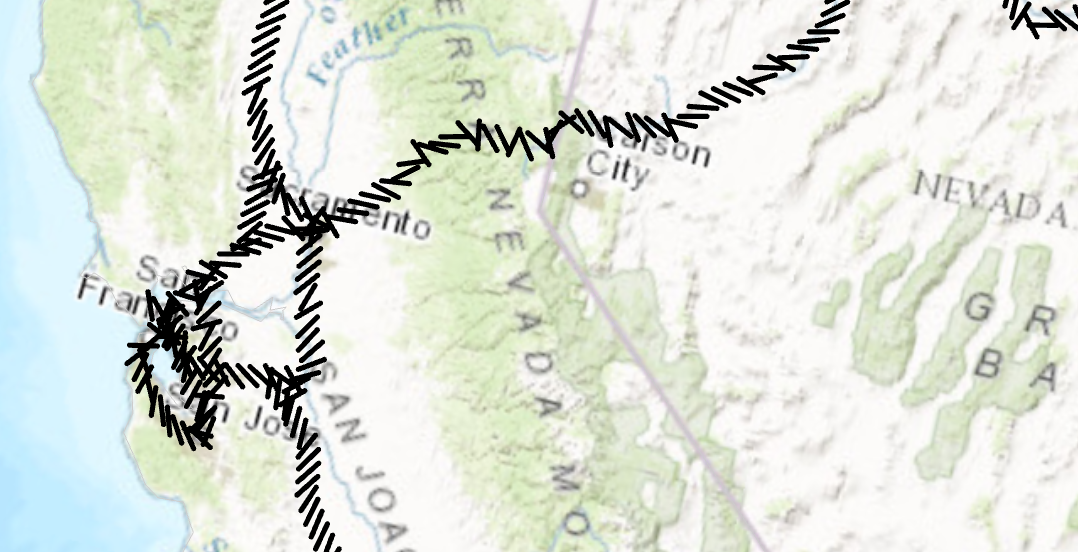 /// </summary> { //Create a line symbol with the markers placed at a 45 degree angle. //Create a marker from the "|" character. This is the marker that will be used to render the line layer. //Note: Run withing QueuedTask var lineMarker = SymbolFactory.Instance.ConstructMarker(124, "Agency FB", "Regular", 12); //Default line symbol which will be modified CIMLineSymbol lineSymbolWithMarkersAtAngle = SymbolFactory.Instance.ConstructLineSymbol(ColorFactory.Instance.BlackRGB, 2, SimpleLineStyle.Solid); //Modifying the marker to align with line //First define "markerplacement" CIMMarkerPlacementAlongLineSameSize markerPlacement = new CIMMarkerPlacementAlongLineSameSize() { AngleToLine = true, PlacementTemplate = new double[] { 5 } }; //assign the markerplacement to the marker lineMarker.MarkerPlacement = markerPlacement; //angle the marker if needed lineMarker.Rotation = 45; //assign the marker as a layer to the line symbol lineSymbolWithMarkersAtAngle.SymbolLayers[0] = lineMarker; }
Dash line with two markers - Method I
/// <summary> /// Create a line symbol with a dash and two markers.<br/> /// This line symbol comprises three symbol layers listed below: /// 1. A solid stroke that has dashes. /// 1. A circle marker. /// 1. A square marker. /// 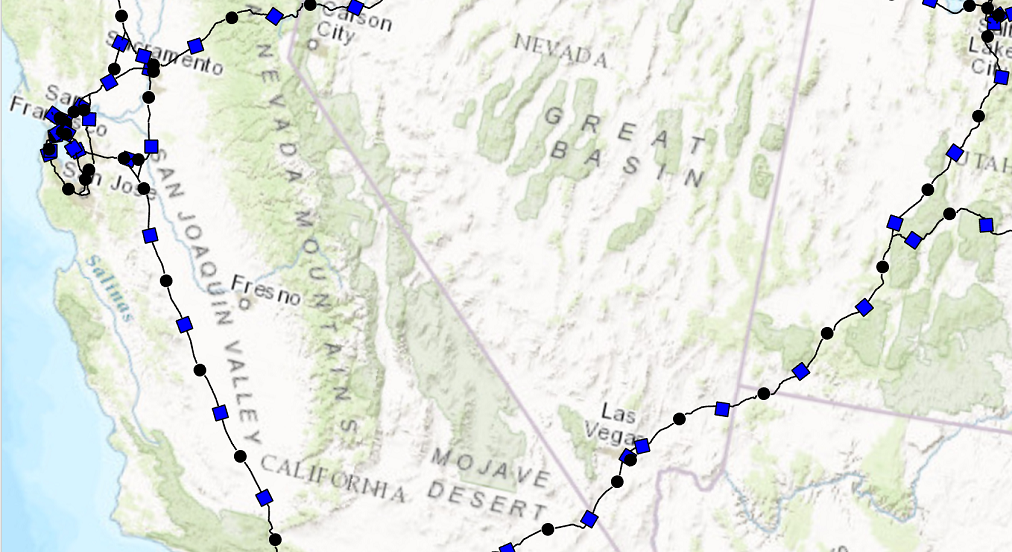 /// </summary> { //Create a line symbol with a dash and two markers. //Note: Run withing QueuedTask CIMLineSymbol dash2MarkersLine = new CIMLineSymbol(); var mySymbolLyrs = new CIMSymbolLayer[] { new CIMSolidStroke() { Color = ColorFactory.Instance.BlackRGB, Enable = true, ColorLocked = true, CapStyle = LineCapStyle.Round, JoinStyle = LineJoinStyle.Round, LineStyle3D = Simple3DLineStyle.Strip, MiterLimit = 10, Width = 1, CloseCaps3D = false, Effects = new CIMGeometricEffect[] { new CIMGeometricEffectDashes() { CustomEndingOffset = 0, DashTemplate = new double[] {20, 10, 20, 10}, LineDashEnding = LineDashEnding.HalfPattern, OffsetAlongLine = 0, ControlPointEnding = LineDashEnding.NoConstraint }, new CIMGeometricEffectOffset() { Method = GeometricEffectOffsetMethod.Bevelled, Offset = 0, Option = GeometricEffectOffsetOption.Fast } }, }, CreateCircleMarkerPerSpecs(), CreateSquareMarkerPerSpecs() }; dash2MarkersLine.SymbolLayers = mySymbolLyrs; static CIMMarker CreateCircleMarkerPerSpecs() { var circleMarker = SymbolFactory.Instance.ConstructMarker(ColorFactory.Instance.BlackRGB, 5, SimpleMarkerStyle.Circle) as CIMVectorMarker; //Modifying the marker to align with line //First define "markerplacement" CIMMarkerPlacementAlongLineSameSize markerPlacement = new CIMMarkerPlacementAlongLineSameSize() { AngleToLine = true, Offset = 0, Endings = PlacementEndings.Custom, OffsetAlongLine = 15, PlacementTemplate = new double[] { 60 } }; //assign the markerplacement to the marker circleMarker.MarkerPlacement = markerPlacement; return circleMarker; } static CIMMarker CreateSquareMarkerPerSpecs() { var squareMarker = SymbolFactory.Instance.ConstructMarker(ColorFactory.Instance.BlueRGB, 5, SimpleMarkerStyle.Square) as CIMVectorMarker; CIMMarkerPlacementAlongLineSameSize markerPlacement2 = new CIMMarkerPlacementAlongLineSameSize() { AngleToLine = true, Endings = PlacementEndings.Custom, OffsetAlongLine = 45, PlacementTemplate = new double[] { 60 }, }; squareMarker.MarkerPlacement = markerPlacement2; return squareMarker; } }
Dash line with two markers - Method II
/// <summary> /// Create a line symbol with a dash and two markers. <br/> /// In this pattern of creating this symbol, a [CIMVectorMarker](https://pro.arcgis.com/en/pro-app/sdk/api-reference/#topic6176.html) object is created as a new [CIMSymbolLayer](https://pro.arcgis.com/en/pro-app/sdk/api-reference/#topic5503.html). /// The circle and square markers created by [ContructMarker](https://pro.arcgis.com/en/pro-app/sdk/api-reference/#topic12350.html) method is then assigned to the [MarkerGraphics](https://pro.arcgis.com/en/pro-app/sdk/api-reference/#topic6188.html) property of the CIMVectorMarker. /// When using this method, the CIMVectorMarker's [Frame](https://pro.arcgis.com/en/pro-app/sdk/api-reference/#topic6187.html) property needs to be set to the [CIMMarker](https://pro.arcgis.com/en/pro-app/sdk/api-reference/#topic3264.html) object's Frame. /// Similarly, the CIMVectorMarker's [Size](https://pro.arcgis.com/en/pro-app/sdk/api-reference/#topic3284.html) property needs to be set to the CIMMarker object's size. /// This line symbol comprises three symbol layers listed below: /// 1. A solid stroke that has dashes. /// 1. A circle marker. /// 1. A square marker. ///  /// </summary> { // Create a line symbol with a dash and two markers. //default line symbol that will get modified. //Note: Run withing QueuedTask CIMLineSymbol dash2MarkersLine = new CIMLineSymbol(); //circle marker to be used in our line symbol as a layer var circleMarker = SymbolFactory.Instance.ConstructMarker(ColorFactory.Instance.BlackRGB, 5, SimpleMarkerStyle.Circle) as CIMVectorMarker; //circle marker to be used in our line symbol as a layer var squareMarker = SymbolFactory.Instance.ConstructMarker(ColorFactory.Instance.BlueRGB, 5, SimpleMarkerStyle.Square) as CIMVectorMarker; //Create the array of layers that make the new line symbol CIMSymbolLayer[] mySymbolLyrs = { new CIMSolidStroke() //dash line { Color = ColorFactory.Instance.BlackRGB, Enable = true, ColorLocked = true, CapStyle = LineCapStyle.Round, JoinStyle = LineJoinStyle.Round, LineStyle3D = Simple3DLineStyle.Strip, MiterLimit = 10, Width = 1, CloseCaps3D = false, Effects = new CIMGeometricEffect[] { new CIMGeometricEffectDashes() { CustomEndingOffset = 0, DashTemplate = new double[] {20, 10, 20, 10}, LineDashEnding = LineDashEnding.HalfPattern, OffsetAlongLine = 0, ControlPointEnding = LineDashEnding.NoConstraint }, new CIMGeometricEffectOffset() { Method = GeometricEffectOffsetMethod.Bevelled, Offset = 0, Option = GeometricEffectOffsetOption.Fast } } }, new CIMVectorMarker() //circle marker { MarkerGraphics = circleMarker.MarkerGraphics, Frame = circleMarker.Frame, //need to match the CIMVector marker's frame to the circleMarker's frame. Size = circleMarker.Size, //need to match the CIMVector marker's size to the circleMarker's size. MarkerPlacement = new CIMMarkerPlacementAlongLineSameSize() { AngleToLine = true, Offset = 0, Endings = PlacementEndings.Custom, OffsetAlongLine = 15, PlacementTemplate = new double[] {60}, } }, new CIMVectorMarker() //square marker { MarkerGraphics = squareMarker.MarkerGraphics, Frame = squareMarker.Frame, //need to match the CIMVector marker's frame to the squareMarker frame. Size = squareMarker.Size, //need to match the CIMVector marker's size to the squareMarker size. MarkerPlacement = new CIMMarkerPlacementAlongLineSameSize() { AngleToLine = true, Endings = PlacementEndings.Custom, OffsetAlongLine = 45, PlacementTemplate = new double[] {60}, } } }; dash2MarkersLine.SymbolLayers = mySymbolLyrs; }
Diagonal cross hatch fill
/// <summary> /// Create a polygon symbol with a diagonal cross hatch fill. <br/> /// 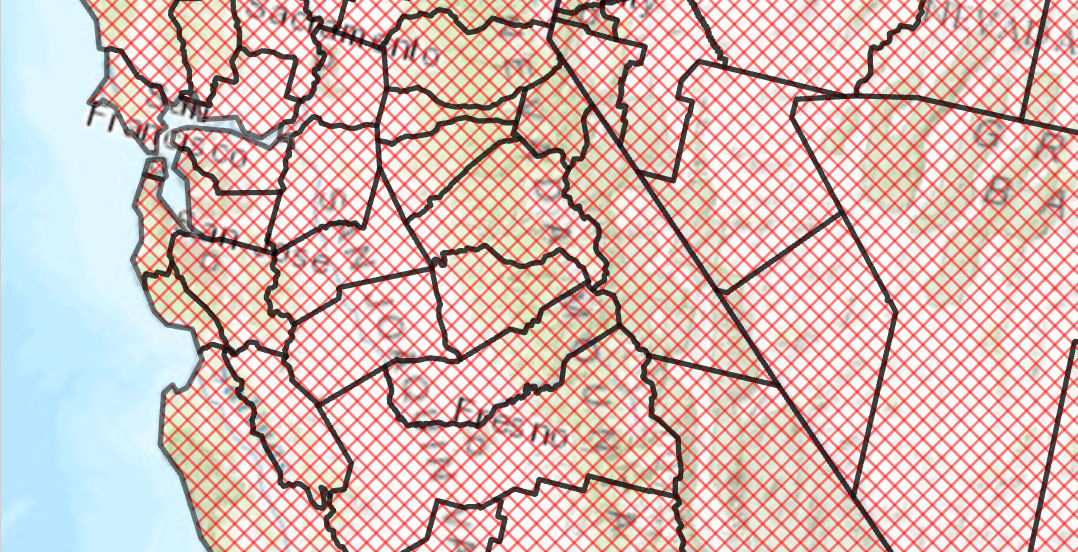 /// </summary> { var trans = 50.0;//semi transparent CIMStroke outline = SymbolFactory.Instance.ConstructStroke(CIMColor.CreateRGBColor(0, 0, 0, trans), 2.0, SimpleLineStyle.Solid); //Stroke for the fill var solid = SymbolFactory.Instance.ConstructStroke(CIMColor.CreateRGBColor(255, 0, 0, trans), 1.0, SimpleLineStyle.Solid); //Mimic cross hatch CIMFill[] diagonalCross = { new CIMHatchFill() { Enable = true, Rotation = 45.0, Separation = 5.0, LineSymbol = new CIMLineSymbol() { SymbolLayers = new CIMSymbolLayer[1] { solid } } }, new CIMHatchFill() { Enable = true, Rotation = -45.0, Separation = 5.0, LineSymbol = new CIMLineSymbol() { SymbolLayers = new CIMSymbolLayer[1] { solid } } } }; List<CIMSymbolLayer> symbolLayers = [ outline, .. diagonalCross ]; //This is the polygon symbol with a diagonal cross hatch fill CIMPolygonSymbol diagonalCrossHatchFillSymbol = new() { SymbolLayers = [.. symbolLayers] }; //To apply the symbol to a polygon feature layer //var renderer = theLayer.GetRenderer() as CIMSimpleRenderer; //renderer.Symbol = diagonalCrossHatchFillSymbol.MakeSymbolReference(); //theLayer.SetRenderer(renderer); }
Inheritance Hierarchy
System.Object
ArcGIS.Core.CIM.CIMObject
ArcGIS.Core.CIM.CIMSymbol
ArcGIS.Core.CIM.CIMMultiLayerSymbol
ArcGIS.Core.CIM.CIMLineSymbol
Requirements
Target Platforms: Windows 11 Home, Pro, Enterprise (64 bit)
ArcGIS Pro version: 3.0 or higher.
See Also