/// <summary>
/// Create a polygon symbol with a gradient color fill. <br/>
/// 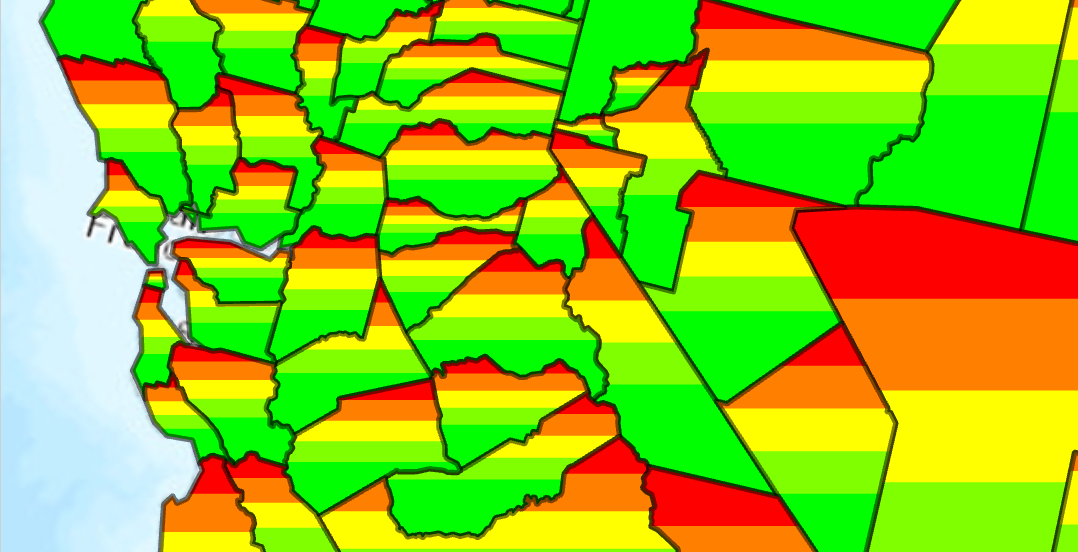
/// 1. Create a solid colored stroke with 50% transparency
/// 1. Create a fill using gradient colors red through green
/// 1. Apply both the stroke and fill as a symbol layer array to the new PolygonSymbol
/// </summary>
{
//Note: Run withing QueuedTask
var trans = 50.0;//semi transparent
CIMStroke outline = SymbolFactory.Instance.ConstructStroke(CIMColor.CreateRGBColor(0, 0, 0, trans), 2.0, SimpleLineStyle.Solid);
//Mimic cross hatch
CIMFill solidColorHatch =
new CIMGradientFill()
{
ColorRamp = ColorFactory.Instance.ConstructColorRamp(ColorRampAlgorithm.LinearContinuous,
ColorFactory.Instance.RedRGB, ColorFactory.Instance.GreenRGB)
};
List<CIMSymbolLayer> symbolLayers = new List<CIMSymbolLayer>
{
outline,
solidColorHatch
};
CIMPolygonSymbol gradientColorFillPolygon = new CIMPolygonSymbol() { SymbolLayers = symbolLayers.ToArray() };
//To apply the symbol to a polygon feature layer
//var renderer = theLayer.GetRenderer() as CIMSimpleRenderer;
//renderer.Symbol = gradientColorFillPolygon.MakeSymbolReference();
//theLayer.SetRenderer(renderer);
}