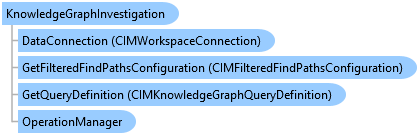
KnowledgeGraphInvestigation Class
In This Topic
Represents a Knowledge Graph investigation in a project and provides access to the entities, relationships and other items in the
knowledge graph.
Object Model
Syntax
Public NotInheritable Class KnowledgeGraphInvestigation
public sealed class KnowledgeGraphInvestigation
Remarks
To create a KnowledgeGraphInvestigation, you must call a create method of the KnowledgeGraphInvestigationFactory class.
To open a KnowledgeGraphInvestigation, use the ProApp.Panes.CreateInvestigationPane method.
You need to use a KnowledgeGraphInvestigationView to interact with a KnowledgeGraphInvestigation. Multiple KnowledgeGraphInvestigationViews can be opened for a KnowledgeGraphInvestigation at a given time, but there can only be one active KnowledgeGraphInvestigationView which is returned by the KnowledgeGraphInvestigation.Active static member. Use the KnowledgeGraphInvestigation property to access the KnowledgeGraphInvestigation object associated with the KnowledgeGraphInvestigationView.
Example
Create an Investigation
{
  await QueuedTask.Run(() =>
  {
    var investigation = KnowledgeGraphInvestigationFactory.Instance.CreateInvestigation(url, "myInvestigation");
    //TODO - use the investigation

  });
}
Create and open an investigation pane
{
  await QueuedTask.Run(() =>
  {
    var investigation = KnowledgeGraphInvestigationFactory.Instance.CreateInvestigation(url, "myInvestigation");

    ProApp.Panes.CreateInvestigationPaneAsync(investigation);
  });
}
Open an existing investigation
{
  // open an existing investigation
  var investigationProjectItems = Project.Current.GetItems<KnowledgeGraphInvestigationProjectItem>();
  var investigationProjectItem = investigationProjectItems.FirstOrDefault(ipi => ipi.Name.Equals("myInvestigation"));
  await QueuedTask.Run(() =>
  {
    KnowledgeGraphInvestigation investigation = investigationProjectItem.GetInvestigation();
    ProApp.Panes.CreateInvestigationPaneAsync(investigation);


    // or
    investigation.OpenViewAsync();
  });

  // or
  investigationProjectItem.OpenInvestigationPaneAsync();
}
Get the panes for an investigation
{
  // open an existing investigation
  var investigationProjectItems = Project.Current.GetItems<KnowledgeGraphInvestigationProjectItem>();
  var investigationProjectItem = investigationProjectItems.FirstOrDefault(ipi => ipi.Name.Equals("myInvestigation"));
  await QueuedTask.Run(() =>
  {
    KnowledgeGraphInvestigation investigation = investigationProjectItem.GetInvestigation();
    var panes = investigation.GetInvestigationPanes();

    foreach (var pane in panes)
    {
      KnowledgeGraphInvestigationView kgView = pane.InvestigationView;
      // if it's the active investigation view
      if (kgView == KnowledgeGraphInvestigationView.Active)
      {
        // do something
      }
    }
  });
}
Get the active KnowledgeGraphInvestigationView, KnowledgeGraphInvestigation
{
  // access the currently active knowledge graph investigation view
  KnowledgeGraphInvestigationView activeView = KnowledgeGraphInvestigationView.Active;
  KnowledgeGraphInvestigation investigation = activeView?.Investigation;
  if (investigation != null)
  {
    // perform some action
  }
}
Activate an existing investigation view
{
  //Confirm if investigation exists as a project item
  KnowledgeGraphInvestigationProjectItem investigationItem =
     Project.Current.GetItems<KnowledgeGraphInvestigationProjectItem>().FirstOrDefault(
                                                        item => item.Name.Equals("myInvestigation"));
  if (investigationItem != null)
  {
    KnowledgeGraphInvestigation investigation =
       await QueuedTask.Run(() => investigationItem.GetInvestigation());

    // see if a view is already open that references the same investigation
    foreach (var investigationPane in ProApp.Panes.OfType<IKnowledgeGraphInvestigationPane>())
    {
      //if there is a match, activate the view
      if (investigationPane.InvestigationView.Investigation == investigation)
      {
        (investigationPane as Pane).Activate();
        return;
      }
    }
  }
}
Inheritance Hierarchy
System.Object
ArcGIS.Desktop.KnowledgeGraph.KnowledgeGraphInvestigation
Requirements
Target Platforms: Windows 11 Home, Pro, Enterprise (64 bit)
ArcGIS Pro version: 3.5 or higher.
See Also