ArcGIS Pro 3.7 API Reference Guide
ArcGIS.Core.CIM Namespace / CIMProceduralSymbolLayer Class / RulePackage Property
Example

In This Topic
    RulePackage Property (CIMProceduralSymbolLayer)
    In This Topic
    Gets or sets the URI of the referenced rule package file.
    Syntax
    Public Property RulePackage As String
    public string RulePackage {get; set;}
    Example
    Mesh procedural texture symbol
    /// <summary>
    /// Creates Mesh procedural symbol with various textures.
    /// ![MeshProceduralTexture](https://ArcGIS.github.io/arcgis-pro-sdk/images/Symbology/mesh-procedural-texture.png)
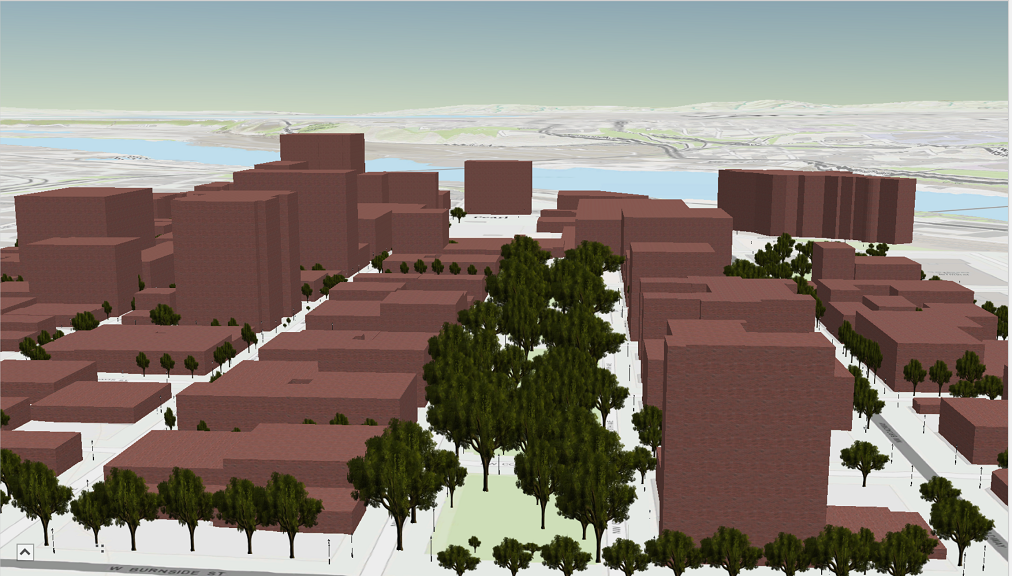
    /// Note: The rule package used in this method can be obtained from the Sample Data included in the arcgis-pro-sdk-community-samples repository.
    /// </summary>
    {
      //Note: Run withing QueuedTask
      string _rulePkgPath = @"C:\Data\RulePackages\MultipatchTextures.rpk";
      CIMSymbolLayer[] proceduralSymbolLyr =
              {
                  new CIMProceduralSymbolLayer()
                  {
                      PrimitiveName = "Textures",
                      RulePackage = _rulePkgPath,
                      RulePackageName = "Textures",
                  }
              };
      var meshProceduralTextureSymbol = new CIMMeshSymbol()
      {
        SymbolLayers = proceduralSymbolLyr
      };
    }
    Requirements

    Target Platforms: Windows 11 Home, Pro, Enterprise (64 bit)

    ArcGIS Pro version: 3.0 or higher.
    See Also