CIMBackgroundCallout Class
In This Topic
Represents a background callout which draws a callout with an optional polygon background and leader line.
Object Model
Syntax
Public Class CIMBackgroundCallout
   Inherits CIMLineCallout
   Implements System.ComponentModel.INotifyPropertyChanged, System.Xml.Serialization.IXmlSerializable
public class CIMBackgroundCallout : CIMLineCallout, System.ComponentModel.INotifyPropertyChanged, System.Xml.Serialization.IXmlSerializable
Example
Snippet Creates a background callout text symbol
/// <summary> /// Creates a solid fill background text symbol with an Accent bar and leader line. The [CIMBackgroundCallout](https://pro.arcgis.com/en/pro-app/sdk/api-reference/#topic474.html) created has a solid fill aqua polygon, with a black dash-dot-dash leader line and a solid accent bar. /// 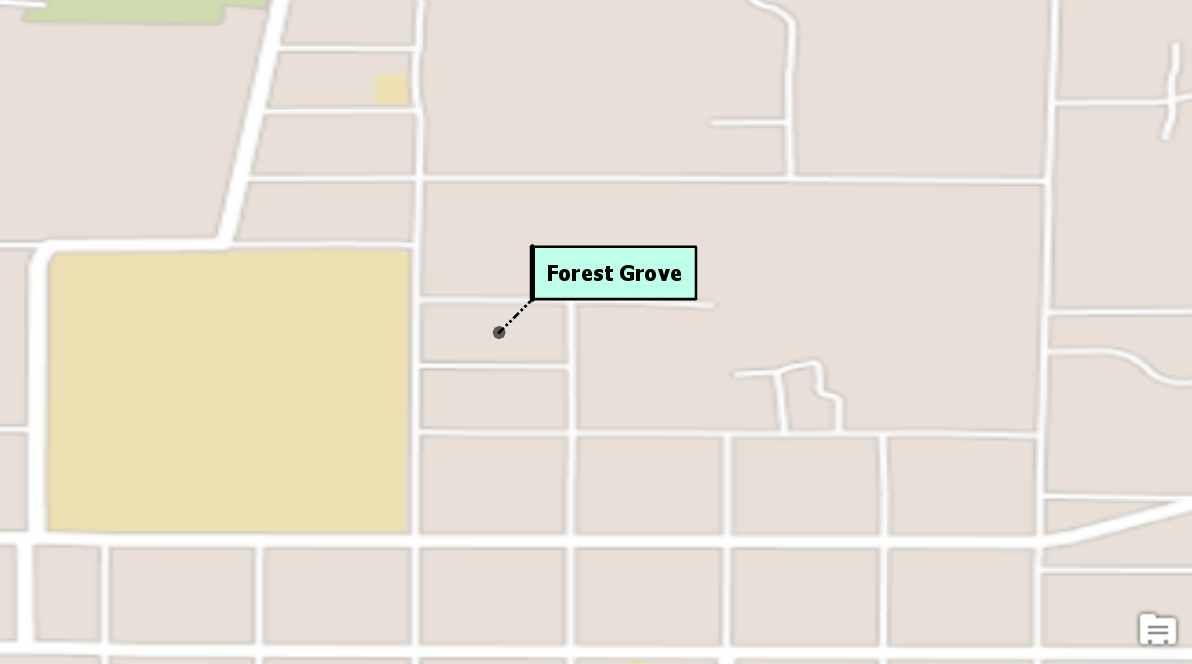 /// </summary> { //Note: Run this code inside a QueuedTask var textSymbolBackgroundCallout = SymbolFactory.Instance.ConstructTextSymbol(ColorFactory.Instance.BlackRGB, 8, "Tahoma", "Bold"); //Create a call out var backgroundCalloutSymbol = new CIMBackgroundCallout(); //Leader line //Get a line symbol var lineSymbol = SymbolFactory.Instance.ConstructLineSymbol(ColorFactory.Instance.BlackRGB, 1, SimpleLineStyle.DashDotDot); //Create a solid fill polygon symbol for the callout. var aquaBackground = ColorFactory.Instance.CreateRGBColor(190, 255, 232, 100); var polySymbol = SymbolFactory.Instance.ConstructPolygonSymbol(aquaBackground, SimpleFillStyle.Solid); //assign the line to the callout backgroundCalloutSymbol.LeaderLineSymbol = lineSymbol; //Offset for the text textSymbolBackgroundCallout.OffsetX = 10; textSymbolBackgroundCallout.OffsetY = 10; //Assign the polygon to the background callout backgroundCalloutSymbol.BackgroundSymbol = polySymbol; //Accent bar var accentSymbol = SymbolFactory.Instance.ConstructLineSymbol(ColorFactory.Instance.BlackRGB, 2, SimpleLineStyle.Solid); backgroundCalloutSymbol.AccentBarSymbol = accentSymbol; //Set margins for the callout backgroundCalloutSymbol.Margin = new CIMTextMargin { Left = 5, Right = 5, Top = 5, Bottom = 5 }; //assign the callout to the textSymbol textSymbolBackgroundCallout.Callout = backgroundCalloutSymbol; //Refer to the snippet "How to apply a Text Symbol to labels of a layer" below to see how to apply this text symbol to a label class }
Inheritance Hierarchy
System.Object
ArcGIS.Core.CIM.CIMObject
ArcGIS.Core.CIM.CIMCallout
ArcGIS.Core.CIM.CIMLineCallout
ArcGIS.Core.CIM.CIMBackgroundCallout
Requirements
Target Platforms: Windows 11 Home, Pro, Enterprise (64 bit)
ArcGIS Pro version: 3.0 or higher.
See Also