EditingRowTemplate Class
In This Topic
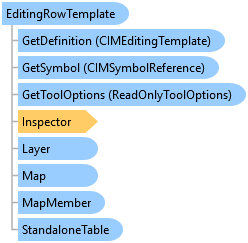
Defines how a new row is created for a particular MapMember.
Object Model
Syntax
Public Class EditingRowTemplate
   Inherits EditingTemplate
   Implements System.ComponentModel.INotifyPropertyChanged
public class EditingRowTemplate : EditingTemplate, System.ComponentModel.INotifyPropertyChanged
Remarks
This implementation of EditingTemplate defines the attributes necessary to create a row within a single MapMember.
Example
Find edit template by name on a layer
// Finds and retrieves specific editing templates by name from layers in the active map.
await QueuedTask.Run(() =>
{
  var mainTemplate = activeMap.FindLayers("main").FirstOrDefault()?.GetTemplate("Distribution");
  var mhTemplate = activeMap.FindLayers("Manhole").FirstOrDefault()?.GetTemplate("Active");
});
Find table templates belonging to a standalone table
// retrieve editing templates associated with standalone tables in the active map.
await QueuedTask.Run(() =>
{
  //Get a particular table template
  var tableTemplate = activeMap.FindStandaloneTables("Address Points").FirstOrDefault()?.GetTemplate("Residences");
  //Get all the templates of a standalone table
  var ownersTableTemplates = activeMap.FindStandaloneTables("Owners").FirstOrDefault()?.GetTemplates();
  var statisticsTableTemplates = activeMap.GetStandaloneTablesAsFlattenedList().First(l => l.Name.Equals("Trading Statistics")).GetTemplates();
});
Change Default Edit tool for a template
await QueuedTask.Run(() =>
      {
        var templateName = "Distribution"; // name of the template to update
        var toolDamlPlugInID = "esri_editing_SketchTwoPointLineTool"; // DAML ID of the tool to set as default
        var toolContentGUID = "e2096d13-b437-4bc1-94ea-4494c3260f72"; // Example GUID, replace with actual GUID from DAML
                                                                      // retrieve the edit template form the layer by name
        var template = featureLayer?.GetTemplate(templateName) as EditingTemplate;
        // get the definition of the layer
        var layerDef = featureLayer?.GetDefinition() as CIMFeatureLayer;
        if (template == null || layerDef == null)
          return;
        if (template.DefaultToolID != toolDamlPlugInID)
        {
          bool updateLayerDef = false;
          if (layerDef.AutoGenerateFeatureTemplates)
          {
            layerDef.AutoGenerateFeatureTemplates = false;
            updateLayerDef = true;
          }

          // retrieve the CIM edit template definition
          var templateDef = template.GetDefinition();

          // assign the GUID from the tool DAML definition, for example
          // <tool id="TestConstructionTool_SampleSDKTool" categoryRefID="esri_editing_construction_polyline" ….>
          //   <tooltip heading="">Tooltip text<disabledText /></tooltip>
          //   <content guid="e58239b3-9c69-49e5-ad4d-bb2ba29ff3ea" />
          // </tool>
          // then the toolContentGUID would be "e58239b3-9c69-49e5-ad4d-bb2ba29ff3ea"

          //templateDef.ToolProgID = toolContentGUID;
          templateDef.DefaultToolGUID = toolContentGUID;

          // set the definition back to
          template.SetDefinition(templateDef);

          // update the layer definition too
          if (updateLayerDef)
            featureLayer.SetDefinition(layerDef);
        }
      });
Create New Template using layer.CreateTemplate
await QueuedTask.Run(() =>
  {
    var newFieldValues = new object[] { "Value1", 123, DateTime.Now };
    // Creates a new editing template for the specified feature layer with the provided field values.
    var insp = new Inspector();
    insp.LoadSchema(featureLayer);

    insp["Field1"] = newFieldValues[0];
    insp["Field2"] = newFieldValues[1];
    insp["Field3"] = newFieldValues[2];

    var tags = new[] { "Polygon", "tag1", "tag2" };

    // set defaultTool using a daml-id
    string defaultTool = "esri_editing_SketchCirclePolygonTool";

    // tool filter is the tools to filter OUT
    var toolFilter = new[] { "esri_editing_SketchTracePolygonTool" };

    // create a new template
    var newTemplate = featureLayer.CreateTemplate("My new template", "description", insp, defaultTool, tags, toolFilter);
  });
Create New Table Template using table.CreateTemplate
// Creates new table templates for the specified standalone table.
await QueuedTask.Run(() =>
{
  var table = activeMap.GetStandaloneTablesAsFlattenedList().FirstOrDefault();
  var tableTemplate = table.GetTemplate("Template1");

  var definition = tableTemplate.GetDefinition();
  definition.Description = "New definition";
  definition.Name = "New name";
  //Create new table template using this definition
  table.CreateTemplate(definition);

  //You can also create a new table template using this extension method. You can use this method the same way you use the layer.CreateTemplate method.
  table.CreateTemplate("New template name", "Template description", tags: ["tag 1", "tag 2"]);
});
Inheritance Hierarchy
System.Object
ArcGIS.Desktop.Framework.Contracts.PropertyChangedBase
ArcGIS.Desktop.Editing.Templates.EditingTemplate
ArcGIS.Desktop.Editing.Templates.EditingRowTemplate
ArcGIS.Desktop.Editing.Templates.EditingMultiPatchTemplate
Requirements
Target Platforms: Windows 11 Home, Pro, Enterprise (64 bit)
ArcGIS Pro version: 3.0 or higher.
See Also