Project Class
In This Topic
Represents an ArcGIS Pro project
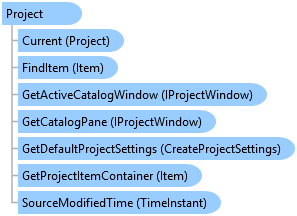
Object Model
Syntax
Public NotInheritable Class Project
   Inherits ArcGIS.Desktop.Framework.Contracts.PropertyChangedBase
   Implements IMetadata, System.ComponentModel.INotifyPropertyChanged
public sealed class Project : ArcGIS.Desktop.Framework.Contracts.PropertyChangedBase, IMetadata, System.ComponentModel.INotifyPropertyChanged
Remarks
An ArcGIS Pro project must be created or opened before you can start to use the application
Example
Workflow to open an ArcGIS Pro project
{
  projectPath = @"https://<userName>.<domain>.com/portal/sharing/rest/content/items/1a434faebbe7424d9982f57d00223baa";
  string docVer = string.Empty;

  // A portal project path looks like this:
  //@"https://<ServerName>.<Domain>.com/portal/sharing/rest/content/items/1a434faebbe7424d9982f57d00223baa";
  //A local project path looks like this:
  //@"C:\Users\<UserName>\Documents\ArcGIS\Projects\MyProject\MyProject.aprx";

  //Check if the project can be opened
  if (Project.CanOpen(projectPath, out docVer))
  {
    //Open the project
    Project.OpenAsync(projectPath);
  }
  else //The project cannot be opened
  {
    //One possible reason: If the project is a portal project, the active portal must match the portal of the project
    //Check if this is a portal project
    bool isPortalProject = Uri.TryCreate(projectPath, UriKind.Absolute, out Uri uriResult)
         && (uriResult.Scheme == Uri.UriSchemeHttp || uriResult.Scheme == Uri.UriSchemeHttps);

    if (isPortalProject)
    {
      //Parse the project path to get the portal
      var uri = new Uri(projectPath);
      var portalUrlOfProjectToOpen = $"{uri.Scheme}://{uri.Host}/portal/";

      //Get the current active portal
      var activePortal = ArcGISPortalManager.Current.GetActivePortal();
      //Compare to see if the active Portal is the same as the portal of the project
      bool isSamePortal = activePortal != null && activePortal.PortalUri.ToString() == portalUrlOfProjectToOpen;
      if (!isSamePortal) //not the same.
      {
        //Set new active portal to be the portal of the project
        //Find the portal to sign in with using its Uri...
        var projectPortal = ArcGISPortalManager.Current.GetPortal(new Uri(portalUrlOfProjectToOpen, UriKind.Absolute));
        // Note: Needs QueuedTask to run
        {
          if (!projectPortal.IsSignedOn())
          {
            //Calling "SignIn" will trigger the OAuth popup if your credentials are
            //not cached (eg from a previous sign in in the session)
            if (projectPortal.SignIn().success)
            {
              //Set this portal as my active portal
              ArcGISPortalManager.Current.SetActivePortal(projectPortal);
              return;
            }
          }
          //Set this portal as my active portal
          ArcGISPortalManager.Current.SetActivePortal(projectPortal);
        }
        //Now try opening the project again
        if (Project.CanOpen(projectPath, out docVer))
        {
          Project.OpenAsync(projectPath);
        }
        else
        {
          System.Diagnostics.Debug.WriteLine("The project cannot be opened.");
        }
      }
      else //The portals are the same. So the problem could be something else - permissions, portal is down?
      {
        System.Diagnostics.Debug.WriteLine("The project cannot be opened.");
      }
    }
    else //Project is on disk and cannot be opened.
    {
      System.Diagnostics.Debug.WriteLine("The project cannot be opened.");
    }
  }
}
Determine if the project is a portal project from a project's path
{
  projectPath = Project.Current.Url;
  // A portal project path looks like this:
  //@"https://<ServerName>.<Domain>.com/portal/sharing/rest/content/items/1a434faebbe7424d9982f57d00223baa";
  //A local project path looks like this:
  //@"C:\Users\<UserName>\Documents\ArcGIS\Projects\MyProject\MyProject.aprx";
  bool isPortalProject = Uri.TryCreate(projectPath, UriKind.Absolute, out Uri uriResult)
                         && (uriResult.Scheme == Uri.UriSchemeHttp || uriResult.Scheme == Uri.UriSchemeHttps);
  if (isPortalProject)
  {
    System.Diagnostics.Debug.WriteLine("This is a portal project");
  }
  else
  {
    System.Diagnostics.Debug.WriteLine("This is not a portal project");
  }
  // Use isPortalProject;
}
Determine if the project is a portal project from a project object
{
  var isPortalProject = Project.Current.IsPortalProject;
  // Use isPortalProject;
}
Get the portal from a portal project's path
{
  projectPath = Project.Current.Url;
  // A portal project path looks like this:
  //@"https://<ServerName>.<Domain>.com/portal/sharing/rest/content/items/1a434faebbe7424d9982f57d00223baa";
  //A local project path looks like this:
  //@"C:\Users\<UserName>\Documents\ArcGIS\Projects\MyProject\MyProject.aprx";

  //Check if the project is a portal project
  bool isPortalProject = Uri.TryCreate(projectPath, UriKind.Absolute, out Uri uriResult)
                         && (uriResult.Scheme == Uri.UriSchemeHttp || uriResult.Scheme == Uri.UriSchemeHttps);
  if (isPortalProject)
  {
    //Parse the project path to get the portal
    var uri = new Uri(projectPath);
    var fullUri = $"{uri.Scheme}://{uri.Host}/portal/";
    System.Diagnostics.Debug.WriteLine($"The Url of the project is: {fullUri}");
    //Now get the ArcGISPortal object from the portal Uri
    var arcgisPortal = ArcGISPortalManager.Current.GetPortal(new Uri(fullUri, UriKind.Absolute));
    System.Diagnostics.Debug.WriteLine($"The portal of the project is: {arcgisPortal.PortalUri}");
    //Note: You can set the active portal to be the portal of the project. Refer to this snippet: [ArcGISPortalManager: Get a portal and Sign In, Set it Active](ProSnippets-sharing#arcgisportalmanager-get-a-portal-and-sign-in-set-it-active)
  }
}
Retrieve a project item from a portal and open it
{
  var projectPortal = ArcGISPortalManager.Current.GetPortal(new Uri(@"https://<serverName>.<domain>.com/portal/", UriKind.Absolute));
  string owner = string.Empty;
  // Note: Needs QueuedTask to run
  {
    //Get the signed on user name
    owner = projectPortal.GetSignOnUsername();
  }
  //Get the user content from the portal
  PortalUserContent userContent = projectPortal.GetUserContentAsync(owner).Result;
  //Get the first portal project item
  var firstPortalProject = userContent.PortalItems.FirstOrDefault(pi => pi.PortalItemType == PortalItemType.ProProject);
  var portalProjectUri = firstPortalProject.ItemUri.ToString();
  //Check if project can be opened
  string docVer = string.Empty;
  if (Project.CanOpen(portalProjectUri, out docVer))
  {
    Project.OpenAsync(portalProjectUri);
  }
  //Note: If Project.CanOpen returns false, the project cannot be opened. One reason could be
  // the active portal is not the same as the portal of the project. Refer to the snippet: [Workflow to open an ArcGIS Pro project](ProSnippets-sharing#workflow-to-open-an-arcgis-pro-project)
}
Inheritance Hierarchy
System.Object
ArcGIS.Desktop.Framework.Contracts.PropertyChangedBase
ArcGIS.Desktop.Core.Project
Requirements
Target Platforms: Windows 11 Home, Pro, Enterprise (64 bit)
ArcGIS Pro version: 3.0 or higher.
See Also