Extract LOD2 Buildings (3D Analyst Tools)
Summary
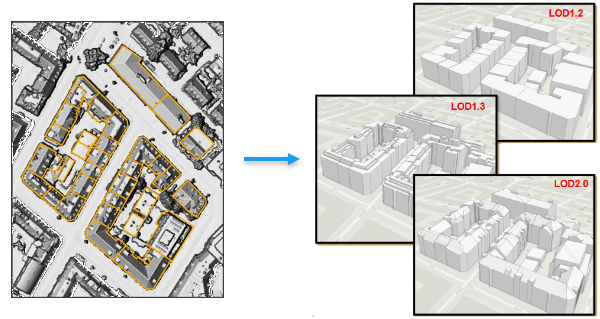
Creates 3D building models using their polygon footprints and a raster or point cloud based height source.
Illustration
Usage
The characteristics of the output building models are described by the Levels of Detail (LOD) concept in the CityGML standard. The tool supports the generation of LOD 1.2, LOD 1.3, and LOD 2.0. LOD 1.x models using a flat representation of the roof; LOD 2.x models capture the slope and directional orientation of the roof.
The building footprint polygons should be aligned with the elevation profile of the structure in the height source. Misalignments between the footprint and the height source may distort the output features.
Each building footprint should represent one contiguous structure without any overlapping polygons. Overlapping polygons that belong to the same building and may be used to represent structures on the roof should be excluded from the footprint by running the Dissolve tool.
When using a LAS dataset layer as the height source, the tool will honor the point filters that are applied to the layer. The LAS dataset should have the ground and building points included in the layer filters. Classified lidar is not required, but if points are classified, filtering them out may improve the quality of the result and processing time. Use the Classify LAS Ground tool to classify ground points, and use the Classify LAS Building tool to classify building rooftop points. The resulting LAS dataset can then be filtered for class 2 and 6 to ensure that only the building rooftop and ground elevation data will be used to generate the output buildings.
If the input height source has a lot of noise, consider increasing the smoothness level to minimize distortions in the output 3D buildings.
This tool uses parallel processing to improve performance by dividing the buildings being generated across multiple cores. You can control the number of cores that are utilized through the Parallel Processing Factor environment setting. By default, this tool will use all available cores. To modify the number of cores, provide the exact number of cores or a percentage of the CPU's cores that will be committed.
Parameters
| Label | Explanation | Data type |
|---|---|---|
|
Input Height Source |
The raster, mosaic dataset. or LAS dataset layer that provides the height information for the buildings being modeled. When the input is a LAS dataset, the layer's filtered points will be processed. It is important to include both the ground and the building points in the LAS dataset's layer filters. |
Raster Layer; Mosaic Layer; LAS Dataset Layer |
|
Input Building Footprints |
The polygon features that represent the footprint of the buildings that will be extracted. |
Feature Layer |
|
Output Multipatch Feature Class |
The output multipatch features that will contain the 3D building models. |
Feature Class |
|
Level of Detail (Optional) |
Specifies the level of detail that will be used to generate the rooftop in the building models. Each building will extend from the rooftop to the surrounding ground level.
|
String |
|
Smoothness Level (Optional) |
A value between 0.0 and 1.0 that impacts the extent to which details in the building will be preserved or generalized. A higher value will result in a more simplified output, and a smaller value will be more likely to extract subelements of a building. A higher value can help minimize the impact of noise in the elevation source provided in the Input Height Source parameter. The default is 0.5. |
Double |
|
Extraction Accuracy (Optional) |
Specifies the broader accuracy of the resulting building model.
|
String |
Environments
Current Workspace, Output Coordinate System, Geographic Transformations, Output CONFIG Keyword, Output M Domain, Output XY Domain, Output Z Domain, XY Resolution, XY Tolerance, Z Resolution, Z Tolerance, Extent, Auto Commit, Parallel Processing Factor
Licensing information
- Basic: Requires 3D Analyst
- Standard: Requires 3D Analyst
- Advanced: Requires 3D Analyst