Extrude Between (3D Analyst Tools)
Summary
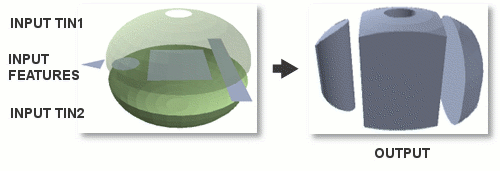
Creates 3D features by extruding each input feature between two triangulated irregular network (TIN) datasets.
Illustration
Usage
Only the portion of input features that overlap the XY extent of both TINs will be represented in the output.
The geometry of the extruded features depends on the geometry of the input features:
Line and polygon input features result in the creation of multipatch geometry.
Point input features result in the creation of line geometry.
The tool may fail to generate a valid ouput if any of the input datasets have coincident boundaries with another input dataset. If the input polygon shares coincident borders with any of the TIN surfaces, consider using the Buffer tool to slightly modify the polygon's shape. Likewise, if one of the TIN surfaces has a coincident boundary with the other in the region overlapping with the polygon, consider modifying the TIN's data area either through interactive editing or by using the TIN Domain tool to output the TIN's footprint as a polygon, applying a slight buffer to the polygon, and loading the polygon back into the TIN using the Edit TIN tool.
Parameters
| Label | Explanation | Data type |
|---|---|---|
|
Input TIN |
The first input TIN. |
TIN Layer |
|
Input TIN |
The second input TIN. |
TIN Layer |
|
Input Feature Class |
The features that will be extruded between the TINs. |
Feature Layer |
|
Output Feature Class |
The output that will store the extruded features. |
Feature Class |
Environments
Current Workspace, Output Coordinate System, Extent, Geographic Transformations, XY Resolution, XY Tolerance, Z Resolution, Z Tolerance, Output CONFIG Keyword, Auto Commit, Output XY Domain, Output Z Domain
Licensing information
- Basic: Requires 3D Analyst
- Standard: Requires 3D Analyst
- Advanced: Requires 3D Analyst