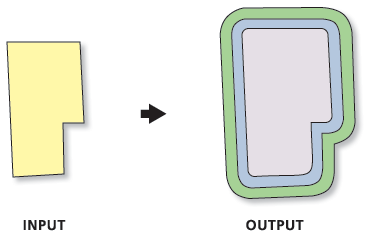
Creates multiple buffers at specified distances around the input features. These buffers can be merged and dissolved using the buffer distance values to create nonoverlapping buffers.
Illustration
Usage
If the Input Features parameter value has a projected coordinate system, planar buffers will be produced in the output by default. If the Input Features parameter value has a geographic coordinate system, geodesic buffers will be produced in the output by default. The Method parameter can be used to change the default behavior.
If the Dissolve Option parameter's Non-overlapping (rings) option (Dissolve_Option = "ALL" in Python) is specified, the output feature class will contain one feature for each distance specified in the Distances parameter; all buffers that are the same distance from the input features will be dissolved together.
The input point, line, or polygon features to be buffered.
Feature Layer
Output Feature class
The output feature class that will contain multiple buffers.
Feature Class
Distances
The list of buffer distances.
Double
Distance Unit
(Optional)
Specifies the linear unit that will be used with the distance values.
Default—The linear unit of the input features' spatial reference will be used. If the Output Coordinate System geoprocessing environment has been set, the linear unit of the environment will be used. The linear unit is ignored if the input features have an unknown or undefined spatial reference. This is the default.
Inches—The unit will be inches.
Feet—The unit will be feet.
Yards—The unit will be yards.
Miles—The unit will be miles.
Nautical miles—The unit will be nautical miles.
Millimeters—The unit will be millimeters.
Centimeters—The unit will be centimeters.
Decimeters—The unit will be decimeters.
Meters—The unit will be meters.
Kilometers—The unit will be kilometers.
Decimal degrees—The unit will be decimal degrees.
Points—The unit will be points.
String
Buffer Distance Field Name
(Optional)
The name of the field in the output feature class that will store the buffer distance used to create each buffer feature. The default is distance. The field will be of type Double.
String
Dissolve Option
(Optional)
Specifies whether buffers will be dissolved to resemble rings around the input features.
Non-overlapping (rings)—Buffers will be dissolved to resemble rings around the input features that do not overlap (think of these as rings or donuts around the input features). The smallest buffer will cover the area of its input feature plus the buffer distance, and subsequent buffers will be rings around the smallest buffer that do not cover the area of the input feature or smaller buffers. All buffers of the same distance will be dissolved into a single feature. This is the default.
Overlapping (disks)—Buffers will not be dissolved. All buffer areas will be maintained regardless of overlap. Each buffer will cover its input feature plus the area of any smaller buffers.
String
Outside Polygons Only
(Optional)
Specifies whether the buffers will cover the input features. This parameter is valid only for polygon input features.
Checked—Buffers will be rings around the input features, and will not overlap or cover the input features (the area inside the input polygon will be erased from the buffer).
Unchecked—Buffers will overlap or cover the input features. This is the default.
Boolean
Method
(Optional)
Specifies the method used to create the buffer.
Planar—Buffers will be created using a Euclidean buffer method. This is the default when the input has a projected coordinate system.
Geodesic—Buffers will be created using a shape-preserving geodesic buffer method. This is the default when the input has a geographic coordinate system.
The input point, line, or polygon features to be buffered.
Feature Layer
Output_Feature_class
The output feature class that will contain multiple buffers.
Feature Class
Distances[distance,...]
The list of buffer distances.
Double
Buffer_Unit
(Optional)
Specifies the linear unit that will be used with the distance values.
Default—The linear unit of the input features' spatial reference will be used. If the Output Coordinate System geoprocessing environment has been set, the linear unit of the environment will be used. The linear unit is ignored if the input features have an unknown or undefined spatial reference. This is the default.
Inches—The unit will be inches.
Feet—The unit will be feet.
Yards—The unit will be yards.
Miles—The unit will be miles.
NauticalMiles—The unit will be nautical miles.
Millimeters—The unit will be millimeters.
Centimeters—The unit will be centimeters.
Decimeters—The unit will be decimeters.
Meters—The unit will be meters.
Kilometers—The unit will be kilometers.
DecimalDegrees—The unit will be decimal degrees.
Points—The unit will be points.
String
Field_Name
(Optional)
The name of the field in the output feature class that will store the buffer distance used to create each buffer feature. The default is distance. The field will be of type Double.
String
Dissolve_Option
(Optional)
Specifies whether buffers will be dissolved to resemble rings around the input features.
ALL—Buffers will be dissolved to resemble rings around the input features that do not overlap (think of these as rings or donuts around the input features). The smallest buffer will cover the area of its input feature plus the buffer distance, and subsequent buffers will be rings around the smallest buffer that do not cover the area of the input feature or smaller buffers. All buffers of the same distance will be dissolved into a single feature. This is the default.
NONE—Buffers will not be dissolved. All buffer areas will be maintained regardless of overlap. Each buffer will cover its input feature plus the area of any smaller buffers.
String
Outside_Polygons_Only
(Optional)
Specifies whether the buffers will cover the input features. This parameter is valid only for polygon input features.
OUTSIDE_ONLY—Buffers will be rings around the input features, and will not overlap or cover the input features (the area inside the input polygon will be erased from the buffer).
FULL—Buffers will overlap or cover the input features. This is the default.
Boolean
Method
(Optional)
Specifies the method used to create the buffer.
PLANAR—Buffers will be created using a Euclidean buffer method. This is the default when the input has a projected coordinate system.
GEODESIC—Buffers will be created using a shape-preserving geodesic buffer method. This is the default when the input has a geographic coordinate system.
String
Code sample
MultipleRingBuffer example 1 (Python window)
The following Python window script demonstrates how to use the MultipleRingBuffer function in immediate mode.