Aggregate Points (GeoAnalytics Server Tools)
Summary
Aggregates points into polygon features or bins. A polygon is returned with a count of points as well as optional statistics at all locations where points exist.
Legacy:
The ArcGIS GeoAnalytics Server extension is being deprecated in ArcGIS Enterprise. The final release of GeoAnalytics Server was included with ArcGIS Enterprise 11.3. This geoprocessing tool is available through ArcGIS Enterprise 11.3 and earlier versions.
Illustration
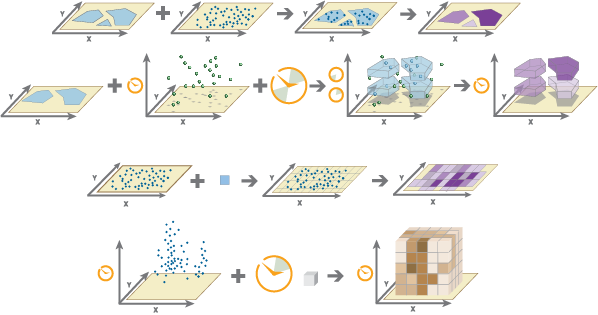
Usage
You can specify the areas where the points will be aggregated in either of the following ways:
Use a polygon layer.
Use a square, hexagonal, or H3 bin of a specified size that is generated when the analysis is run.
You can provide the area layer to use for analysis, or you can generate bins of a specified size and shape (hexagon, square, or H3) into which the points will be aggregated. The bin size specifies how large square and hexagon bins will be.
If you are aggregating into hexagons, the size is the height of each hexagon, and the width of the resulting hexagon will be 2 times the height divided by the square root of 3.
If you are aggregating into squares, the bin size is the height of the square, which is equal to the width.
If you are aggregating into H3 bins, bin size is determined by the specified H3 bin resolution. The H3 bin resolution can be a value between 0 and 15 in which 0 produces the largest bins and 15 produces the smallest bins.

Aggregate Points requires that the Point Layer parameter value is projected or that the output coordinate system is set to a projected coordinate system when aggregating into hexagon or square bins. If the data is not in a projected coordinate system when aggregating into hexagon or square bins and you do not set a projected processing coordinate system, a projection will be assigned based on the extent of the data you are analyzing. When aggregating into H3 bins, the Point Layer parameter value must be in World Geodetic System 1984 (WKID 4326) and will be transformed into this coordinate system if needed.
The output feature layer is always a polygon layer. Only polygons that contain points will be returned, and resulting polygons will be completely removed from the result layer.
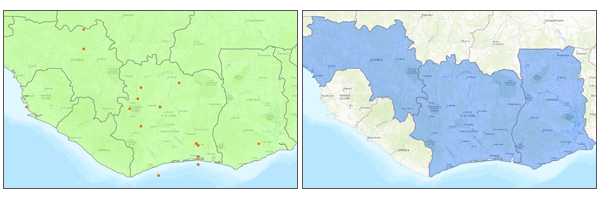
The input point and polygon features are shown in the first image and the resulting area features from the Aggregate Points tool are shown in the second image. The most basic aggregations will calculate a count of the number of points in each polygon. Statistics (count, sum, minimum, maximum, range, mean, standard deviation, and variance) can also be calculated on numerical fields, and statistics (count, any) can be calculated on string fields. The statistics will be calculated on each area separately. If you specify a statistic that is not valid (the mean of a string field, for example), it will be skipped.
Note:
When count is applied to a field, it returns a count of the nonnull values present in the field. When any is applied to a string field, it returns a single string present in the field.
If time is enabled on the input, you can apply time stepping to the analysis. Each time step is analyzed independent of features outside the time step. To use time stepping, the input data must be time enabled and represent an instant in time. When time stepping is applied, output features will be time intervals represented by the
START_DATETIMEandEND_DATETIMEfields.If you specify a time-step interval, time-step repeat, or reference time, and time is not enabled on the data, an error will occur.
The Time Step Reference parameter can be a date and time value or solely a date value; it cannot be solely a time value.
The following fields are included in the output features:
Field name
Description
countThe count of features within each polygon.
statistic_fieldnameSpecified statistics will each create an attribute field, named in the following format: statistic_fieldname. For example, the maximum and standard deviation of the
idfield areMAX_idandSD_id, respectively.start_dateWhen time stepping is specified, output polygons will have a time interval. This field represents the start time.
end_dateWhen time stepping is specified, output polygons will have a time interval. This field represents the end time.
bin_idThe numeric H3 bin ID. This field is only included when aggregating into H3 bins.
You can improve the performance of the Aggregate Points tool by using one or more of the following tips:
Set the extent environment so you only analyze data of interest.
Larger bins will perform better than smaller bins. If you are unsure about which size to use, start with a larger bin to prototype.
Similar to bins, larger time steps will perform better than smaller time steps.
Use data that is local to where the analysis is being run.
This geoprocessing tool is powered by ArcGIS GeoAnalytics Server. Analysis is completed on GeoAnalytics Server, and results are stored in your content in ArcGIS Enterprise.
When running GeoAnalytics Server tools, the analysis is completed on GeoAnalytics Server. For optimal performance, make data available to GeoAnalytics Server through feature layers hosted on your ArcGIS Enterprise portal or through big data file shares. Data that is not local to GeoAnalytics Server will be moved to GeoAnalytics Server before analysis begins. This means that it will take longer to run a tool and, in some cases, moving the data from ArcGIS Pro to GeoAnalytics Server may fail. The threshold for failure depends on your network speeds, as well as the size and complexity of the data. It is recommended that you always share your data or create a big data file share.
Learn more about sharing data to your portal
Learn more about creating a big data file share through Server Manager
Similar analysis can also be completed using the Aggregate Points tool in the Standard Feature Analysis toolbox.
Parameters
| Label | Explanation | Data type |
|---|---|---|
|
Point Layer |
The point features that will be aggregated into polygons or bins. |
Feature Set |
|
Output Name |
The name of the output feature service. |
String |
|
Polygon or Bin |
Specifies how the Point Layer parameter value will be aggregated.
|
String |
|
Polygon Layer (Optional) |
The polygon features into which the input points will be aggregated. |
Feature Set |
|
Bin Type (Optional) |
Specifies the bin shape that will be generated to hold the aggregated points.
|
String |
|
Bin Size (Optional) |
The distance interval that represents the bin size and units into which the Point Layer value will be aggregated. The distance interval must be a linear unit. |
Linear Unit |
|
Time Step Interval (Optional) |
A value that specifies the duration of the time step. This parameter is only available if the input points are time enabled and represent an instant in time. Time stepping can only be applied if time is enabled on the input. |
Time Unit |
|
Time Step Repeat (Optional) |
A value that specifies how often the time-step interval occurs. This parameter is only available if the input points are time enabled and represent an instant in time. |
Time Unit |
|
Time Step Reference (Optional) |
A date that specifies the reference time with which to align the time steps. The default is January 1, 1970, at 12:00 a.m. This parameter is only available if the input points are time enabled and represent an instant in time. |
Date |
|
Summary Fields (Optional) |
The statistics that will be calculated on specified fields. Value table columns:
|
Value Table |
|
Data Store (Optional) |
Specifies the ArcGIS Data Store where the output will be stored. All results stored in a spatiotemporal big data store will be stored in WGS84. Results stored in a relational data store will maintain their coordinate system.
|
String |
|
Bin Resolution (Optional) |
The resolution of the H3 bins. This is a value between 0 and 15 in which 0 will produce the largest H3 bins and 15 will produce the smallest H3 bins. |
Long |
Derived output
| Label | Explanation | Data type |
|---|---|---|
|
Output Feature Layer |
The aggregated polygon features or bins. |
Feature Set |
Environments
Output Coordinate System, Extent, Current Workspace
Special cases
- Output Coordinate System
-
The coordinate system that will be used for analysis. Analysis will be completed in the input coordinate system unless specified by this parameter. For GeoAnalytics Tools, final results will be stored in the spatiotemporal data store in WGS84.
Licensing information
- Basic: Requires ArcGIS GeoAnalytics Server
- Standard: Requires ArcGIS GeoAnalytics Server
- Advanced: Requires ArcGIS GeoAnalytics Server