Detect Incidents expressions
The Detect Incidents tool uses Arcade expressions to determine start and end conditions for incidents. A Detect Incidents condition must result in true or false. Use a condition to determine whether a feature should be included in an incident. The conditions are tested on each feature to determine which features are incidents. The sections below include examples of using expressions. Calculations are performed when analysis is run on ArcGIS GeoAnalytics Server and always create a new layer.
At ArcGIS Enterprise 10.6 and later, expressions are formatted using Arcade. In Arcade, field names are formatted as $feature["field name"] or $feature.fieldname. The first option, $feature["field name"], is required when a field name includes a space. All examples below use this option.
Learn more about Arcade expressions
The following tools use Arcade expressions in GeoAnalytics Server:
Reconstruct Tracks—Buffer expressions.
Create Buffers—Buffer expressions.
Join Features—Join expressions.
Calculate Field—Calculate field values.
Legacy:
The ArcGIS GeoAnalytics Server extension is being deprecated in ArcGIS Enterprise. The final release of GeoAnalytics Server was included with ArcGIS Enterprise 11.3. These tools are available through ArcGIS Enterprise 11.3 and earlier versions.
Mathematical operation and function examples
Expressions can mathematically process numbers. The following table shows examples of available operations.
Learn more about mathematical operations and functions in Arcade
|
Operator |
Explanation |
Example |
|---|---|---|
|
|
Returns the sum of a plus b. |
4.0 |
|
|
Returns the difference of a minus b. |
1.1 |
|
|
Returns the product of a times b. |
4.4 |
|
|
Returns the quotient of a divided by b. |
3.2 |
|
|
Returns the absolute (positive) value of a. |
1.5 |
|
|
Returns the natural logarithm (base E) of a. |
0 |
|
|
Returns the trigonometric sine of a. The input is assumed to be an angle in radians. |
1 |
|
|
Returns the trigonometric cosine of a. The input is assumed to be an angle in radians. |
1 |
|
|
Returns the tangent of a. The input is assumed to be an angle in radians. |
0 |
|
|
Returns the square root of a. |
3 |
|
|
Returns the lowest valued number between a and b. |
-3 |
|
|
Returns the highest valued number between a and b. |
1.5 |
|
|
Returns the input value if it's within the constraining bounds. If the value is less than the low value, it returns the low value. If the value is greater than the high value, it returns the high value. |
Example 1: Returns 0 if Example 2: Returns 6 if |
Text function examples
Detect Incidents expressions can process text. The following table shows examples of available operations.
Learn more about text functions in Arcade
|
Operator |
Explanation |
Example |
Result |
|---|---|---|---|
|
|
Concatenates values together and returns a string.
|
|
GeoAnalytics is great! |
|
|
Finds a string within a string. Wildcards are not supported.
|
|
2 |
|
|
Makes a string lowercase.
|
|
geoanalytics |
Text example using find and lower.
find(("north"), lower("146NorthStreet"))
Date function examples
Detect Incidents expressions can process dates. The following table shows examples of available operations. In Arcade, month values range from 0 (January) to 11 (December), day values from the 1st to the 31st, hour values from 0 (12:00 a.m.) to 23 (11:00 p.m.), minute and second values from 0 to 59, and millisecond values from 0 to 999. Arcade dates return time for theGeoAnalytics Server location.
Learn more about date functions in Arcade
|
Operator |
Explanation |
Example |
Result |
|---|---|---|---|
|
|
Parses a value or set of values into a date string.
|
Example 1: Example 2: Example 3: |
Example 1: 20 Oct 2016 11:23:03 am Example 2: 14 Jan 2017 12:00:00 am Example 3: Returns the current time |
|
|
Subtracts two dates and returns the difference in the specified units.
|
Example 1: Example 2: |
Result will vary depending on when you run this command. Example 1: -20532129137 Example 2: -0.6546783768647119 |
|
|
Returns the year of the given date.
|
Example 1:
Example 2: |
Example 1: 2017 Example 2: 2012 |
Logical function examples
In addition to simple mathematical expressions, more advanced functions, shown in the following table, can be used to apply buffer expressions.
|
Function |
Explanation |
Example |
Result |
|---|---|---|---|
|
|
Returns one value if a condition evaluates to
|
|
Returns Returns the result of the second |
|
|
Evaluates a series of expressions in order until one evaluates to
|
|
If |
|
|
Evaluates an expression and compares its value with subsequent parameters. If the expression matches, it returns the next parameter value. If none match, there is the option for the last parameter to be a default return value.
|
|
Compares equality between the conditional val |
Conditional operators
Conditional statements can use the following operators:
|
Operator |
Explanation |
Example |
Results |
|---|---|---|---|
|
|
a is greater than b a is less than b |
|
False |
|
|
a is greater than or equal to b a is less than or equal to b |
|
True |
|
|
a is not equal to b |
|
True |
|
|
a is equal to b |
|
True |
|
|
Condition 1 or condition 2 is met. |
|
True |
|
|
Condition 1 and condition 2 are met. |
|
False |
Track-aware examples
You can use track-aware equations in Arcade in GeoAnalytics Tools, such as Detect Incidents and Calculate Field. In Calculate Field, you can use track equations when the input layer is time enabled, the expression is track aware, and one or more fields are used to identify tracks.
Use the following track expressions in ArcGIS Enterprise 10.6:
|
Function |
Explanation |
Example |
Result |
||||||||||||
|---|---|---|---|---|---|---|---|---|---|---|---|---|---|---|---|
|
|
Returns an array of values in the given field for the specified time index.
|
Example 1: Example 2: Example 3: Example 4: |
When example 1 is evaluated at index k, it will return an array of values at index 3 through k. If you evaluate at index 6 ( Example 2 returns an array of values calculated as index k minus the given value minus 1 ( Example 3 returns the mean of the values at index Example 4 returns the first item (index 0) of the array created in example 2, which is |
||||||||||||
|
|
Returns an array of values starting from index1 ( |
Example 1: Example 2: |
Example 1: Example 2: |
||||||||||||
|
|
Calculates the start time of a track in milliseconds from epoch. |
Using a track that starts on January 2, 2017.
|
|
||||||||||||
|
|
Calculates the duration of a track in milliseconds from the start until the current time step. |
Using a track that starts on January 2, 2017, and the current time is January 4, 2017.
|
|
||||||||||||
|
|
Calculates the current time in a track. |
Using a feature that occurs on January 3, 2017, at 9:00 a.m.
|
|
||||||||||||
|
|
Returns the time index of the feature being calculated. |
Calculating this value on the first feature in a track.
|
|
||||||||||||
|
|
Returns the feature time plus the time created using the numeric <value> and given <units>.
|
Using a feature that is at January 2, 2017, at 2 p.m. Example 1: Example 2: |
Example 1: Returns January 2 at 3 p.m.: Example 2: Returns December 31st at 2 p.m.: |
||||||||||||
|
|
Returns an array of values in the given field for the specified time index. The window function allows you to go forward and backward in time. The expression is evaluated at each feature in the track.
The window function is available at ArcGIS Enterprise 10.6.1 or later. |
Example 1: Example 2: Example 3: |
Example 1: When evaluated at each feature, the table shows the following results.
Example 2: When evaluated at index 2 (value is 30), it returns: Example 3: When evaluated at index 2 (value is 30), it returns: |
||||||||||||
|
|
Returns an array of values representing geometry for the specified time index. The window function allows you to go forward and backward in time. The expression is evaluated at each feature in the track.
The window function is available at ArcGIS Enterprise 10.6.1 or later. |
Example 1: Example 2: Example 3: Example 4: Find the X value of the previous point |
Example 1: When evaluated at each feature, the table shows the following results.
Example 2: Polylines are returned in the following format: Example 3: Polygons are returned in the following format: Example 4: Evaluated at index 2 (value is 30): |
||||||||||||
|
|
Returns an array of values representing geometry and all attributes for the specified time index. The window function allows you to go forward and backward in time.
The window function is available at ArcGIS Enterprise 10.6.1 or later. |
Example 1: Example 2: |
Example 1: When evaluated at each feature, the table shows the following results.
Example 2: Evaluated at index 2 (value is 30): |
Use the following track expressions in ArcGIS Enterprise 10.6.1 or later:
|
Function |
Explanation |
Example |
Result |
||||||||||||
|---|---|---|---|---|---|---|---|---|---|---|---|---|---|---|---|
|
|
Calculates the start time of a track in milliseconds from epoch. |
Using a track that starts on January 2, 2017.
|
|
||||||||||||
|
|
Calculates the duration of a track in milliseconds from the start until the current time step. |
Using a track that starts on January 2, 2017, and the current time is January 4, 2017.
|
|
||||||||||||
|
|
Calculates the current time in a track. |
Using a feature that occurs on January 3, 2017, at 9:00 a.m.
|
|
||||||||||||
|
|
Returns the time index of the feature being calculated. |
Calculating this value on the first feature in a track.
|
|
||||||||||||
|
|
Returns an array of values in the given field for the specified time index. The window function allows you to go forward and backward in time. The expression is evaluated at each feature in the track.
|
Example 1: Example 2: Example 3: |
Example 1: When evaluated at each feature, the table shows the following results.
Example 2: When evaluated at index 2 (value is 30), it returns: Example 3: When evaluated at index 2 (value is 30), it returns: |
||||||||||||
|
|
Returns an array of values representing geometry for the specified time index. The window function allows you to go forward and backward in time. The expression is evaluated at each feature in the track.
|
Example 1: Example 2: Example 3: Example 4: Find the X value of the previous point |
Example 1: When evaluated at each feature, the table shows the following results.
Example 2: Polylines are returned in the following format: Example 3: Polygons are returned in the following format: Example 4: Evaluated at index 2 (value is 30): |
||||||||||||
|
|
Returns an array of values representing geometry and all attributes for the specified time index. The window function allows you to go forward and backward in time.
|
Example 1: Example 2: |
Example 1: When evaluated at each feature, the table shows the following results.
Example 2: Evaluated at index 2 (value is 30): |
Use the following track expressions to calculate distance, speed, and acceleration on tracks in ArcGIS Enterprise 10.9 or later.
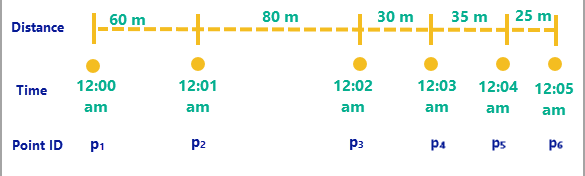
All distance calculations are calculated in meters, speed in meters per second, and acceleration in meters per second squared. Distances are measured using geodesic distances.
|
Function |
Explanation |
|---|---|
|
|
The sum of the distances travelled between observations from the first to current observation. |
|
|
The sum of the distances travelled between observations from the first to the current observation plus the given value. |
|
|
The distances between the first value (inclusive) to the last value (exclusive) in a window about the current observation (0). |
|
|
The speed between the previous observation and the current observation. |
|
|
The speed at the observation relative to the current observation. For example, at value 2, it's the speed at the observation two observations after the current. |
|
|
The speed values between the first value (inclusive) to the last value (exclusive) in a window around the current observation (0). |
|
|
The acceleration between the previous observation and the current observation. |
|
|
The acceleration at the observation relative to the current observation. |
|
|
The acceleration values between the first value (inclusive) to the last value (exclusive) in a window around the current observation (0). |
The example calculations for distance, speed, and acceleration use examples from the following image.
|
Function |
Example result |
||||||||||||||
|---|---|---|---|---|---|---|---|---|---|---|---|---|---|---|---|
|
|
|
||||||||||||||
|
|
|
||||||||||||||
|
|
|
||||||||||||||
|
|
|
||||||||||||||
|
|
|
||||||||||||||
|
|
|
||||||||||||||
|
|
|
||||||||||||||
|
|
|
||||||||||||||
|
|
|