Join Features (GeoAnalytics Server Tools)
Summary
Joins attributes from one layer to another based on spatial, temporal, or attribute relationships, or a combination of those relationships.
Legacy:
The ArcGIS GeoAnalytics Server extension is being deprecated in ArcGIS Enterprise. The final release of GeoAnalytics Server was included with ArcGIS Enterprise 11.3. This geoprocessing tool is available through ArcGIS Enterprise 11.3 and earlier versions.
Illustration
Usage
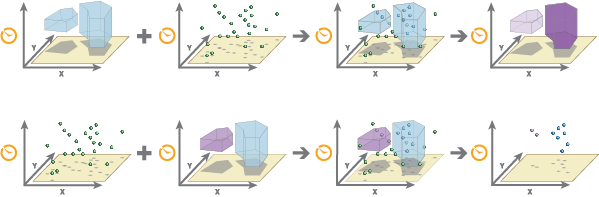
A spatial join matches features (rows) from the input features (the Target Layer and Join Layer parameter values) based on their spatial locations. A temporal join matches features (rows) from the input features based on their temporal relationships. An attribute join matches features based on field values.
You can join features based on a spatial relationship, a temporal relationship, an attribute relationship, or a combination of the three.
Options
Description
Spatial Relationship
The spatial relationship that will determine whether features are joined to each other. The available relationships depend on the geometry type (point, line, or area) of the layers being joined. Available spatial relationships are as follows:
Intersects
Equals
Planar Near—Uses planar distances.
Geodesic Near—Uses geodesic distances. This is only available in ArcGIS Enterprise 10.7.1 and later.
Contains
Within
Touches
Crosses
Overlaps
Learn more about spatial relationships in GeoAnalytics Server tools
Temporal Relationship
The temporal relationship that will determine whether features are joined to each other. The available relationships depend on the time type (instant or interval) of the layers being joined. Available temporal relationships are as follows:
Meets
Met by
Overlaps
Overlapped by
During
Contains
Equals
Finishes
Finished by
Starts
Started by
Intersects
Near
Near Before
Near After
Learn more about temporal relationships in GeoAnalytics Server tools
Attribute Relationship
The attribute relationship that will determine whether features are joined to each other. Features are matched when the field values in the join layer are equal to field values in the target layer.
If target and join features are in different coordinate systems, the coordinate system of the target feature will be used. If an output coordinate system is specified, both features are projected to the output coordinate system and are then joined.
When the Spatial Relationship parameter value is Planar Near, the Target Layer parameter value must be projected or the output coordinate system must be set to a projected coordinate system.
If multiple features match the same target feature, you can decide whether all the matching features will be joined (a Join Operation value of Join one to many) or all the matching features will be summarized together (a Join Operation value of Join one to one) as follows:
Join one to many—Joins all the matching features in the join layer to the target layer. The result layer will contain multiple records of the target feature. All original attributes from the join feature will be appended to the attributes of the target feature, in the result feature.
Join one to one—Summarizes all of the matching join features with each feature in the target layer. Only the features that have a match will be included in the summary and output. The count of joined features will be added, in addition to other optionally added statistics such as sum, minimum, maximum, range, mean, variance, and standard deviation. Only the requested summary statistic attributes (and the count) from the join feature will be appended to the attributes of the target feature, in the result feature. By default, only those target features that have the specified relationships will be maintained in the output feature class (this is known as an inner join). If Keep All Target Features is checked, all input target features will be written to the output feature class (this is known as a left outer join). Only the requested summary statistic attributes from the join feature will be appended to the attributes of the target feature, in the result feature.

Examples of a one-to-many and one-to-one join are shown. In this example, the one-to-one join only includes the count; additional statistics that can be calculated are shown below. You can build an expression to join features using the Join Condition parameter. If you specify an expression, only features that meet the condition will be used. For example, using the
$target["Magnitude"] > $join["Explosion"]expression, you can only join target features from theMagnitudefield if greater than the join feature with a field namedExplosion. See Join Features expressions for more information.The following fields are included in the output features when running a one-to-many join:
All fields from the target layers
All fields from the joined layer
If the same field name exists in the target and join datasets, the joined field will start with the word join (for example
join_fieldname).Field name
Description
start_datetimeThis field represents the start time and is created when the input has time set as an instant or interval.
end_datetimeThis field represents the end time and is created when the input has time set as an interval.
In addition to all fields from the target layer, the following fields are included in the output features when running a one-to-one join:
Field name
Description
countThe count of features that have been joined.
statistic_fieldnameSpecified statistics will each create an attribute field named in the following format: statistic_fieldname. For example, the maximum and standard deviation of the
idfield isMAX_idandSD_id.start_datetimeThis field represents the start time and is created when the input has time set as an instant or interval.
end_datetimeThis field represents the end time and is created when the input has time set as an interval.
If the Include Distance parameter is checked and the Join Operation parameter is set to Join one to many, the following fields may be included in the output features:
Field name
Description
distanceThe distance between target and join features. This field is included if the Spatial Relationship parameter is Planar Near or Geodesic Near.
A distance of 0 indicates that the target and join geometries intersect. A null value indicates that the geometries are farther apart than the Spatial Near Distance parameter value. If the Spatial Relationship parameter value is Planar Near, the distance values will be planar; if the parameter value is Geodesic Near, the distance values will be geodesic. The values will be in the units specified by the Distance Unit parameter. The default distance unit is meters.
timegapThe temporal difference between the target and join features in milliseconds. This field is included if the Temporal Relationship parameter is Near, Near Before, or Near After.
A difference of 0 indicates that the target and join features temporally intersect. Positive values mean the target feature occurs before the join feature, and negative values mean the join feature occurs before the target feature. Null values indicate that the features did not meet the join condition. For example, the features are farther apart than the Temporal Near Distance parameter value.
You can improve performance of the Join Features tool by doing one or more of the following:
Set the extent environment so that you only analyze data of interest.
Make the join conditions as selective as possible. For example, a near join of 1 kilometer will perform better than a near join of 5 kilometers on the same data.
Add more than one join condition. Additional join conditions make the join more selective. For example, a near join of 1 kilometer and 1 hour will perform better than a near join of 1 kilometer on the same data.
Apply a join expression.
Use data that is local to where the analysis is being run.
Similar analysis can also be completed using the Spatial Join tool in the Analysis toolbox.
This geoprocessing tool is powered by ArcGIS GeoAnalytics Server. Analysis is completed on GeoAnalytics Server, and results are stored in your content in ArcGIS Enterprise.
When running GeoAnalytics Server tools, the analysis is completed on GeoAnalytics Server. For optimal performance, make data available to GeoAnalytics Server through feature layers hosted on your ArcGIS Enterprise portal or through big data file shares. Data that is not local to GeoAnalytics Server will be moved to GeoAnalytics Server before analysis begins. This means that it will take longer to run a tool and, in some cases, moving the data from ArcGIS Pro to GeoAnalytics Server may fail. The threshold for failure depends on your network speeds, as well as the size and complexity of the data. It is recommended that you always share your data or create a big data file share.
Learn more about sharing data to your portal
Learn more about creating a big data file share through Server Manager
Parameters
| Label | Explanation | Data type |
|---|---|---|
|
Target Layer |
Contains the target features. The attributes from the target features and the attributes from the joined features will be transferred to the output. |
Record Set |
|
Join Layer |
Contains the join features. The attributes from the join features will be joined to the attributes of the target features. See the explanation for the Join Operation parameter for details about how the aggregation of joined attributes are affected by the type of join operation. |
Record Set |
|
Output Name |
The name of the output feature service. |
String |
|
Join Operation |
Specifies how joins between the Target Layer values and the Join Layer values will be handled in the output if multiple join features have the same spatial relationship with a single target feature.
|
String |
|
Spatial Relationship (Optional) |
Specifies the criteria that will be used to spatially join features.
|
String |
|
Spatial Near Distance (Optional) |
The distance from a target feature within which join features will be considered for the spatial join. A search radius is only valid when the Spatial Relationship parameter value is Planar Near or Geodesic Near. |
Linear Unit |
|
Temporal Relationship (Optional) |
Specifies the time criteria that will be used to match features.
|
String |
|
Temporal Near Distance (Optional) |
The distance in time from a target feature within which join features will be considered for the spatial join. A time is only valid when the Temporal Relationship parameter value is Near, Near Before, or Near After and both features are time enabled. |
Time Unit |
|
Attribute Relationship (Optional) |
Joins features based on values in an attribute field. Specify the attribute field from the target layer that matches an attribute field from the join layer. Value table columns:
|
Value Table |
|
Summary Fields (Optional) |
The statistics that will be calculated on specified fields. Value table columns:
|
Value Table |
|
Join Condition (Optional) |
Applies a condition to specified fields. Only features with fields that meet these conditions will be joined. For example, you can apply a join condition to features in which the HealthSpending attribute in the join layer is more than 20 percent of the Income attribute in the target layer. In ArcGIS Enterprise 10.5 and 10.5.1, the join condition to use to apply this expression is If the layer is added to the map, the Fields and Helpers filters can be used to build an expression. |
String |
|
Data Store (Optional) |
Specifies the ArcGIS Data Store where the output will be stored. All results stored in a spatiotemporal big data store will be stored in WGS84. Results stored in a relational data store will maintain their coordinate system.
|
String |
|
Keep All Target Features (Optional) |
Specifies whether all target features will be maintained in the output feature class (a left outer join) or only those that have the specified relationships with the join features (an inner join).
|
Boolean |
|
Include Distance (Optional) |
Specifies whether the spatial distance or the temporal difference will be included in the result. This parameter is active when the Join Operation parameter value is Join one to many and either the Spatial Relationship parameter value is Planar Near or Geodesic Near, or the Temporal Relationship parameter value is Near, Near before, or Near after.
|
Boolean |
|
Distance Unit (Optional) |
Specifies the unit of measure that will be used for distance values in the output feature class.
|
String |
Derived output
| Label | Explanation | Data type |
|---|---|---|
|
Output_Feature_Class |
The joined output. |
Record Set |
Environments
Output Coordinate System, Extent, Current Workspace
Special cases
- Output Coordinate System
-
The coordinate system that will be used for analysis. Analysis will be completed in the input coordinate system unless specified by this parameter. For GeoAnalytics Tools, final results will be stored in the spatiotemporal data store in WGS84.
Licensing information
- Basic: Requires ArcGIS GeoAnalytics Server
- Standard: Requires ArcGIS GeoAnalytics Server
- Advanced: Requires ArcGIS GeoAnalytics Server