Group By Proximity (GeoAnalytics Server Tools)
Summary
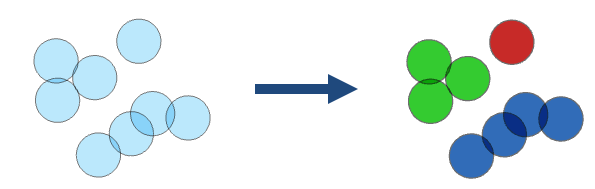
Groups features that are within spatial or spatiotemporal proximity to each other.
Legacy:
The ArcGIS GeoAnalytics Server extension is being deprecated in ArcGIS Enterprise. The final release of GeoAnalytics Server was included with ArcGIS Enterprise 11.3. This geoprocessing tool is available through ArcGIS Enterprise 11.3 and earlier versions.
The following are examples of questions that can be answered by Group By Proximity workflows:
Which roads are connected?
Where are there groups of crime that happened within a close distance and time of each other?
Are there groups of polygons that overlap each other?
Illustration
Usage
This geoprocessing tool is available with ArcGIS Enterprise 10.9.1 or later.
The output result is a copy of the input with a new field named
group_id. Thegroup_idfield represents the grouping of features. Features with the samegroup_idvalue are in the same group. The group numbers represent membership in a particular group and don't imply value. The group numbers may not be sequential or the same number in repeat use of the tool. Results will be symbolized with eight groups. If there are more than eight groups in the result, all groups will be symbolized with eight colors by default. You can modify the symbology to show each unique group by symbolizing with unique symbols on thegroup_idfield.The tool supports the following combinations of relationships:
A spatial relationship
A spatial relationship and a temporal relationship
A spatial relationship and attribute relationships
A spatial relationship, a temporal relationship, and attribute relationships
Features are grouped when all specified relationships are met.
The supported spatial relationships and input geometries are described in the following table:
Input geometry type
Intersects
Touches
Geodesic Near
Planar Near
Point

Polyline
Polygon
Overlay method
Description
Intersects
Features intersect when features or portions of features overlap. This is the default.
Touches
Features touch another feature if they have an intersecting vertex, but the features do not overlap.
Geodesic Near
Features are near if a vertex or edge is within a given geodesic distance of another feature.
Planar Near
Features are near if a vertex or edge is within a given planar distance of another feature.
To use the Spatial Relationship parameter's Planar Near option, the Input Layer parameter value must be projected or the output coordinate system is set to a projected coordinate system.
The supported temporal relationships and temporal types are described in the following table:
Input temporal type
Intersects
Near
None
Instant
Interval
Temporal relationship method
Description
Intersects
Features intersect when any part of a feature's time overlaps another.
Near
Features are near one another if a feature's time is within a given time distance of another feature.
Attribute expressions are a symmetric operation. The tool takes a single input layer that is compared to itself when grouping. Because of this, the input layer is denoted as both a and b in the ArcGIS Arcade expression, and all expressions need to include both a and b. For example, to group all records when the
Amountfield has the same value, use the following expression:$a["Amount"] == $b["Amount"].You can improve performance of the Group By Proximity tool by doing one or more of the following:
Set the extent environment so that you only analyze data of interest.
When using the Spatial Relationship parameter's Planar Near or Geodesic Near option, use a smaller Spatial Near Distance parameter value.
When using the Spatial Relationship parameter, the Planar Near option is faster than the Geodesic Near option.
When using the Temporal Relationship parameter's Near option, use a smaller Temporal Near Distance parameter value.
Use data that is local to where the analysis is being run.
This geoprocessing tool is powered by ArcGIS GeoAnalytics Server. Analysis is completed on GeoAnalytics Server, and results are stored in your content in ArcGIS Enterprise.
When running GeoAnalytics Server tools, the analysis is completed on GeoAnalytics Server. For optimal performance, make data available to GeoAnalytics Server through feature layers hosted on your ArcGIS Enterprise portal or through big data file shares. Data that is not local to GeoAnalytics Server will be moved to GeoAnalytics Server before analysis begins. This means that it will take longer to run a tool and, in some cases, moving the data from ArcGIS Pro to GeoAnalytics Server may fail. The threshold for failure depends on your network speeds, as well as the size and complexity of the data. It is recommended that you always share your data or create a big data file share.
Learn more about sharing data to your portal
Learn more about creating a big data file share through Server Manager
Parameters
| Label | Explanation | Data type |
|---|---|---|
|
Input Layer |
The point, line, or polygon features that will be grouped. |
Feature Set |
|
Output Name |
The name of the output feature service with grouped features represented by a new |
String |
|
Spatial Relationship |
Specifies the type of relationship that features will be grouped by.
|
String |
|
Spatial Near Distance (Optional) |
The distance that will be used to group near features. This parameter is only used when the Spatial Relationship parameter value is Planar Near or Geodesic Near. |
Linear Unit |
|
Temporal Relationship (Optional) |
Specifies the time criteria that will be used to match features. When the parameter is set to Intersects or Near, features are grouped when both the spatial and time criteria are met. Time must be enabled on the input to support this option.
|
String |
|
Temporal Near Distance (Optional) |
The temporal distance that will be used to group near features. This parameter is only used when the Temporal Relationship parameter value is Near. |
Time Unit |
|
Data Store (Optional) |
Specifies the ArcGIS Data Store where the output will be stored. All results stored in a spatiotemporal big data store will be stored in WGS84. Results stored in a relational data store will maintain their coordinate system.
|
String |
|
Attribute Relationship (Optional) |
An ArcGIS Arcade expression that will be used to group features by. For example, |
String |
Derived output
| Label | Explanation | Data type |
|---|---|---|
|
Output Feature Layer |
A new feature class with grouped features represented by a new field named |
Feature Set |
Environments
Output Coordinate System, Extent, Current Workspace
Special cases
- Output Coordinate System
-
The coordinate system that will be used for analysis. Analysis will be completed in the input coordinate system unless specified by this parameter. For GeoAnalytics Tools, final results will be stored in the spatiotemporal data store in WGS84.
Licensing information
- Basic: Requires ArcGIS GeoAnalytics Server
Available with ArcGIS Enterprise10.9.1 - Standard: Requires ArcGIS GeoAnalytics Server
Available with ArcGIS Enterprise10.9.1 - Advanced: Requires ArcGIS GeoAnalytics Server
Available with ArcGIS Enterprise10.9.1