Eliminate Polygon Part (Data Management Tools)
Summary
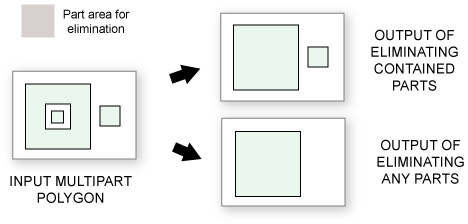
Creates a new output feature class containing the features from the input polygons with some parts or holes of a specified size deleted.
Illustration
Usage
Since polygon holes are considered parts of the polygon, they can be deleted or filled using this tool. If the hole area is smaller than the specified size, the hole will be eliminated and the space will be filled in the output. Any parts that are inside the deleted hole will also be eliminated in the output.
Part size can be specified as an area, a percent, or a combination of both. Use the Condition parameter to determine how the part size will be specified. The Condition parameter's Area and percent and Area or percent options are used to eliminate parts using both the area and percent criteria.
Polygon part percent is calculated as a percentage of the feature's total outer area, including the area of any holes. For example, if a polygon with a hole has an area of 75 square meters, with the hole covering 25 square meters, the polygons total outer area is 100 square meters. To eliminate this hole, an area greater than 25 square meters or a percentage greater than 25% would need to be specified. If the input is a multipart polygon, a feature's outer area is the sum of the area covered by all polygon parts.
For multipart polygons, the area of each part will be compared with the specified area. If an individual polygon part is smaller than the specified size, the part will be eliminated in the output.
If all of a polygon feature's parts are smaller than the specified size, the largest part will be kept in the output while all other parts will be eliminated.
Parameters
| Label | Explanation | Data type |
|---|---|---|
|
Input Features |
The input feature class or layer whose features will be copied to the output feature class, with some parts or holes eliminated. |
Feature Layer |
|
Output Feature Class |
The output polygon feature class containing the remaining parts. |
Feature Class |
|
Condition (Optional) |
Specifies how the parts to be eliminated will be determined.
|
String |
|
Area (Optional) |
Eliminate parts smaller than this area. |
Areal Unit |
|
Percentage (Optional) |
Eliminate parts smaller than this percentage of a feature's total outer area. |
Double |
|
Eliminate contained parts only (Optional) |
Determines what parts can be eliminated.
|
Boolean |
Environments
Current Workspace, Default Output Z Value, Output CONFIG Keyword, Output M Domain, Output XY Domain, Output Z Domain, Output Coordinate System, Extent, Output has M values, Output has Z values, Scratch Workspace, Geographic Transformations, XY Resolution, XY Tolerance, Z Resolution, Z Tolerance
Licensing information
- Basic: No
- Standard: No
- Advanced: Yes