Feature Envelope To Polygon (Data Management Tools)
Summary
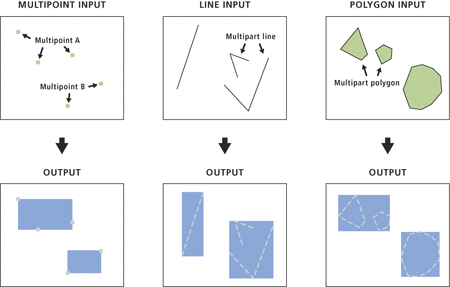
Creates a feature class containing polygons, each of which represents the envelope of an input feature.
Illustration
Usage
The attributes of the input features will be maintained in the output feature class. A new field, ORIG_FID, will be added to the output feature class and set to the input feature IDs.
Since the envelope of a perfectly horizontal line (parallel to the x-axis) has a zero height and the envelope of a perfectly vertical line (parallel to the y-axis) has a zero width, the resulting polygon from either line would have a zero area; such invalid polygons will be omitted in the output. The same applies to a part in a multipart line feature.
The input features that can be multipoint, line, polygon, or annotation.
Feature Layer
Output Feature Class
The output polygon feature class.
Feature Class
Create multipart features
(Optional)
Specifies whether to use one envelope for each entire multipart feature or one envelope per part of a multipart feature. This parameter will affect the results of multipart input features only.
Checked—Uses one envelope for each part of a multipart feature; the resulting polygon of the multipart feature will remain multipart.
Unchecked—Uses one envelope containing an entire multipart feature; therefore, the resulting polygon will be singlepart. This is the default.
The input features that can be multipoint, line, polygon, or annotation.
Feature Layer
out_feature_class
The output polygon feature class.
Feature Class
single_envelope
(Optional)
Specifies whether to use one envelope for each entire multipart feature or one envelope per part of a multipart feature. This parameter will affect the results of multipart input features only.
MULTIPART—Uses one envelope for each part of a multipart feature; the resulting polygon of the multipart feature will remain multipart.
SINGLEPART—Uses one envelope containing an entire multipart feature; therefore, the resulting polygon will be singlepart. This is the default.
Boolean
Code sample
FeatureEnvelopeToPolygon example 1 (Python window)
The following Python window script demonstrates how to use the FeatureEnvelopeToPolygon function in immediate mode.
FeatureEnvelopeToPolygon example 2 (stand-alone script)
The following stand-alone script is a simple example of how to apply the FeatureEnvelopeToPolygon function in a scripting environment.
# Name: FeatureEnvelopeToPolygon_Example2.py
# Description: Use FeatureEnvelopeToPolygon function to find
#              the general extent of features.

# import system modules
import arcpy

# Set environment settings
arcpy.env.workspace = "C:/data/urban_analysis.gdb"

# Set local variables
inFeatures = "houses"
outFeatureClass = "c:/output/output.gdb/houses_extent"

# Run FeatureEnvelopeToPolygon
arcpy.management.FeatureEnvelopeToPolygon(inFeatures, outFeatureClass,
                                          "SINGLEPART")