Feature Vertices To Points (Data Management Tools)
Summary
Creates a feature class containing points generated from specified vertices or locations of the input features.
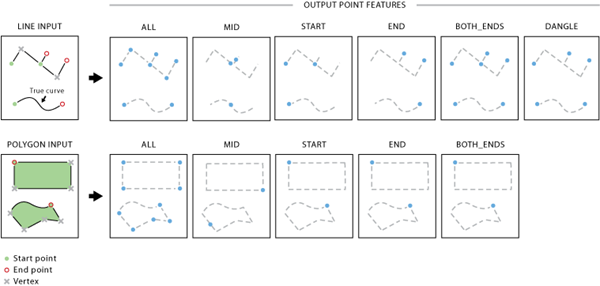
Illustration
Feature Vertices To Points
Usage
The attributes of the input features will be maintained in the output feature class. A new field, ORIG_FID, will be added to the output feature class and set to the input feature IDs.
For multipart lines or polygons, each part will be treated as a line. Therefore, each part will have its own start, end, and mid points, as well as possible dangle point(s).
A parametric (true) curve has only the start and end points and will not be densified.
For the Dangle option of the Point Type parameter, an additional field, DANGLE_LEN carrying the dangle length values in feature unit, will be added to the output feature class. For an isolated line, both endpoints are dangle points; therefore, the dangle length is the line length itself. For a dangle line that intersects another line at one of its endpoints, the dangle length is measured from the dangling endpoint to the intersection.
All vertices—A point will be created at each input feature vertex. This is the default.
Midpoint—A point will be created at the midpoint, not necessarily a vertex, of each input line or polygon boundary.
Start vertex—A point will be created at the start point (first vertex) of each input feature.
End vertex—A point will be created at the end point (last vertex) of each input feature.
Both start and end vertex—Two points will be created, one at the start point and another at the endpoint of each input feature.
Dangling vertex—A dangle point will be created for any start or end point of an input line, if that point is not connected to another line at any location along that line. This option does not apply to polygon input.
ALL—A point will be created at each input feature vertex. This is the default.
MID—A point will be created at the midpoint, not necessarily a vertex, of each input line or polygon boundary.
START—A point will be created at the start point (first vertex) of each input feature.
END—A point will be created at the end point (last vertex) of each input feature.
BOTH_ENDS—Two points will be created, one at the start point and another at the endpoint of each input feature.
DANGLE—A dangle point will be created for any start or end point of an input line, if that point is not connected to another line at any location along that line. This option does not apply to polygon input.
String
Code sample
FeatureVerticesToPoints example 1 (Python window)
The following Python window script demonstrates how to use the FeatureVerticesToPoints function in immediate mode.
FeatureVerticesToPoints example 2 (stand-alone script)
The following stand-alone script is a simple example of how to apply the FeatureVerticesToPoints function in a scripting environment.
# Name: FeatureVerticesToPoints_Example2.py
# Description: Use FeatureVerticesToPoints function to get the mid-points
#              of input line features

# import system modules
import arcpy

# Set environment settings
arcpy.env.workspace = "C:/data"

# Set local variables
inFeatures = "majorrds.shp"
outFeatureClass = "c:/output/output.gdb/majorrds_midpt"

# Run FeatureVerticesToPoints
arcpy.management.FeatureVerticesToPoints(inFeatures, outFeatureClass, "MID")