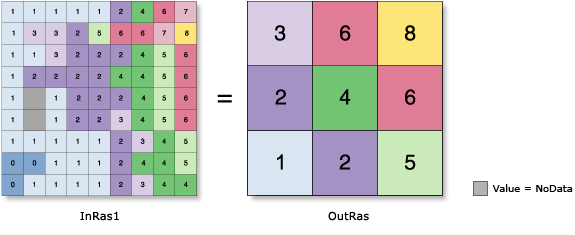
Generates a reduced-resolution version of a raster. Each output cell contains the Sum, Minimum, Maximum, Mean, or Median of the input cells that are encompassed by the extent of that cell.
For the Aggregation technique settings of Maximum, Minimum, or Sum, the output raster type will be the same as that of the input raster. If the setting is Mean or Median, the output type will always be float.
The geoprocessing analysis environments Extent and Cell size are recognized by this tool. To determine the output raster's resolution when an integer cell size has been specified, multiply the cell resolution of the analysis environment by the input cell factor parameter. If the cell size for the analysis environment is set to the minimum or maximum of the inputs, the resolution of the output raster will be the product of the input raster's resolution multiplied by the specified cell factor.
The factor by which the cell size of the input raster will be multiplied. The value must be an integer greater than 1.
For example, a cell factor value of 3 results in an output cell size three times larger than that of the input raster.
Long
Aggregation technique
(Optional)
The method that will be used for aggregation.
The values of the input cells encompassed by the coarser output cells are aggregated by one of the following statistics:
Sum—The total of the input cell values. This is the default.
Maximum—The largest value of the input cells.
Mean—The average value of the input cells.
Median—The median value of the input cells.
Minimum—The smallest value of the input cells.
String
Expand extent if needed
(Optional)
Specifies whether the boundaries of the input raster will be expanded when its rows or columns are not a multiple of the cell factor.
If the number of rows and columns in the input raster is a multiple of the cell_factor, this parameter is ignored.
Checked—The top or right boundaries of the input raster will be expanded so the total number of cells in a row or column is a multiple of the cell factor. The output raster can cover a larger spatial extent than the input raster. Those expanded cells are given a value of NoData when put into the calculation. This is the default.
Unchecked—The number of rows or columns will be reduced by 1 in the output raster. This truncates the remaining cells on the top or right boundaries of the input raster, making the number of rows or columns in the input raster a multiple of the cell factor. With this option, the output raster can cover a smaller spatial extent than the input raster.
Boolean
Ignore NoData in calculations
(Optional)
Denotes whether NoData values are ignored by the aggregation calculation.
Checked—Specifies that if NoData values exist for any of the cells that fall within the spatial extent of a larger cell on the output raster, the NoData values will be ignored when determining the value for output cell locations. Only input cells within the extent of the output cell that have data values will be used in determining the value of the output cell. This is the default.
Unchecked—Specifies that if any cell that falls within the spatial extent of a larger cell on the output raster has a value of NoData, the value for that output cell location will be NoData. When this option is used, it is implied that when cells within an aggregation contain the NoData value, there is insufficient information to perform the specified calculations necessary to determine an output value.
Boolean
Return value
Label
Explanation
Data type
Output raster
The output aggregated raster.
It is a reduced-resolution version of the input raster.
The factor by which the cell size of the input raster will be multiplied. The value must be an integer greater than 1.
For example, a cell factor value of 3 results in an output cell size three times larger than that of the input raster.
Long
aggregation_type
(Optional)
The method that will be used for aggregation.
The values of the input cells encompassed by the coarser output cells are aggregated by one of the following statistics:
SUM—The total of the input cell values. This is the default.
MAXIMUM—The largest value of the input cells.
MEAN—The average value of the input cells.
MEDIAN—The median value of the input cells.
MINIMUM—The smallest value of the input cells.
String
extent_handling
(Optional)
Specifies whether the boundaries of the input raster will be expanded when its rows or columns are not a multiple of the cell factor.
If the number of rows and columns in the input raster is a multiple of the cell_factor, this parameter is ignored.
EXPAND—The top or right boundaries of the input raster will be expanded so the total number of cells in a row or column is a multiple of the cell factor. The output raster can cover a larger spatial extent than the input raster. Those expanded cells are given a value of NoData when put into the calculation. This is the default.
TRUNCATE—The number of rows or columns will be reduced by 1 in the output raster. This truncates the remaining cells on the top or right boundaries of the input raster, making the number of rows or columns in the input raster a multiple of the cell factor. With this option, the output raster can cover a smaller spatial extent than the input raster.
Boolean
ignore_nodata
(Optional)
Denotes whether NoData values are ignored by the aggregation calculation.
DATA—Specifies that if NoData values exist for any of the cells that fall within the spatial extent of a larger cell on the output raster, the NoData values will be ignored when determining the value for output cell locations. Only input cells within the extent of the output cell that have data values will be used in determining the value of the output cell. This is the default.
NODATA—Specifies that if any cell that falls within the spatial extent of a larger cell on the output raster has a value of NoData, the value for that output cell location will be NoData. When this option is used, it is implied that when cells within an aggregation contain the NoData value, there is insufficient information to perform the specified calculations necessary to determine an output value.
Boolean
Return value
Name
Explanation
Data type
out_raster
The output aggregated raster.
It is a reduced-resolution version of the input raster.
Raster
Code sample
Aggregate example 1 (Python window)
This example aggregates a raster by averaging the values with a cell factor of 3 and outputs a TIFF raster.
This example aggregates a raster by averaging the values with a cell factor of 3 and outputs a Grid raster.
# Name: Aggregate_Ex_02.py
# Description: Generates a reduced resolution version of a raster.
# Requirements: Spatial Analyst extension

# Import system modules
import arcpy
from arcpy import env
from arcpy.sa import *

# Set environment settings
env.workspace = "C:/sapyexamples/data"

# Set local variables
inRaster = "highres"
cellFactor = 3

# Run Aggregate
outAggreg = Aggregate(inRaster, cellFactor, "MEAN", "TRUNCATE", "NODATA")

# Save the output
outAggreg.save("C:/sapyexamples/output/aggregate02")