Collect Events (Spatial Statistics Tools)
Summary
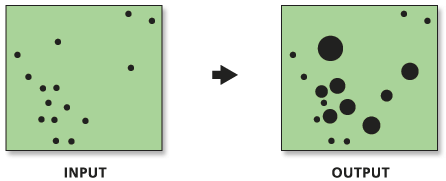
Converts event data, such as crime or disease incidents, to weighted point data.
Illustration
Usage
This tool combines coincident points. It creates a new Output Feature Class value that contains the unique locations found in the Input Feature Class value. It then adds an
ICOUNTfield to hold the sum of all incidents at each unique location.This tool will only combine features that have the exact same x and y centroid coordinates. You can use the Integrate tool to snap nearby features together before running this tool.
Caution:
The Integrate tool permanently alters feature geometry; always make a backup copy of the feature class before using the Integrate tool.
The Hot Spot Analysis (Getis-Ord Gi*), Cluster and Outlier Analysis (Local Moran's I), and Spatial Autocorrelation (Morans I) tools, for example, require weighted points rather than individual incidents. You can use this tool to create weights when the input feature class contains coincident features.
Although this tool will work with polygon or line data, it is only appropriate for event, incident, or other point feature data. For line and polygon features, feature coincidence is based on feature true geometric centroids. For multipoint, polyline, or polygons with multiple parts, the centroid is computed using the weighted mean center of all feature parts. The weighting for point features is 1, for line features is length, and for polygon features is area.
If you want each individual point or part of multipoint or multipart data treated as singlepart features, run the Multipart to Singlepart tool. Then run Collect Events on the singlepart feature class. For more information, see Processing Multipoint Data.
In addition to the Output Weighted Point Feature Class value, this tool passes, as derived output values, the name of the count field and the maximum count value encountered for any one location. These derived output values are helpful when you use this tool in models or scripts.
Parameters
| Label | Explanation | Data type |
|---|---|---|
|
Input Incident Features |
The features representing event or incident data. |
Feature Layer |
|
Output Weighted Point Feature Class |
The output feature class that will contain the weighted point data. |
Feature Class |
Derived output
| Label | Explanation | Data type |
|---|---|---|
|
Results Field |
The name of the count field |
Field |
|
Z Max Value |
The maximum count value encountered for any one location. |
Double |
Environments
Output Coordinate System, Geographic Transformations, Current Workspace, Scratch Workspace, Output has M values, M Resolution, M Tolerance, Output has Z values, Default Output Z Value, Z Resolution, Z Tolerance, XY Resolution, XY Tolerance
Special cases
- Output Coordinate System
-
Feature geometry is projected to the Output Coordinate System prior to analysis. All mathematical computations are based on the Output Coordinate System spatial reference.
Licensing information
- Basic: Yes
- Standard: Yes
- Advanced: Yes