FuzzySmall
サマリー
Defines a fuzzy membership function where the smaller input values have membership closer to 1. The function is defined by a midpoint (which is assigned a membership of 0.5) with a defined spread.
ディスカッション
The tool that uses the FuzzySmall object: FuzzyMembership.
The equation for this function is:
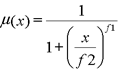
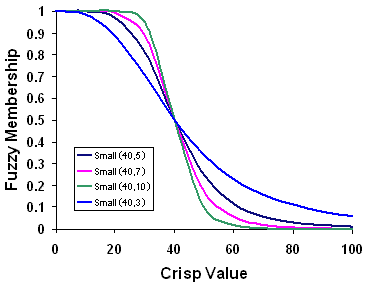
The inputs to the equation are \(f1\), the spread, and \(f2\), the midpoint. Increasing the spread causes the fuzzy membership curve to become steeper.
This function is useful when the small input values have a higher membership.
The input values can be either integer or floating point positive values.
構文
FuzzySmall(midpoint, spread)
| 名前 | 説明 | データ タイプ |
|---|---|---|
|
midpoint |
The value with a fuzzy membership of 0.5. The default is the midpoint of the range of values of the input raster. |
Double |
|
spread |
Defines the spread of the function. The spread generally ranges from 1 to 10, with the larger the value results in a steeper distribution from the midpoint. The default value is 5. |
Double |
プロパティ
| 名前 | 説明 | データ タイプ |
|---|---|---|
|
midpoint (読み取り/書き込み) |
Defines the midpoint for the membership function. |
Double |
|
spread (読み取り/書き込み) |
Defines the spread of the membership function. The larger the value results in a steeper distribution from the midpoint. |
Double |
コードのサンプル
Demonstrates how to create a FuzzySmall class and use it in the FuzzyMembership tool within the Python window.
import arcpy
from arcpy.sa import *
from arcpy import env
env.workspace = "c:/sapyexamples/data"
outFzyMember = FuzzyMembership("as_std", FuzzySmall(19, 8))
outFzyMember.save("c:/sapyexamples/fzysml")
Performs a FuzzyMembership using the FuzzySmall class.
# Name: FuzzySmall_Ex_02.py
# Description: Scales input raster data into values ranging from zero to one
#     indicating the strength of a membership in a set.
# Requirements: Spatial Analyst extension

# Import system modules
import arcpy
from arcpy import env
from arcpy.sa import *

# Set environment settings
env.workspace = "C:/sapyexamples/data"

# Set local variables
inRaster = "as_std"

# Create the FuzzySmall algorithm object
midpoint = 12
spread = 8
myFuzzyAlgorithm = FuzzySmall(midpoint, spread)

# Run FuzzyMembership
outFuzzyMember = FuzzyMembership(inRaster, myFuzzyAlgorithm)

# Save the output
outFuzzyMember.save("c:/sapyexamples/fzysml2")