arcpy.management.FindIdentical(in_dataset, out_dataset, fields, {xy_tolerance}, {z_tolerance}, {output_record_option})
|
名前
|
説明
|
データ タイプ
|
|
in_dataset
|
同一値を持つレコードを検出するテーブルまたはフィーチャクラス。
|
Table View
|
|
out_dataset
|
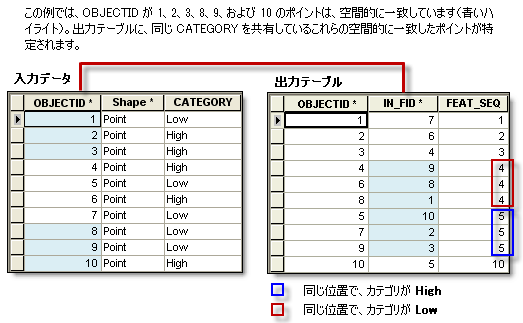
同一値を持つレコードを報告する出力テーブル。 出力テーブルの FEAT_SEQ フィールドは、同一レコードでは同じ値を持ちます。
|
Table
|
|
fields
[fields,...]
|
同一値を持つレコードを検出するために値が照合されるフィールド。
|
Field
|
|
xy_tolerance
(オプション)
|
別のフィーチャ内に同一値の頂点が存在するかどうかを評価するときに各頂点に適用される XY 許容値。
このパラメーターは、fields パラメーターの値に Shape フィールドが含まれる場合に有効になります。
|
Linear Unit
|
|
z_tolerance
(オプション)
|
別のフィーチャ内に同一値の頂点が存在するかどうかを評価するときに各頂点に適用される Z 許容値。
このパラメーターは、fields パラメーターの値に Shape フィールドが含まれる場合に有効になります。
|
Double
|
|
output_record_option
(オプション)
|
出力テーブルに重複レコードのみを含めるかどうかを指定します。
|
Boolean
|
コードのサンプル
FindIdentical の例 1 (Python ウィンドウ)
次の Python ウィンドウ スクリプトは、イミディエイト モードで FindIdentical 関数を使用する方法を示しています。
import arcpy

# Find identical records based on a text field and a numeric field.
arcpy.management.FindIdentical("C:/data/fireincidents.shp", "C:/output/duplicate_incidents.dbf", ["ZONE", "INTENSITY"])
FindIdentical の例 2 (スタンドアロン スクリプト)
次のスタンドアロン スクリプトは、FindIdentical 関数を使用して、テーブルまたはフィーチャクラスの重複するレコードを識別する方法を示しています。
# Name: FindIdentical_Example2.py
# Description: Finds duplicate features in a dataset based on location (Shape field) and fire intensity

import arcpy

arcpy.env.overwriteOutput = True

# Set workspace environment
arcpy.env.workspace = "C:/data/findidentical.gdb"

# Set input feature class
in_dataset = "fireincidents"

# Set the fields upon which the matches are found
fields = ["Shape", "INTENSITY"]

# Set xy tolerance
xy_tol = ".02 Meters"

out_table = "duplicate_incidents"

# Run Find Identical
arcpy.management.FindIdentical(in_dataset, out_table, fields, xy_tol)
print(arcpy.GetMessages())
FindIdentical の例 3: (スタンドアロン スクリプト)
次のスタンドアロン スクリプトで、オプションの output_record_option パラメーターを使用する方法を示します。 パラメーター値が ONLY_DUPLICATES である場合、一意のレコードはすべて削除され、重複レコードだけが出力に残されます。
# Name: FindIdentical_Example3.py
# Description: Demonstrates the use of the optional parameter Output only duplicated records.

import arcpy

arcpy.env.overwriteOutput = True

# Set workspace environment
arcpy.env.workspace = "C:/data/redlands.gdb"

in_data = "crime"
out_data = "crime_dups"

# Note that XY Tolerance and Z Tolerance parameters are not used
# In that case, any optional parameter after them must assign
# the value with the name of that parameter
arcpy.management.FindIdentical(in_data, out_data, ["Shape"], output_record_option="ONLY_DUPLICATES")

print(arcpy.GetMessages())
FindIdentical の例 4: (スタンドアロン スクリプト)
次のスタンドアロン スクリプトで、FindIdentical 関数の出力を読み取り、FEAT_SEQ フィールド値によって同一レコードをグループ化します。
import arcpy

from itertools import groupby
from operator import itemgetter

# Set workspace environment
arcpy.env.workspace = r"C:\data\redlands.gdb"

# Run Find Identical on feature geometry only.
result = arcpy.management.FindIdentical("parcels", "parcels_dups", ["Shape"])

# List of all output records as IN_FID and FEAT_SEQ pair - a list of lists
out_records = []
for row in arcpy.SearchCursor(result.getOutput(0), fields="IN_FID; FEAT_SEQ"):
    out_records.append([row.IN_FID, row.FEAT_SEQ])

# Sort the output records by FEAT_SEQ values
# Example of out_records = [[3, 1], [5, 3], [1, 1], [4, 3], [2, 2]]
out_records.sort(key = itemgetter(1))

# records after sorted by FEAT_SEQ: [[3, 1], [1, 1], [2, 2], [5, 3], [4, 3]]
# records with same FEAT_SEQ value will be in the same group (i.e., identical)
identicals_iter = groupby(out_records, itemgetter(1))

# now, make a list of identical groups - each group in a list.
# example identical groups: [[3, 1], [2], [5, 4]]
# i.e., IN_FID 3, 1 are identical, and 5, 4 are identical.
identical_groups = [[item[0] for item in data] for (key, data) in identicals_iter]

print(identical_groups)