NbrCircle
汇总
用于定义圆形邻域,将通过以地图单位或像元数指定半径来创建该邻域。

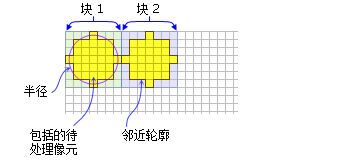
讨论
使用圆形邻域对象的工具包括: 块统计 、 焦点统计 、 点统计 、 点密度分析 和 地形位置指数 。
许可:
如果您拥有 Image Analyst 扩展模块许可,也可以使用该类,但仅限于 焦点统计 工具。
通过指定 radius 值来创建圆形邻域。 radius 以像元或地图单位为单位,并沿垂直于 x 轴或 y 轴的方向进行测量。 当以地图单位指定半径时,会将其转换为以像元为单位的半径。 所得的以像元为单位的半径会生成一个区域,该区域能够近似地表示出使用原始的地图单位为半径时计算的区域。 圆形包围的任何像元中心都将包含在邻域的处理中。
语法
NbrCircle({radius}, {units})
| 名称 | 说明 | 数据类型 |
|---|---|---|
|
radius (可选) |
The radius of the circle neighborhood. (默认值为 3) |
Double |
|
units (可选) |
Defines the units of the neighborhood.
(默认值为 CELL) |
String |
属性
| 名称 | 说明 | 数据类型 |
|---|---|---|
|
radius (读取和写入) |
圆形邻域的半径。 |
Double |
|
units (读取和写入) |
定义邻域单位。
|
String |
代码示例
演示如何创建 NbrCircle 类以及如何在 Python 窗口的 BlockStatistics 工具中使用该类。
import arcpy
from arcpy import env
from arcpy.sa import *
env.workspace = "C:/sapyexamples/data"
outNbrC = BlockStatistics("block", NbrCircle(2, "MAP"))
outNbrC.save("C:/sapyexamples/output/blstatsnbrc2")
使用 NbrCircle 类执行 BlockStatistics 工具。
# Name: NbrCircle_Ex_02.py
# Description: Uses the NbrCircle object to run BlockStatistics tool.
# Requirements: Spatial Analyst extension

# Import system modules
import arcpy
from arcpy import env
from arcpy.sa import *

# Set environment settings
env.workspace = "C:/sapyexamples/data"

# Set local variables
inRaster = "block"

# Create the Neighborhood Object
radius = 2
myNbrCirc = NbrCircle(radius, "MAP")

# Run BlockStatistics
outBlkStat =  BlockStatistics(inRaster, myNbrCirc, "MINIMUM", "DATA")

# Save the output
outBlkStat.save("C:/sapyexamples/output/blstat_cir3")