3D 相交 (3D Analyst 工具)
汇总
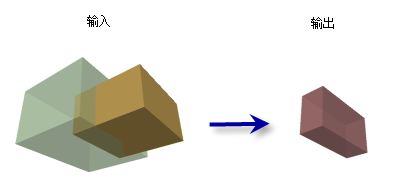
计算多面体要素的交集,以便生成包含重叠体积的闭合多面体,根据公共表面积生成非闭合多面体要素,或根据相交边生成线要素。
插图
用法
在确定此分析的数据时需要谨慎。 高度详细的要素可能会生成复杂的几何,这可能因为涉及的总折点数和方向,导致性能受到影响。
如果只提供了一个输入要素,将会评估该多面体数据集中各要素的相交情况。 如果提供了两个要素,将会确定这两个数据集的要素的相交部分,同时忽略那些只存在于一个输入中的相交情况。
注:
使用两个输入要素时,将在输出中融合来自两个要素的属性。
输入多面体要素的纹理和颜色将不会在输出中保留。
当输出几何类型 参数指定为实体 时,输入多面体必须闭合。 表面 和线 选项无需闭合多面体作为输入。 可以使用 是否为闭合 3D
参数
标注
说明
数据类型
输入多面体要素
将要进行相交操作的多面体要素。 当只提供一个输入要素图层或要素类时,输出将表示其自身要素的交集。
Feature Layer
输出要素类
将生成的要素类。
Feature Class
输入多面体要素
(可选)
将与第一个要素相交的第二个多面体要素图层或要素类。
Feature Layer
输出几何类型
(可选)
指定将创建的相交几何类型。
Solid A closed multipatch representing the overlapping volumes between input features will be created. This is the default.
Surface A multipatch surface representing coincident areas of faces between input features will be created.
Line Lines representing the intersection between faces of input features will be created.
String
arcpy.3d.Intersect3D(in_feature_class_1, out_feature_class, {in_feature_class_2}, {output_geometry_type})
名称
说明
数据类型
in_feature_class_1
将要进行相交操作的多面体要素。 当只提供一个输入要素图层或要素类时,输出将表示其自身要素的交集。
Feature Layer
out_feature_class
将生成的要素类。
Feature Class
in_feature_class_2
(可选)
将与第一个要素相交的第二个多面体要素图层或要素类。
Feature Layer
output_geometry_type
(可选)
指定将创建的相交几何类型。
SOLIDA closed multipatch representing the overlapping volumes between input features will be created. This is the default.
SURFACEA multipatch surface representing coincident areas of faces between input features will be created.
LINELines representing the intersection between faces of input features will be created.
String
代码示例
Intersect3D 示例 1(Python 窗口)
下面的示例演示了如何在 Python 窗口中使用此工具:
import arcpy

arcpy.env.workspace = 'C:/data'
arcpy.ddd.Intersect3D('inMultipatch1.shp', 'outMultipatch.shp',
                      'inMultipatch2.shp')
下面的示例演示了如何在独立 Python 脚本中使用此工具:
'''****************************************************************************
Name: Intersect3D Example
Description: This script demonstrates how to use the
             Intersect3D tool
****************************************************************************'''
# Import system modules
import arcpy

# Set environment settings
arcpy.env.workspace = 'C:/data'

# Set Local Variables
inMP1 = 'Boston_MP_Small.shp'
inMP2 = 'Boston_MP.shp'

# Ensure output has a unique name
outMP = arcpy.CreateUniqueName('Intersect.shp')

# Run Intersect3D
arcpy.ddd.Intersect3D(inMP1, outMP, inMP2)
环境
当前工作空间 , 范围 , 输出坐标系 , 地理变换 , 输出配置关键字 , 自动提交 , 输出 XY 值域 , 输出 Z 值域
许可信息
基本: 需要 3D Analyst
标准: 需要 3D Analyst
高级: 需要 3D Analyst