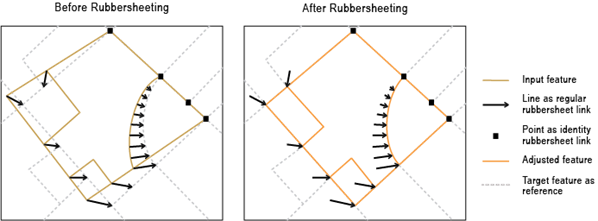
arcpy.edit.RubbersheetFeatures(in_features, in_link_features, {in_identity_links}, {method})
|
名称
|
说明
|
数据类型
|
|
in_features
|
将进行校正的输入要素。 可以为点、线、面或注记。
|
Feature Layer
|
|
in_link_features
|
表示橡皮页变换常规链接的输入线要素。
|
Feature Layer
|
|
in_identity_links
(可选)
|
表示橡皮页变换标识链接的输入点要素。
|
Feature Layer
|
|
method
(可选)
|
指定将用于校正要素的橡皮页变换法。
|
String
|
派生输出
|
名称
|
说明
|
数据类型
|
|
out_feature_class
|
更新后的输入要素。
|
Feature Layer
|
代码示例
RubbersheetFeatures 示例 1(Python 窗口)
以下 Python 窗口脚本演示了如何在即时模式下使用 RubbersheetFeatures 函数。
import arcpy
arcpy.env.workspace = "C:/data"
arcpy.edit.RubbersheetFeatures("source_Roads.shp","rubbersheet_Links.shp",
                               "rubbersheet_Links_pnt.shp", "LINEAR")
RubbersheetFeatures 示例 2(独立脚本)
以下独立脚本演示了如何在脚本环境中应用 RubbersheetFeatures 函数。
"""Name:        RubbersheetFeatures_example_script2.py
Description: Performs rubbersheeting spatial adjustment using links produced by
             GenerateRubbersheetLinks, assuming newly updated roads are more
             accurate than existing base roads. The links go from base road data
             to corresponding newly updated road data. The links are then
             analyzed for potential errors. They are then used to adjust the
             base roads (a copy is made) to better align with the updated roads.
"""

# Import system modules
import arcpy

# Set environment settings
arcpy.env.overwriteOutput = True
arcpy.env.workspace = r"D:\conflationTools\ScriptExamples\data.gdb"

# Set local variables
sourceFeatures = "baseRoads"
targetFeatures = "updateRoads"
grlOutput = "grlinks_out"
grlOutputPts = "grlinks_out_pnt"

search_distance = "300 Feet"
match_fields = "FULLNAME RD_NAME"

qaLocations = "qa_locations"

# Generate rubbersheet links
arcpy.edit.GenerateRubbersheetLinks(sourceFeatures, targetFeatures, grlOutput, search_distance, match_fields)

"""
Note 1:  The result of GenerateRubbersheetLinks may contain errors; see the tool reference.
         Inspection and editing may be necessary to ensure correct links before using
         them for rubbersheeting.

         One of the common errors is intersecting or touching links. Their locations
         can be found by the process below.
"""

# Find locations where links intersect or touch. The result contains coincident points.
arcpy.analysis.Intersect(grlOutput, qaLocations, "", "", "POINT")

# Delete coincident points
arcpy.management.DeleteIdentical(qaLocations, "Shape")

"""
Note 2:  You can manually inspect locations in qaLocations and delete or
         modify links as needed.
"""

# Make a copy of the sourceFeatures for rubbersheeting
arcpy.management.CopyFeatures(sourceFeatures, "sourceFeatures_Copy")

# Use the links for rubbersheeting
arcpy.edit.RubbersheetFeatures("sourceFeatures_Copy", grlOutput, grlOutputPts, "LINEAR")