What is the ArcGIS Spatial Analyst extension?
 Available with Spatial Analyst license.
The ArcGIS Spatial Analyst extension provides a broad range of powerful spatial modeling and analysis capabilities. You can create, query, map, and analyze cell-based raster data; perform integrated raster/vector analysis; derive new information from existing data; query information across multiple data layers; and fully integrate cell-based raster data with traditional vector data sources.
Sample applications
With Spatial Analyst, some examples of the things you can accomplish include:
Derive new information from existing data.
Apply Spatial Analyst tools to create useful information from your source data.
Some examples of things you can do include deriving distance from points, polylines, or polygons; calculating population density from measured quantities at certain points; reclassifying existing data into suitability classes; or creating slope, aspect, or hillshade outputs from elevation data.
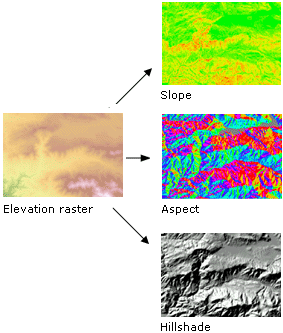
Learn more about creating surfaces from elevation data
Learn more about calculating density surfaces
Learn more about calculating distance surfaces
Learn more about reclassifying data
Find suitable locations.
Find areas that are the most suitable for particular objectives (for example, siting a new building or analyzing high-risk areas for flooding or landslides) by combining layers of information.
For example, based on a set of input criteria defining that areas of vacant land with the least steep terrain that are nearest to roads would be most suitable for a development project, the following graphic shows the most suitable locations in green, medium suitability in yellow, and the least suitable locations in brown.
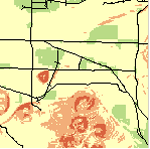
Learn more about overlay analysis
Perform distance and cost-of-travel analyses.
Create Euclidean distance surfaces to understand the straight-line distance from one location to another, or create cost-weighted distance surfaces to understand the cost of getting from one location to another based on a set of input criteria you specify.
You can calculate the distance in a straight line from any location (cell) to the nearest source, or you can calculate the cost of getting from any location to the nearest source.
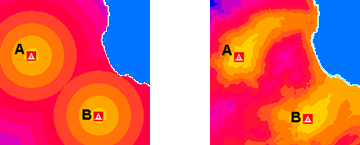
Learn more about performing distance and cost-of-travel analysis
Connect locations in the most optimal way
Identify the optimal path or corridors for roads, pipelines, or animal migration, factoring in economic, environmental, and other criteria. The shortest path might not be the least-costly path, and there might be several alternative corridors that could be taken.

Learn more about connecting locations with optimal paths
Learn more about connecting locations with corridors
Perform statistical analysis based on the local environment, small neighborhoods, or predetermined zones.
Perform calculations on a per-cell basis between multiple rasters, such as calculating the mean crop yield over a 10-year period. Study a neighborhood by calculating, for example, the variety of species contained within it. Determine the mean value in each zone, such as the mean elevation per forest zone.
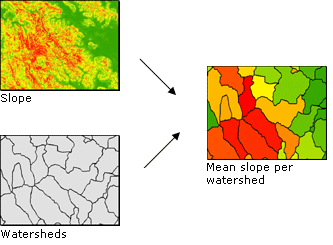
Learn more about calculating statistics between rasters (local, per-cell analysis)
Learn more about calculating statistics within neighborhoods
Learn more about calculating statistics within zones
Interpolate data values for a study area based on samples
Measure a phenomenon at strategically dispersed sample locations and predict values for all other locations by interpolating data values. Create continuous raster surfaces from elevation, pollution, or noise sample points. With a set of point spot heights and vector contour data, create a hydrologically correct elevation surface.
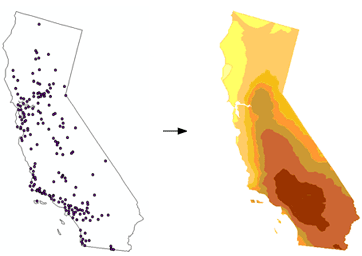
Learn more about interpolating values based on sample points
Clean up a variety of data for further analysis or display
Clean up raster datasets that contain data that is either erroneous, irrelevant to the analysis at hand, or more detailed than you need.
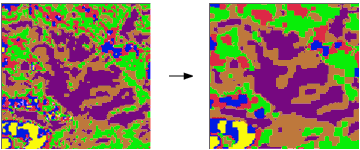
Learn more about generalizing data
Summary
Listed above are only a few examples of the types of analysis you can perform with the Spatial Analyst extension. By understanding and becoming familiar with the functionality available to you, many more spatial problems can be mapped, modeled, and solved.