Event editing using feature edits
 Available with the Linear Referencing license.
You can edit an event feature in a feature service event layer using the Edit Vertices tool  .
Using this method, you can edit an existing event shape. The tool updates the event’s route ID, route name, and measures accordingly. The event’s dates do not change.
Before editing a feature service, you must share branch versioned linear referencing system (LRS) data as a web layer. If the feature service is not yet published, see Share as web layers.
When an event is moved from one route to another route, the event's time slice is based on the route's start and end dates.
When you edit a point event, the tool updates the route ID and measure based on the underlying route. When you edit a line event feature, the tool uses the first vertex to populate the From Measure and From Route fields and the last vertex to populate the To Measure and To Route fields. For spanning line event features, the start and end measures must be on routes that have the same line ID.
Learn more about editing features using standard editing tools in ArcGIS Pro
Tip:
If a message regarding acquiring locks or reconciling appears, it means that conflict prevention is enabled.
After editing an event’s vertices, you can retire the existing event and create a new event with a start date as of the specified retirement date including the edited vertices. You can also merge any coincident line events. For more information, refer to the event editing options in the Linear Referencing options.
Location errors
The location error attributes provide information about the status of each event feature. When you edit an event feature correctly, the location error field of the event displays the No Error value. If the status is anything other than No Error, inspect the modified event feature and its attributes for issues and resolve them.
Note:
You can also review a complete list of location errors.
Any of the following statuses indicate a problem that should be resolved:
| Location error | Description |
|---|---|
| Different From Route And To Route Line IDs | The starting route and the ending route have different line IDs. This is applicable to events associated with line networks. |
| Invalid Location Route ID | The route location's route ID is invalid (NULL, empty, or invalid value). |
| Invalid Location Measure | At least one of the route location's measure values is invalid. |
| Invalid Route ID | The route location's route ID is invalid (NULL, empty, or invalid value). |
| Reversed Line Order | The starting route does not have a lower line order than the ending route. This is applicable to line networks. |
| Route Not Found | The route does not exist. This may be due to the route not existing in the network or the route and event having different time ranges that do not overlap. |
Scenarios for editing line events using feature edits
The scenarios below detail the results of editing event features using the Edit Vertices tool .
Line event editing
The following diagram shows the route and its associated event. Route 1 has measures from 0 to 20, and Event 1 has measures from 0 to 10.

The following table details the route attributes:
| Route ID | From Date | To Date |
|---|---|---|
| Route1 | 1/1/2000 | <Null> |
The following table details the event before editing:
| Event ID | Route ID | From Date | To Date | From Measure | To Measure | Location Error | MAOP Design |
|---|---|---|---|---|---|---|---|
| Event1 | Route1 | 1/1/2005 | <Null> | 0 | 10 | No Error | 800 |
| Event ID | Route ID | From Date | To Date | From Measure | To Measure | Location Error | Speed Limit |
|---|---|---|---|---|---|---|---|
| Event1 | Route1 | 1/1/2005 | <Null> | 0 | 10 | No Error | 55 |
To edit the event so that it runs from 0 to 20, where the intersection with Route 2 is located, drag the last vertex of the event to the intersection using the Edit Vertices tool . The first vertex is used as the start measure, and the last vertex is used as the end measure.

The following diagram shows the event after editing:
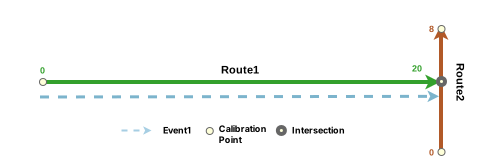
The following table details the event after editing:
| Event ID | Route ID | From Date | To Date | From Measure | To Measure | Location Error | MAOP Design |
|---|---|---|---|---|---|---|---|
| Event1 | Route1 | 1/1/2005 | <Null> | 0 | 20 | No Error | 800 |
| Event ID | Route ID | From Date | To Date | From Measure | To Measure | Location Error | Speed Limit |
|---|---|---|---|---|---|---|---|
| Event1 | Route1 | 1/1/2005 | <Null> | 0 | 20 | No Error | 55 |
Line event editing resulting in a location error
The following diagram shows the route and its associated event. Route 1 has measures from 0 to 20, and Event 1 has measures from 0 to 15.

The following table details the route attributes:
| Route ID | From Date | To Date |
|---|---|---|
| Route1 | 1/1/2000 | <Null> |
The following table details the event before editing. Event 1 on Route 1 has measures from 0 to 15.
| Event ID | Route ID | From Date | To Date | From Measure | To Measure | Location Error | MAOP Design |
|---|---|---|---|---|---|---|---|
| Event1 | Route1 | 1/1/2000 | <Null> | 0 | 15 | No Error | 800 |
| Event ID | Route ID | From Date | To Date | From Measure | To Measure | Location Error | Speed Limit |
|---|---|---|---|---|---|---|---|
| Event1 | Route1 | 1/1/2000 | <Null> | 0 | 15 | No Error | 55 |
During the edit, Event 1 is dragged beyond the intersection and beyond the end of Route 1. In this case, the event's shape remains intact and a location error occurs.
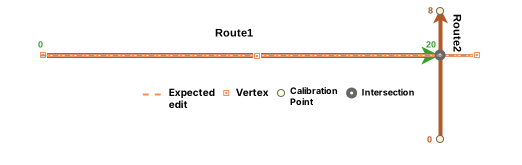
The following table details Event 1. Since the event's end measure cannot be located, a location error occurs.
| Event ID | Route ID | From Date | To Date | From Measure | To Measure | Location Error | MAOP Design |
|---|---|---|---|---|---|---|---|
| Event1 | Route1 | 1/1/2000 | <Null> | 0 | <Null> | Invalid Location Route ID | 800 |
| Event ID | Route ID | From Date | To Date | From Measure | To Measure | Location Error | Speed Limit |
|---|---|---|---|---|---|---|---|
| Event1 | Route1 | 1/1/2000 | <Null> | 10.5 | <Null> | Invalid Location Route ID | 55 |
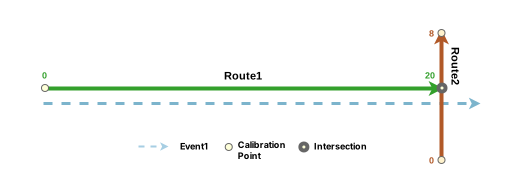
The following diagram shows the route after relocating the end vertex of the line event (Event 1) on Route 1:
Scenarios for editing spanning events using feature edits
The scenarios below detail the results of editing a spanning line event using the Edit Vertices tool .
Spanning event editing
The following diagram shows the routes and their associated event. Route 1 and Route 2 are on Line A.

The following table details the route attributes:
| Route ID | From Date | To Date |
|---|---|---|
| Route1 | 1/1/2000 | <Null> |
| Route2 | 1/1/2000 | <Null> |
The following table details the event before editing:
| Event ID | From Route ID | To Route ID | From Date | To Date | From Measure | To Measure | Location Error | MAOP Design |
|---|---|---|---|---|---|---|---|---|
| Event1 | Route1 | Route2 | 1/1/2000 | <Null> | 5 | 20 | No Error | 800 |
| Event | From Route ID | To Route ID | From Date | To Date | From Measure | To Measure | Location Error | Speed Limit |
|---|---|---|---|---|---|---|---|---|
| Event1 | Route1 | Route2 | 1/1/2000 | <Null> | 0 | 25 | No Error | 55 |
In this case, the event is edited so that the start vertex of the event is snapped to measure 0 on Route 1, and the end vertex of the event is snapped to end measure 25 of Route 2.

The following table details the event after editing:
| Event | From Route ID | To Route ID | From Date | To Date | From Measure | To Measure | Location Error | MAOP Design |
|---|---|---|---|---|---|---|---|---|
| Event1 | Route1 | Route2 | 1/1/2000 | <Null> | 0 | 25 | No Error | 800 |
| Event | From Route ID | To Route ID | From Date | To Date | From Measure | To Measure | Location Error | Speed Limit |
|---|---|---|---|---|---|---|---|---|
| Event1 | Route1 | Route2 | 1/1/2000 | <Null> | 0 | 25 | No Error | 55 |
The following diagram shows the route and its associated event after the edit:

Spanning event editing resulting in a location error
The following diagram shows the routes and their associated event. Route 1 and Route 2 are on Line A, and Route X1 is on Line B. Event 1 spans from measure 5 on Route 1 to measure 20 on Route 2.

The following table details the route attributes. Route X1 is located on Line B.
| Route ID | From Date | To Date |
|---|---|---|
| Route1 | 1/1/2000 | <Null> |
| Route2 | 1/1/2000 | <Null> |
| RouteX1 | 1/1/2000 | <Null> |
The following table details the event before editing:
| Event ID | From Route ID | To Route ID | From Date | To Date | From Measure | To Measure | Location Error | MAOP Design |
|---|---|---|---|---|---|---|---|---|
| Event1 | Route1 | Route2 | 1/1/2000 | <Null> | 5 | 20 | No Error | 800 |
| Event ID | From Route ID | To Route ID | From Date | To Date | From Measure | To Measure | Location Error | Speed Limit |
|---|---|---|---|---|---|---|---|---|
| Event1 | Route1 | Route2 | 1/1/2000 | <Null> | 5 | 20 | No Error | 55 |
In the following diagram, the event is edited so that the last vertex of the event is snapped to measure 35 of Route X1, which is on a different line (Line B).

The following table details Event 1 after editing. Because the event's end measure cannot be located on the same line, the event is drawn only up to the end of Route 2 on Line A and a location error describing the issue is provided.
| Event | From Route ID | To Route ID | From Date | To Date | From Measure | To Measure | Location Error | MAOP Design |
|---|---|---|---|---|---|---|---|---|
| Event1 | Route1 | RouteX1 | 1/1/2000 | <Null> | 5 | 35 | Different From Route And To Route Line IDs | 800 |
| Event | From Route ID | To Route ID | From Date | To Date | From Measure | To Measure | Location Error | Speed Limit |
|---|---|---|---|---|---|---|---|---|
| Event1 | Route1 | RouteX1 | 1/1/2000 | <Null> | 5 | 35 | Different From-Route and To-Route Line IDs | 55 |
The following diagram shows Event 1 after the error. The event is generated without the Line B segment.

Referent offset when using feature edits
The LRS events data model supports the configuration of event referent fields and their enablement using the Enable Referent Fields tool. Once referent fields are configured and enabled in a layer, referent locations are populated and persisted in that layer when events are added or edited.
When a line event is edited using feature edits in a referent-enabled layer, the parent LRS Network is used as the FromRefMethod and ToRefMethod values by default, and the route is used as the FromRefLocation and ToRefLocation values. The start and end measures of the line event are used as the FromRefOffset and ToRefOffset values.
If either measure of a line event is updated, the corresponding offset value updates to reflect the new measure.
The example below demonstrates the impact of editing events that have referent values enabled.
Before editing with referents
The following diagram shows the route and its associated events:
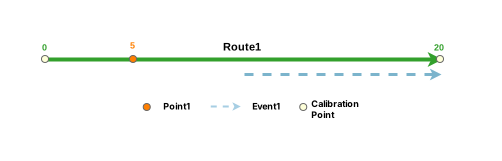
The following table provides details about the event referent fields before the edit:
| FromRefMethod | FromRefLocation | FromRefOffset | ToRefMethod | ToRefLocation | ToRefOffset |
|---|---|---|---|---|---|
| PointEventLayer1 | Point1 | 5 | PointEventLayer1 | Point1 | 15 |
The following table provides details about the other event fields before the edit:
| Event ID | Route ID | From Date | To Date | From Measure | To Measure |
|---|---|---|---|---|---|
| Event1 | Route1 | 1/1/2000 | <Null> | 10 | 20 |
After editing with referents
The following diagram shows the route and its associated events:
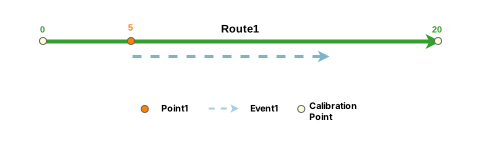
When applying feature edits to an event record that has user-configured referent fields, the FromRefMethod and ToRefMethod values revert to the parent LRS Network, and the FromRefLocation and ToRefLocation values revert to the route.
The following table provides details about the event referent fields after event editing:
| FromRefMethod | FromRefLocation | FromRefOffset | ToRefMethod | ToRefLocation | ToRefOffset |
|---|---|---|---|---|---|
| PipeSeriesNetwork | Route1 | 5 | PipeSeriesNetwork | Route1 | 15 |
| FromRefMethod | FromRefLocation | FromRefOffset | ToRefMethod | ToRefLocation | ToRefOffset |
|---|---|---|---|---|---|
| AllRoutes | Route1 | 5 | AllRoutes | Route1 | 15 |
The following table provides details about the other event fields after the edit:
| Event ID | Route ID | From Date | To Date | From Measure | To Measure |
|---|---|---|---|---|---|
| Event1 | Route1 | 1/1/2000 | <Null> | 5 | 15 |