External event registration
 Available with the Linear Referencing license.
ArcGIS Linear Referencing supports two event types: events in the geodatabase and events stored in an external database.
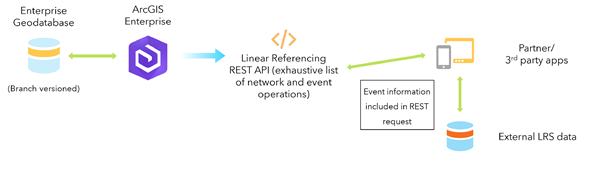
ArcGIS Linear Referencing stores events in the geodatabase as feature classes. You can configure external events with or without a connection file. With a connection file, ArcGIS Linear Referencing links external events to tables or feature classes in an external relational database management system (RDBMS) and stores them as feature classes in the geodatabase. Without a connection file, ArcGIS Linear Referencing creates external events directly in the geodatabase.
External events with a connection file
Use the Configure External Event With LRS tool to connect to and register event data that is stored and maintained outside the geodatabase. This is important because some event data is traditionally considered to be nonspatial tabular data.
The LRS allows you to set up a read-only connection to external event data sources and use them to visualize tabular data in a spatial way and to spatially integrate your business data with other enterprise data.
Tip:
You can right-click an external event data source in the LRS hierarchy and add it to a map or scene in ArcGIS Pro.
Learn more about database connections in ArcGIS Pro and setting up a database connection.
External event data must meet the following requirements and recommendations:
External events must have event ID and route ID fields.
The
From Route IDandTo Route IDfields are required for events that span routes.The event ID field in external business tables or feature classes must be a text field.
Globally unique identifiers (GUID) are read as text.
External events can include a datetime field.
The SQL Server datetime2 data type is not supported; use the datetime data type.
If no datetime field is used, full temporal viewing of event data is not supported.
A single effective date can be used, but it is recommended that you include both start and end dates.
Point events require one measure field, and line events require two measure fields.
ArcGIS Linear Referencing supports pushing updates to the external system through web services.
Learn more about updating external events using the Relocate Event operation
External events without a connection file
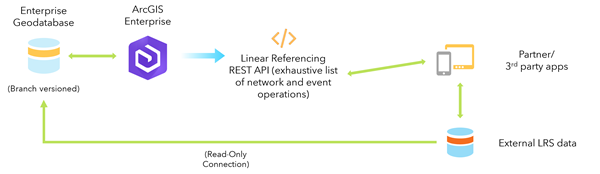
The Configure External Event Behaviors With LRS tool allows you to create external events without linking to a source table or feature. Use this approach when access to event data is limited or when event data is not stored as tables in an RDBMS or as feature classes in a geodatabase.
This type of external event is not a feature class, but ArcGIS Linear Referencing still supports updating and maintaining external events through web services.
Tip:
You can right-click an external event data source in the LRS hierarchy to review its properties. However, this type of external event cannot be added to a map or scene in ArcGIS Pro.
You do not need route or event information to configure external events that do not have a connection file. To update external events, provide required route and event information in the web service. You can update external events using the Relocate Event operation.