Route reassignment
 Available with the Linear Referencing license.
Reassignment is the technique by which all or a portion of a route or line in a linear referencing system (LRS) Network is moved, or reassigned, to the immediate upstream or downstream of another route or line.
One example of a route reassignment is to split your routes and merge (assign) them to another route after a pipeline has changed operation or ownership. Another example is to redesignate a portion of a pipe that falls on the other side of a boundary after an administrative boundary change.
One example is to redesignate a portion of a road that now falls on the other side of a boundary after administrative boundaries change.
Use the Reassign Route tool to perform route reassignment and update attributes and calibration points located along the reassigned route.
Before using this tool to edit a feature service, you must share branch versioned LRS data as a web layer. If the feature service is not yet published, see Share as web layers. If you are using a file geodatabase LRS dataset, this tool provides limited functionality.
Beta:
You can use the ArcGIS Pro Assistant (Beta) to perform route reassignment and to guide you through the workflow.
The following table lists parameters used for line networks in the Reassign Route tool:
| Parameter | Description |
|---|---|
| Network | The network that supports lines in which the routes exist. |
| Effective Date | This is the date when the reassignment has taken place on the ground. |
| Source: From Route Name | The route where the reassignment starts. |
| Source: From Measure | The measure on the source route where the reassignment starts; shown by the green point. |
| Source: To Route Name | The route where the reassignment ends. For example, if the reassignment takes place on a single route, the source route and target route are the same. The source routes should belong to the same line. |
| Source: To Measure | The measure on the source route where the reassignment ends, shown by the red point. |
| Target: Route Name | The route to which the reassigned portion will be added. This can also be a new route. |
| Target: From Measure | The start measure on the reassigned portion. |
| Target: To Measure | The end measure on the reassigned portion. |
The following table lists parameters used for nonline networks in the Reassign Route tool:
| Parameter | Description |
|---|---|
| Network | The network in which the routes exist. |
| Effective Date | This is the date when the reassignment has taken place on the ground. |
| Source: Route Name/ID | The route where the reassignment starts. |
| Source: From Measure | The measure on the source route where the reassignment starts; shown by the green point. |
| Source: To Measure | The measure on the source route where the reassignment ends, shown by the red point. |
| Target: Route Name/ID | The route to which the reassigned portion will be added. This can also be a new route. |
| Target: From Measure | The start measure on the reassigned portion. |
| Target: To Measure | The end measure on the reassigned portion. |
There are three methods where you can implement the parameters above using the Reassign Route tool:
Merge to adjacent route—Either a portion of a route, the entire route, or multiple routes can be reassigned and merged with the adjacent route.
Form a new route—A new route is created either by merging source routes if multiple routes are selected in the source or by splitting the source route if a portion of a route is selected in the source. A route can also be renamed by selecting an entire route and providing a new route name or ID.
Transfer to another line—Routes are transferred to a new line if a new line name is provided, or routes are transferred to an adjacent line if an existing line name is provided.
Route reassignment scenarios
Scenarios that can be accomplished using the Reassign Route tool are described below. In the scenarios described below, you can select entire routes or partial routes.
Route merges to an existing route
Route X and Route Y are adjoining routes. You can use the Reassign Route tool to merge Route X with Route Y or vice versa. The existing Route X and Route Y are retired and a new Route Y is created on the date of reassignment. You can merge the reassigned portion to any immediate upstream or downstream route.
The date of reassignment is 1/1/2010.
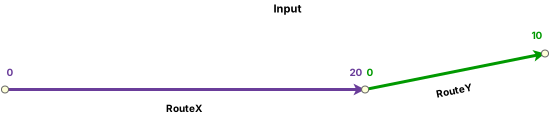

The following shows routes before reassignment:
| Route ID | From Date | To Date |
|---|---|---|
| RouteX | 1/1/2005 | <Null> |
| RouteY | 1/1/2005 | <Null> |
The following are inputs used for the Reassign Route tool:
|
Method |
Merge to adjacent route |
|---|---|
|
Source |
|
|
Route ID |
RouteX |
|
From Measure |
0 |
|
To Measure |
20 |
|
Target |
|
|
Route ID |
RouteY |
|
From Measure |
0 |
|
To Measure |
20 |
The following show routes after reassignment:
| Route ID | From Date | To Date |
|---|---|---|
| RouteX | 1/1/2005 | 1/1/2010 |
| RouteY | 1/1/2005 | 1/1/2010 |
| RouteY | 1/1/2010 | <Null> |
Split to an existing route
Route XYZ has measures from 0 to 30. In the following example, the route is split in two: a new Route 1 and a new version of Route XYZ. The existing Route XYZ is retired as a result of this operation.
The date of reassignment is 1/1/2010.

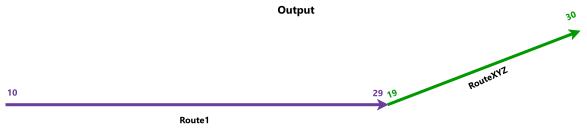
The following shows the route before reassignment:
| Route ID | From Date | To Date |
|---|---|---|
| RouteXYZ | 1/1/2005 | <Null> |
The following are inputs used for the Reassign Route tool:
|
Method |
Form a new route |
|---|---|
|
Source |
|
|
Route ID |
RouteXYZ |
|
From Measure |
0 |
|
To Measure |
19 |
|
Target |
|
|
Route ID |
Route1 (new) |
|
From Measure |
10 |
|
To Measure |
29 |
The following shows routes after reassignment:
| Route ID | From Date | To Date |
|---|---|---|
| RouteXYZ | 1/1/2005 | 1/1/2010 |
| RouteXYZ | 1/1/2010 | <Null> |
| Route1 | 1/1/2010 | <Null> |
Route is renamed
You can rename an existing route and change its start (from) and end (to) measure values using the Reassign Route tool. In the following example, Route XYZ is renamed Route 123 and contains new measures. The existing Route XYZ is retired as a result of this operation.
Tip:
Use the Rename Route tool to rename all of the route records across all of the time slices without creating more time slices.
The date of reassignment is 1/1/2010.


The following shows the route before reassignment:
| Route ID | From Date | To Date |
|---|---|---|
| RouteXYZ | 1/1/2005 | <Null> |
The following are inputs used for the Reassign Route tool:
|
Method |
Form a new route |
|---|---|
|
Source |
|
|
Route ID |
RouteXYZ |
|
From Measure |
0 |
|
To Measure |
30 |
|
Target |
|
|
Route |
Route123 |
|
From Measure |
15 |
|
To Measure |
45 |
The following shows routes after reassignment:
| Route ID | From Date | To Date |
|---|---|---|
| RouteXYZ | 1/1/2005 | 1/1/2010 |
| Route123 | 1/1/2010 | <Null> |
Route reassignment in a line network
Routes in a line network can be reassigned to new or existing routes as shown in the following examples.
Multiple routes merge to a new route
Route X, Route Y, and Route Z are consecutive routes that belong to the same line, Line 1. You can use the Reassign Route tool to merge all of them together into a new route, Route XYZ, which belongs to the same line.
The date of reassignment is 1/1/2010.
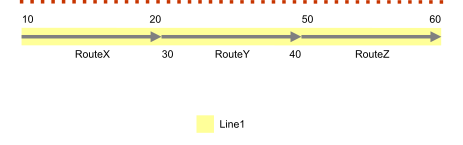
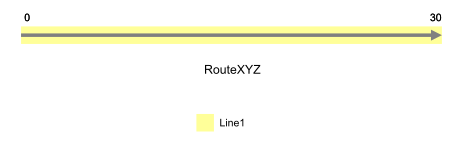
The following shows routes before reassignment:
| Route Name | Line Name | From Date | To Date | Line Order |
|---|---|---|---|---|
| RouteX | Line1 | 1/1/2005 | <Null> | 100 |
| RouteY | Line1 | 1/1/2005 | <Null> | 200 |
| RouteZ | Line1 | 1/1/2005 | <Null> | 300 |
The following are inputs used for the Reassign Route tool:
|
Method |
Form a new route |
|---|---|
|
Source |
|
|
From Route |
RouteX |
|
From Measure |
10 |
|
To Route |
RouteZ |
|
To Measure |
60 |
|
Target |
|
|
Route |
RouteXYZ |
|
From Measure |
0 |
|
To Measure |
30 |
Route XYZ has the line order of 100. Route X, Route Y, and Route Z are retired as a result of this operation. You can choose new start and end measure values for Route XYZ.
The following shows routes after reassignment:
| Route Name | Line Name | From Date | To Date | Line Order |
|---|---|---|---|---|
| RouteX | Line1 | 1/1/2005 | 1/1/2010 | 100 |
| RouteY | Line1 | 1/1/2005 | 1/1/2010 | 200 |
| RouteZ | Line1 | 1/1/2005 | 1/1/2010 | 300 |
| RouteXYZ | Line1 | 1/1/2010 | <Null> | 100 |
Note:
Both the From Route and the To Route values from the Source section can be partially reassigned.
Line orders of the remaining routes in the source line may be recalculated as a result.
Route merges to an existing route
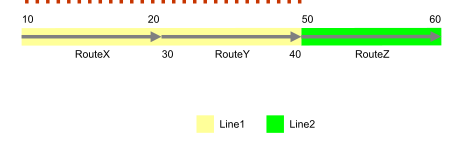
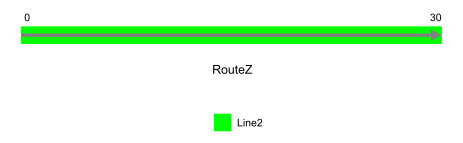
Route X and Route Y are consecutive routes that belong to Line 1. You can use the Reassign Route tool to merge them with Route Z, which belongs to the adjoining Line 2.
The reassigned portion is from the start of Route X to the end of Route Y. The date of reassignment is 1/1/2010.
The following shows routes before reassignment:
| Route Name | Line Name | From Date | To Date | Line Order |
|---|---|---|---|---|
| RouteX | Line1 | 1/1/2005 | <Null> | 100 |
| RouteY | Line1 | 1/1/2005 | <Null> | 200 |
| RouteZ | Line2 | 1/1/2005 | <Null> | 100 |
The following inputs are used for the Reassign Route tool:
|
Method |
Merge to adjacent route |
|---|---|
|
Source |
|
|
From Route |
RouteX |
|
From Measure |
10 |
|
To Route |
RouteY |
|
To Measure |
40 |
|
Target |
|
|
Route |
RouteZ |
|
From Measure |
0 |
|
To Measure |
20 |
In this example, the target route's start measure is set as 0. After clicking the Recalculate To Measure button  , the To Measure input value becomes 20. 0 and 20 represent the start and end measure of the reassigned portion, respectively. The Recalibrate route downstream check box is checked.
After reassignment, Route X, Route Y, and Route Z are retired. The end measure of Route Z is 30 because the source measure length of Route X and Route Y, 20, is added to the source measure length of Route Z, 10.
The following shows routes after reassignment:
| Route Name | Line Name | From Date | To Date | Line Order |
|---|---|---|---|---|
| RouteX | Line1 | 1/1/2005 | 1/1/2010 | 100 |
| RouteY | Line1 | 1/1/2005 | 1/1/2010 | 200 |
| RouteZ | Line2 | 1/1/2005 | 1/1/2010 | 100 |
| RouteZ | Line2 | 1/1/2010 | <Null> | 100 |
Note:
Any one of the From Route and To Route values from the Source section can be partially reassigned to any immediate upstream or downstream route.
Line orders of the remaining routes in the source line may be recalculated as a result.
Routes from one line can be merged to an adjoining route in another line. Either the From Route or To Route value from the Source section in one line should touch the start or end of the target route in another line.
Routes from a line can be merged to an existing adjoining route in the same line.
Route splits
Route Z has measures from 40 to 60. As shown in this example, you can split the route into two: Route Y, which is a new route, and a new version of Route Z.
The date of reassignment is 1/1/2010.


The following shows routes before reassignment:
| Route Name | Line Name | From Date | To Date | Line Order |
|---|---|---|---|---|
| RouteX | Line1 | 1/1/2005 | <Null> | 100 |
| RouteZ | Line1 | 1/1/2005 | <Null> | 200 |
The following inputs are used for the Reassign Route tool:
|
Method |
Form a new route |
|---|---|
|
Source |
|
|
From Route |
RouteZ |
|
From Measure |
40 |
|
To Route |
RouteZ |
|
To Measure |
50 |
|
Target |
|
|
Route |
RouteY |
|
From Measure |
30 |
|
To Measure |
40 |
The source is not recalibrated downstream.
The existing Route Z retires as a result of this operation. Route Y has the line order of Route Z, and the new version of Route Z has the next line order value.
The following shows routes after reassignment:
| Route Name | Line Name | From Date | To Date | Line Order |
|---|---|---|---|---|
| RouteX | Line1 | 1/1/2005 | <Null> | 100 |
| RouteZ | Line1 | 1/1/2005 | 1/1/2010 | 200 |
| RouteY | Line1 | 1/1/2010 | <Null> | 200 |
| RouteZ | Line1 | 1/1/2010 | <Null> | 300 |
Note:
Choose the same From and To source route to split a single route.
Line orders of the remaining routes in the source line may be recalculated as a result.
Route splits and merges
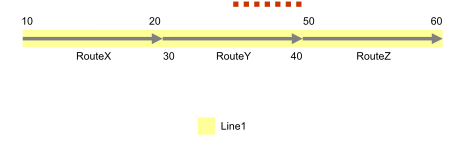
Route Y has measures from 30 to 40. As shown in this example, you can split the route and then merge one of the parts to the adjoining route Route Z.
The date of reassignment is 1/1/2010.

The following shows routes before reassignment:
| Route Name | Line Name | From Date | To Date | Line Order |
|---|---|---|---|---|
| RouteX | Line1 | 1/1/2005 | <Null> | 100 |
| RouteY | Line1 | 1/1/2005 | <Null> | 200 |
| RouteZ | Line1 | 1/1/2005 | <Null> | 300 |
The following are inputs for the Reassign Route tool:
|
Method |
Merge to adjacent route |
|---|---|
|
Source |
|
|
From Route |
RouteY |
|
From Measure |
35 |
|
To Route |
RouteY |
|
To Measure |
40 |
|
Target |
|
|
Route |
RouteZ |
|
From Measure |
50 |
|
To Measure |
55 |
The Recalibrate route downstream check box is checked. The existing Route Y and Route Z retire because of this operation. The new time slice of Route Y has the same line order as the previous one. The other split part of Route Y is merged to Route Z.
The following shows routes after reassignment:
| Route Name | Line Name | From Date | To Date | Line Order |
|---|---|---|---|---|
| RouteY | Line1 | 1/1/2005 | 1/1/2010 | 200 |
| RouteZ | Line1 | 1/1/2005 | 1/1/2010 | 300 |
| RouteY | Line1 | 1/1/2010 | <Null> | 200 |
| RouteZ | Line1 | 1/1/2010 | <Null> | 300 |
Route is renamed
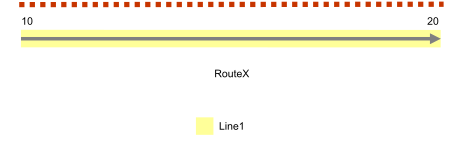
You can rename an existing route and change its start and end measure values using the Reassign Route tool. Route X is renamed Route X_New and has new measures. The line order remains the same. The existing Route X retires because of this operation.
The date of reassignment is 1/1/2010.

The following shows routes before reassignment:
| Route Name | Line Name | From Date | To Date | Line Order |
|---|---|---|---|---|
| RouteX | Line1 | 1/1/2005 | <Null> | 100 |
Tip:
Use the Rename Route tool to rename all of the route records across all of the time slices without creating more time slices.
The following are inputs used for the Reassign Route tool:
|
Method |
Form a new route |
|---|---|
|
Source |
|
|
From Route |
RouteX |
|
From Measure |
10 |
|
To Route |
RouteX |
|
To Measure |
20 |
|
Target |
|
|
Route |
RouteX_New |
|
From Measure |
10.1 |
|
To Measure |
20.1 |
The following shows routes after reassignment:
| Route Name | Line Name | From Date | To Date | Line Order |
|---|---|---|---|---|
| RouteX | Line1 | 1/1/2005 | 1/1/2010 | 100 |
| RouteX_New | Line1 | 1/1/2010 | <Null> | 100 |
Route transfers to an existing line
Routes can be transferred entirely or partially to an existing line. In this case, the reassigned portion must be on either the upstream or downstream end of the source line. As shown in the example, Route Z belongs to Line 2. You can take Route Z from Line 2 and transfer it to an existing adjoining line, Line 1.
The date of reassignment is 1/1/2010.
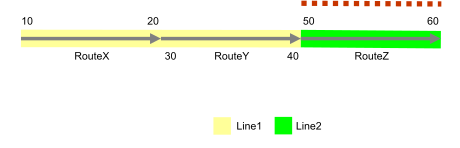
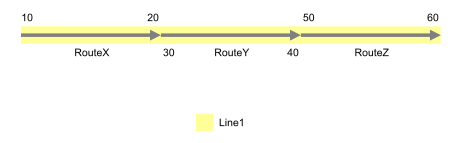
The following shows routes before reassignment:
| Route Name | Line Name | From Date | To Date | Line Order |
|---|---|---|---|---|
| RouteX | Line1 | 1/1/2005 | <Null> | 100 |
| RouteY | Line1 | 1/1/2005 | <Null> | 200 |
| RouteZ | Line2 | 1/1/2005 | <Null> | 100 |
The following are inputs used for the Reassign Route tool:
|
Method |
Transfer to another line |
|
Source |
|
|
From Route |
RouteZ |
|
From Measure |
50 |
|
To Route |
RouteZ |
|
To Measure |
60 |
|
Target |
|
|
Line Name |
Line1 |
|
Route |
RouteZ |
|
From Measure |
50 |
|
To Measure |
60 |
The original Route Z is retired on the date of reassignment. Route Z is recreated on Line 1 with the date of reassignment as its start date and its line order is updated.
The following shows routes after reassignment:
| Route Name | Line Name | From Date | To Date | Line Order |
|---|---|---|---|---|
| RouteX | Line1 | 1/1/2005 | <Null> | 100 |
| RouteY | Line1 | 1/1/2005 | <Null> | 200 |
| RouteZ | Line2 | 1/1/2005 | 1/1/2010 | 100 |
| RouteZ | Line1 | 1/1/2010 | <Null> | 300 |
Note:
Multiple adjoining routes from a line can be transferred to an adjoining line.
Line orders of the remaining routes in the source line may be recalculated as a result.
Line orders of the existing routes in the target line may be recalculated as a result.
If the source routes are transferred to another line in entirety, the original route names and route IDs as well as their measurements can be preserved. Alternatively, you can provide a new route name and start and end measures for the transferred routes.
If a portion of the source routes are transferred to another line, the original route names cannot be preserved, and a new route name must be selected for the transferred route.
Route transfers to a new line
Routes can be transferred entirely or partially to a new line. As shown in the example, Route Z belongs to Line 1. You can transfer it to a new line, Line 2.
The date of reassignment is 1/1/2010.
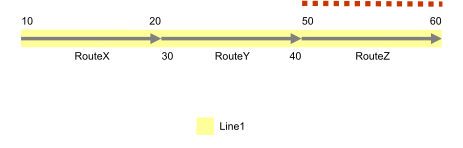
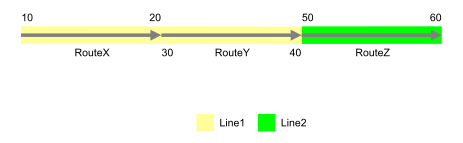
The following shows routes before reassignment:
| Route Name | Line Name | From Date | To Date | Line Order |
|---|---|---|---|---|
| RouteX | Line1 | 1/1/2005 | <Null> | 100 |
| RouteY | Line1 | 1/1/2005 | <Null> | 200 |
| RouteZ | Line1 | 1/1/2005 | <Null> | 300 |
The following are inputs used for the Reassign Route tool:
|
Method |
Transfer to another line |
|---|---|
|
Source |
|
|
From Route |
RouteZ |
|
From Measure |
50 |
|
To Route |
RouteZ |
|
To Measure |
60 |
|
Target |
|
|
Line Name |
Line2 |
|
Route |
RouteZ |
|
From Measure |
50 |
|
To Measure |
60 |
The original Route Z is retired on the date of reassignment. Route Z is recreated on Line 2 with the date of reassignment as its start date and its line order is updated.
The following shows routes after reassignment:
| Route Name | Line Name | From Date | To Date | Line Order |
|---|---|---|---|---|
| RouteX | Line1 | 1/1/2005 | <Null> | 100 |
| RouteY | Line1 | 1/1/2005 | <Null> | 200 |
| RouteZ | Line1 | 1/1/2005 | 1/1/2010 | 300 |
| RouteZ | Line2 | 1/1/2010 | <Null> | 100 |
Note:
Multiple adjoining routes from a line can be transferred to a new line.
Line orders of the remaining routes in the source line may be recalculated as a result.
If the source routes are transferred to a new line in entirety, the original route names and route IDs, as well as their measurements, can be preserved. Alternatively, you can provide a new route name and start and end measures for the transferred routes.
If a portion of the source routes are transferred to a new line, the original route names cannot be preserved, and a new route name must be provided for the transferred route.
Calibration point transfers to a target route
Routes may contain calibration points to maintain known measures between points. When reassigning the route, there is an option to transfer the calibration points contained in the reassigned portion to the target route.
Note:
The Transfer calibration points to target route check box is checked by default and is the preferred method to maintain established measures.
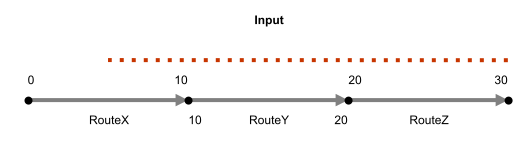
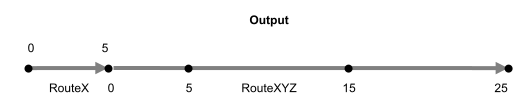
The following are the inputs used for the Reassign Route tool:
|
Method |
Form a new route |
|---|---|
|
Source |
|
|
From Route |
RouteX |
|
From Measure |
5 |
|
To Route |
RouteZ |
|
To Measure |
30 |
|
Target |
|
|
Route |
RouteXYZ (new) |
|
From Measure |
0 |
|
To Measure |
25 |
In the following example, the date of reassignment is 1/1/2010.


The following shows routes before reassignment:
| Route ID | From Date | To Date |
|---|---|---|
| RouteX | 1/1/2005 | <Null> |
| RouteY | 1/1/2005 | <Null> |
The following are inputs used for the Reassign Route tool:
|
Method |
Merge to adjacent route |
|---|---|
|
Source |
|
|
Route ID |
RouteX |
|
From Measure |
0 |
|
To Measure |
20 |
|
Target |
|
|
Route |
RouteY |
|
From Measure |
0 |
|
To Measure |
30 |
The following shows routes after reassignment:
| Route ID | From Date | To Date |
|---|---|---|
| RouteX | 1/1/2005 | 1/1/2010 |
| RouteY | 1/1/2005 | 1/1/2010 |
| RouteY | 1/1/2010 | <Null> |
Downstream recalibration
The following examples describe downstream recalibration. You can choose whether to recalibrate the source route downstream when you reassign routes.
Reassignment with the source route not calibrated downstream
Route X is split into two routes: Route X and Route 1. Route 1 starts at the beginning of the old Route X and ends at the middle of the old Route X. The end measure value for the new Route 1 is set as 3 instead of the suggested measure of 5. The downstream measures for Route X remain intact because the Recalibrate route downstream check box is unchecked for the source route.
In the following example, the date of reassignment is 1/1/2010.


The following shows routes before reassignment:
| Route Name | From Date | To Date |
|---|---|---|
| RouteX | 1/1/2005 | <Null> |
| RouteY | 1/1/2005 | <Null> |
| Route ID | From Date | To Date |
|---|---|---|
| RouteX | 1/1/2005 | <Null> |
| RouteY | 1/1/2005 | <Null> |
The following are the inputs used for the Reassign Route tool:
|
Method |
Form a new route |
|---|---|
|
Source |
|
|
From Route |
RouteX |
|
From Measure |
0 |
|
To Route (This option is only for line networks.) |
RouteX |
|
To Measure |
5 |
|
Target |
|
|
Route |
Route1 (new) |
|
From Measure |
0 |
|
To Measure |
3 |
The following shows routes after reassignment:
| Route Name | From Date | To Date |
|---|---|---|
| RouteX | 1/1/2005 | 1/1/2010 |
| RouteY | 1/1/2005 | <Null> |
| RouteX | 1/1/2010 | <Null> |
| Route1 | 1/1/2010 | <Null> |
| Route ID | From Date | To Date |
|---|---|---|
| RouteX | 1/1/2005 | 1/1/2010 |
| RouteY | 1/1/2005 | <Null> |
| RouteX | 1/1/2010 | <Null> |
| Route1 | 1/1/2010 | <Null> |
Reassignment with the source route calibrated downstream
Route X is split into two routes: Route X and Route 1. Route 1 starts at the beginning of the old Route X and ends at the middle of the old Route X. The end measure value for the new Route 1 is set as 3 instead of the suggested measure of 5. If the Recalibrate route downstream check box is checked for the source route, the downstream route's (Route X) measures change to a start measure value of 0 and an end measure value of 5.
In the following example, the date of reassignment is 1/1/2010.

The following shows routes before reassignment:
| Route Name | From Date | To Date |
|---|---|---|
| RouteX | 1/1/2005 | <Null> |
| RouteY | 1/1/2005 | <Null> |
| Route ID | From Date | To Date |
|---|---|---|
| RouteX | 1/1/2005 | <Null> |
| RouteY | 1/1/2005 | <Null> |
The following are the inputs used for the Reassign Route tool:
|
Method |
Form a new route |
|---|---|
|
Source |
|
|
From Route |
RouteX |
|
From Measure |
0 |
|
To Route (This option is only for line networks.) |
RouteX |
|
To Measure |
5 |
|
Target |
|
|
Route |
Route1 (new) |
|
From Measure |
0 |
|
To Measure |
3 |
The following shows routes after reassignment:
| Route Name | From Date | To Date |
|---|---|---|
| RouteX | 1/1/2005 | 1/1/2010 |
| RouteY | 1/1/2005 | <Null> |
| RouteX | 1/1/2010 | <Null> |
| Route1 | 1/1/2010 | <Null> |
| Route ID | From Date | To Date |
|---|---|---|
| RouteX | 1/1/2005 | 1/1/2010 |
| RouteY | 1/1/2005 | <Null> |
| RouteX | 1/1/2010 | <Null> |
| Route1 | 1/1/2010 | <Null> |
Reassignment with the target route calibrated downstream
A part of Route X is merged with the adjoining route, Route Y. The reassignment takes place from the middle of Route X on the downstream side. Because the Recalibrate route downstream check box is checked for the target route, the measure of Route Y downstream of the reassigned portion is recalibrated. The new version of Route Y now has an end measure value of 9.
In the following example, the date of reassignment is 1/1/2010.


The following shows routes before reassignment:
| Route Name | From Date | To Date |
|---|---|---|
| RouteX | 1/1/2005 | <Null> |
| RouteY | 1/1/2005 | <Null> |
| Route ID | From Date | To Date |
|---|---|---|
| RouteX | 1/1/2005 | <Null> |
| RouteY | 1/1/2005 | <Null> |
The following are the inputs used for the Reassign Route tool:
|
Method |
Merge to adjacent route |
|---|---|
|
Source |
|
|
From Route |
RouteX |
|
From Measure |
5 |
|
To Measure |
10 |
|
Target |
|
|
Route |
RouteY |
|
From Measure |
0 |
|
To Measure |
9 |
The following shows routes after reassignment:
| Route Name | From Date | To Date |
|---|---|---|
| RouteX | 1/1/2005 | 1/1/2010 |
| RouteY | 1/1/2005 | 1/1/2010 |
| RouteX | 1/1/2010 | <Null> |
| RouteY | 1/1/2010 | <Null> |
| Route ID | From Date | To Date |
|---|---|---|
| RouteX | 1/1/2005 | 1/1/2010 |
| RouteY | 1/1/2005 | 1/1/2010 |
| RouteX | 1/1/2010 | <Null> |
| RouteY | 1/1/2010 | <Null> |
Complex route reassignment scenarios
Complex route reassignment scenarios for complex routes and shapes, including loop, lollipop, branch, and barbell shapes are described below.
Reassignment resulting in a loop
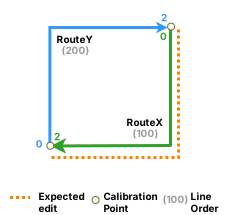
In the following example, Route X and Route Y are merged to create a loop route after reassignment. Route X has measures 0 to 2 and Route Y has measures 0 to 2:
The following shows routes before reassignment:
| Route Name | Line Name | From Date | To Date | Line Order |
|---|---|---|---|---|
| RouteX | Line1 | 1/1/2005 | <Null> | 100 |
| RouteY | Line1 | 1/1/2005 | <Null> | 200 |
The following are the inputs used for the Reassign Route tool:
|
Method |
Merge to adjacent route |
|---|---|
|
Source |
|
|
From Route |
RouteX |
|
From Measure |
0 |
|
To Measure |
2 |
|
Recalibrate source route |
No |
|
Target |
|
|
To Route |
RouteY |
|
From Measure |
0 |
|
To Measure |
2 |
|
Recalibrate target route |
Yes |
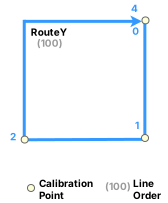
The date of reassignment is 1/1/2010. After reassignment, a calibration point is added at measure 1, and Route Y is recalibrated with measures 0 to 4.
The following shows routes after reassignment:
| Route Name | Line Name | From Date | To Date | Line Order |
|---|---|---|---|---|
| RouteX | Line1 | 1/1/2005 | 1/1/2010 | 100 |
| RouteY | Line1 | 1/1/2005 | 1/1/2010 | 200 |
| RouteY | Line1 | 1/1/2010 | <Null> | 100 |
In the following example, Route X and Route Y are merged to create a loop route after reassignment. Route X has measures 0 to 2, and Route Y has measures 2 to 4:
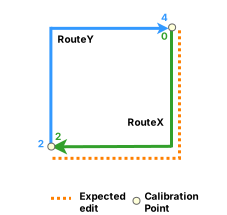
The following shows routes before reassignment:
| Route ID | From Date | To Date |
|---|---|---|
| RouteX | 1/1/2005 | <Null> |
| RouteY | 1/1/2005 | <Null> |
The following are the inputs used for the Reassign Route tool:
|
Method |
Merge to adjacent route |
|---|---|
|
Source |
|
|
From Route |
RouteX |
|
From Measure |
0 |
|
To Measure |
2 |
|
Recalibrate source route |
No |
|
Target |
|
|
To Route |
RouteY |
|
From Measure |
0 |
|
To Measure |
2 |
|
Recalibrate target route |
Yes |
The date of reassignment is 1/1/2010. After reassignment, a calibration point is added at measure 1, and Route Y is recalibrated with measures 0 to 4.
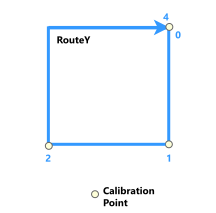
The following shows routes after reassignment:
| Route ID | From Date | To Date |
|---|---|---|
| RouteX | 1/1/2005 | 1/1/2010 |
| RouteY | 1/1/2005 | 1/1/2010 |
| RouteY | 1/1/2010 | <Null> |
Loop splits
In the following example, Route X, on a loop with measures 0 to 12, is split and the edit section is reassigned to a new route (Route Y):
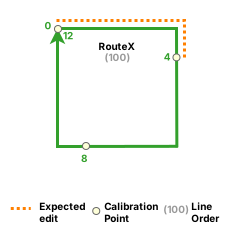
The following shows routes before reassignment:
| Route Name | Line Name | From Date | To Date | Line Order |
|---|---|---|---|---|
| RouteX | Line1 | 1/1/2005 | <Null> | 100 |
The following are the inputs used for the Reassign Route tool:
|
Method |
Form a new route |
|
Source |
|
|
From Route |
RouteX |
|
From Measure |
0 |
|
To Measure |
4 |
|
Recalibrate source route |
Yes |
|
Target |
|
|
To Route |
RouteY |
|
From Measure |
0 |
|
To Measure |
4 |
The date of reassignment is 1/1/2010. After reassignment, Route Y is created with measures 0 to 4. The calibration point formerly at 8 is updated to 4, and Route X is recalibrated with measures 0 to 8.
Route X retains its line order of 100, and the new Route Y is assigned a line order of 200.
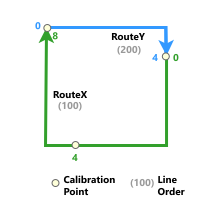
The following shows routes after reassignment:
| Route Name | Line Name | From Date | To Date | Line Order |
|---|---|---|---|---|
| RouteX | Line1 | 1/1/2005 | 1/1/2010 | 100 |
| RouteX | Line1 | 1/1/2010 | <Null> | 100 |
| RouteY | Line1 | 1/1/2010 | <Null> | 200 |
In the following example, Route X, on a loop with measures 0 to 12, is split and the edit section is reassigned to a new route (Route Y):
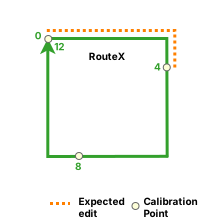
The following shows routes before reassignment:
| Route ID | From Date | To Date |
|---|---|---|
| RouteX | 1/1/2005 | <Null> |
The following are the inputs used for the Reassign Route tool:
|
Method |
Form a new route |
|
Source |
|
|
From Route |
RouteX |
|
From Measure |
0 |
|
To Measure |
4 |
|
Recalibrate source route |
Yes |
|
Target |
|
|
To Route |
RouteY |
|
From Measure |
0 |
|
To Measure |
4 |
The date of reassignment is 1/1/2010. After reassignment, Route Y is created with measures 0 to 4. The calibration point formerly at 8 is updated to 4, and Route X is recalibrated with measures 0 to 8.
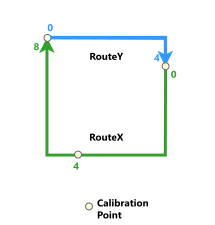
The following shows routes after reassignment:
| Route ID | From Date | To Date |
|---|---|---|
| RouteX | 1/1/2005 | 1/1/2010 |
| RouteX | 1/1/2010 | <Null> |
| RouteY | 1/1/2010 | <Null> |
Reassignment resulting in a lollipop
Route X has measures 0 to 4 and Route Y has measures 0 to 1. In the following example, a loop route (Route X) is merged with a simple route (Route Y) to create a lollipop route after reassignment:
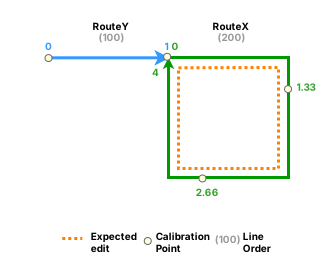
The following shows routes before reassignment:
| Route Name | Line Name | From Date | To Date | Line Order |
|---|---|---|---|---|
| RouteY | Line1 | 1/1/2005 | <Null> | 100 |
| RouteX | Line1 | 1/1/2005 | <Null> | 200 |
The following are the inputs used for the Reassign Route tool:
|
Method |
Merge to adjacent route |
|---|---|
|
Source |
|
|
From Route |
RouteX |
|
From Measure |
0 |
|
To Measure |
4 |
|
Recalibrate source route |
No |
|
Target |
|
|
To Route |
RouteY |
|
From Measure |
1 |
|
To Measure |
5 |
|
Recalibrate target route |
Yes |
The date of reassignment is 1/1/2010. After reassignment, the resulting lollipop route (Route Y) has updated measures 0 to 5.
The line order for Route Y is updated from 200 to 100.
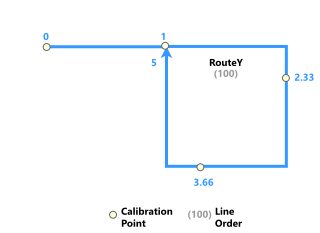
The following shows routes after reassignment:
| Route Name | Line Name | From Date | To Date | Line Order |
|---|---|---|---|---|
| RouteY | Line1 | 1/1/2005 | 1/1/2010 | 100 |
| RouteX | Line1 | 1/1/2005 | 1/1/2010 | 200 |
| RouteY | Line1 | 1/1/2010 | <Null> | 100 |
Route X has measures 0 to 4 and Route Y has measures 0 to 1. In the following example, a loop route (Route X) is merged with a simple route (Route Y) to create a lollipop route after reassignment:
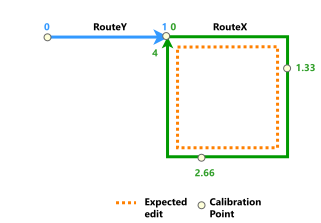
The following shows routes before reassignment:
| Route ID | From Date | To Date |
|---|---|---|
| RouteY | 1/1/2005 | <Null> |
| RouteX | 1/1/2005 | <Null> |
The following are the inputs used for the Reassign Route tool:
|
Method |
Merge to adjacent route |
|---|---|
|
Source |
|
|
From Route |
RouteX |
|
From Measure |
0 |
|
To Measure |
4 |
|
Recalibrate source route |
No |
|
Target |
|
|
To Route |
RouteY |
|
From Measure |
1 |
|
To Measure |
5 |
|
Recalibrate target route |
Yes |
The date of reassignment is 1/1/2010. After reassignment, the resulting lollipop route (Route Y) has updated measures 0 to 5.
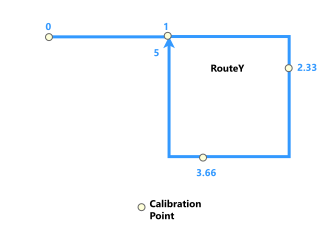
The following shows routes after reassignment:
| Route ID | From Date | To Date |
|---|---|---|
| RouteY | 1/1/2005 | 1/1/2010 |
| RouteX | 1/1/2005 | 1/1/2010 |
| RouteY | 1/1/2010 | <Null> |
Lollipop splits
Route X has measures 0 to 5 and Route Y has measures 0 to 1. In the following example, the stick portion of a lollipop route (Route X) is split and reassigned to an existing route (Route Y):
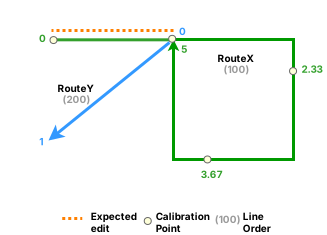
The following shows routes before reassignment:
| Route Name | Line Name | From Date | To Date | Line Order |
|---|---|---|---|---|
| RouteX | Line1 | 1/1/2005 | <Null> | 100 |
| RouteY | Line1 | 1/1/2005 | <Null> | 200 |
The following are the inputs used for the Reassign Route tool:
|
Method |
Merge to adjacent route |
|---|---|
|
Source |
|
|
From Route |
RouteX |
|
From Measure |
0 |
|
To Measure |
1 |
|
Recalibrate source route |
Yes |
|
Target |
|
|
To Route |
RouteY |
|
From Measure |
0 |
|
To Measure |
1 |
|
Recalibrate target route |
Yes |
The date of reassignment is 1/1/2010. After reassignment, both routes are recalibrated. The updated simple route (Route Y) has measures 0 to 2, and the loop route (Route X) has measures 0 to 4.
The line order for the two routes remains the same.
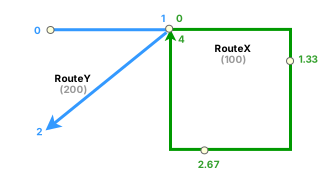
The following shows routes after reassignment:
| Route Name | Line Name | From Date | To Date | Line Order |
|---|---|---|---|---|
| RouteX | Line1 | 1/1/2005 | 1/1/2010 | 100 |
| RouteY | Line1 | 1/1/2005 | 1/1/2010 | 200 |
| RouteX | Line1 | 1/1/2010 | <Null> | 100 |
| RouteY | Line1 | 1/1/2010 | <Null> | 200 |
Route X has measures 0 to 5 and Route Y has measures 0 to 1. In the following example, the stick portion of a lollipop route (Route X) is split and reassigned to an existing route (Route Y):
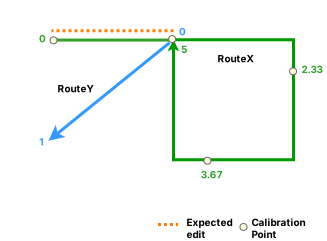
The following shows routes before reassignment:
| Route ID | From Date | To Date |
|---|---|---|
| RouteX | 1/1/2005 | <Null> |
| RouteY | 1/1/2005 | <Null> |
The following are the inputs used for the Reassign Route tool:
|
Method |
Merge to adjacent route |
|---|---|
|
Source |
|
|
From Route |
RouteX |
|
From Measure |
0 |
|
To Measure |
1 |
|
Recalibrate source route |
Yes |
|
Target |
|
|
To Route |
RouteY |
|
From Measure |
0 |
|
To Measure |
1 |
|
Recalibrate target route |
Yes |
The date of reassignment is 1/1/2010. After reassignment, both routes are recalibrated. The updated simple route (Route Y) has measures 0 to 2, and the loop route (Route X) has measures 0 to 4.
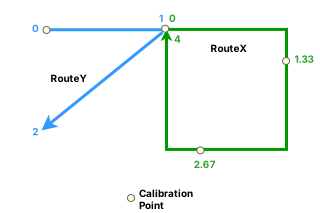
The following shows routes after reassignment:
| Route ID | From Date | To Date |
|---|---|---|
| RouteX | 1/1/2005 | 1/1/2010 |
| RouteY | 1/1/2005 | 1/1/2010 |
| RouteX | 1/1/2010 | <Null> |
| RouteY | 1/1/2010 | <Null> |
Multiple routes merge to create a barbell
In the following example, a loop route (Route X) with measures 0 to 4 is merged with a lollipop route (Route Y) that has measures from 0 to 5:
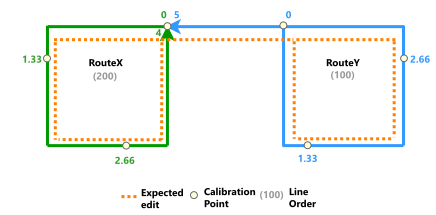
The following shows routes before reassignment:
| Route Name | Line Name | From Date | To Date | Line Order |
|---|---|---|---|---|
| RouteX | Line1 | 1/1/2005 | <Null> | 100 |
| RouteY | Line1 | 1/1/2005 | <Null> | 200 |
The following are the inputs used for the Reassign Route tool:
|
Method |
Form a new route |
|---|---|
|
Source |
|
|
From Route |
RouteX |
|
From Measure |
0 |
|
To Route |
RouteY |
|
To Measure |
5 |
|
Recalibrate source route |
No |
|
Target |
|
|
Target Route |
RNew |
|
From Measure |
5 |
|
To Measure |
9 |
The date of reassignment is 1/1/2010. After reassignment, a new barbell route (RNew) is created from the merged routes. RNew has recalibrated measures 0 to 9.
The new route has line order 100.
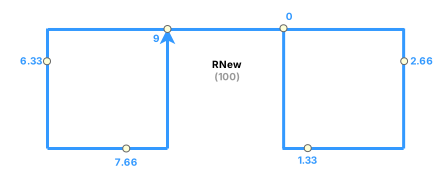
The following shows routes after reassignment:
| Route Name | Line Name | From Date | To Date | Line Order |
|---|---|---|---|---|
| RouteX | Line1 | 1/1/2005 | 1/1/2010 | 100 |
| RouteY | Line1 | 1/1/2005 | 1/1/2010 | 200 |
| RNew | Line1 | 1/1/2010 | <Null> | 100 |
In the following example, a loop route (Route X) with measures 0 to 4 is merged with a lollipop route (Route Y) that has measures from 0 to 5:
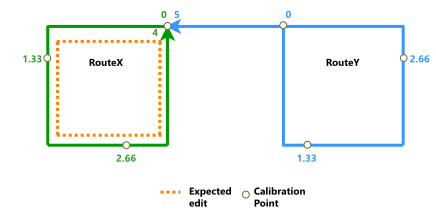
The following shows routes before reassignment:
| Route ID | From Date | To Date |
|---|---|---|
| RouteX | 1/1/2005 | <Null> |
| RouteY | 1/1/2005 | <Null> |
The following are the inputs used for the Reassign Route tool:
|
Method |
Merge to adjacent route |
|---|---|
|
Source |
|
|
From Route |
RouteX |
|
From Measure |
0 |
|
To Measure |
4 |
|
Recalibrate source route |
No |
|
Target |
|
|
Target Route |
RouteY |
|
From Measure |
5 |
|
To Measure |
9 |
|
Recalibrate target route |
Yes |
The date of reassignment is 1/1/2010. After reassignment, a new barbell route (Route Y) is created from the merged routes. Route Y has recalibrated measures from 0 to 9.
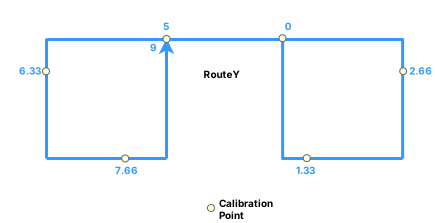
The following shows routes after reassignment:
| Route ID | From Date | To Date |
|---|---|---|
| RouteX | 1/1/2005 | 1/1/2010 |
| RouteY | 1/1/2005 | 1/1/2010 |
| RouteY | 1/1/2010 | <Null> |
Simple routes merge to create a branch
Route Y and Route Z have contiguous measures of 0 to 5 and 6 to 11, respectively, and Route X has measures 0 to 6. In the following example, two simple routes (Route Y and Route Z) are merged with a third simple route (Route X) to create a branch route after reassignment:
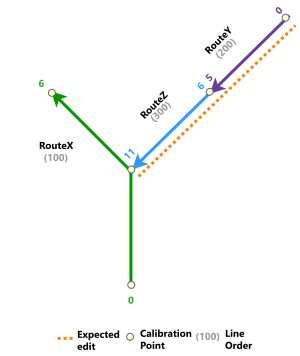
The following shows routes before reassignment:
| Route Name | Line Name | From Date | To Date | Line Order |
|---|---|---|---|---|
| RouteX | Line1 | 1/1/2005 | <Null> | 100 |
| RouteY | Line1 | 1/1/2005 | <Null> | 200 |
| RouteZ | Line1 | 1/1/2005 | <Null> | 300 |
The following are the inputs used for the Reassign Route tool:
|
Method |
Merge to adjacent route |
|---|---|
|
Source |
|
|
From Route |
RouteY |
|
From Measure |
0 |
|
To Route |
RouteZ |
|
To Measure |
11 |
|
Recalibrate source route |
No |
|
Target |
|
|
To Route |
RouteX |
|
From Measure |
6 |
|
To Measure |
16 |
|
Recalibrate target route |
Yes |
The date of reassignment is 1/1/2010. After reassignment, Route Y and Route Z are merged with Route X to create a branch route that has recalibrated measures 0 to 16.
The line order for the remaining route remains 100.
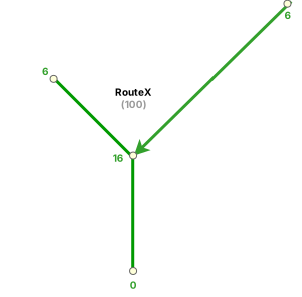
The following shows routes after reassignment:
| Route Name | Line Name | From Date | To Date | Line Order |
|---|---|---|---|---|
| RouteX | Line1 | 1/1/2005 | 1/1/2010 | 100 |
| RouteY | Line1 | 1/1/2005 | 1/1/2010 | 200 |
| RouteZ | Line1 | 1/1/2005 | 1/1/2010 | 300 |
| RouteX | Line1 | 1/1/2010 | <Null> | 100 |
In this example, a simple route (Route Y) is merged to another simple route (Route X) to create a branch route after reassignment. Route X has measures 0 to 6, and Route Y has measures from 5 to 10.
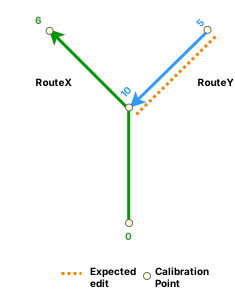
The following shows routes before reassignment:
| Route ID | From Date | To Date |
|---|---|---|
| RouteX | 1/1/2005 | <Null> |
| RouteY | 1/1/2005 | <Null> |
The following are the inputs used for the Reassign Route tool:
|
Method |
Merge to adjacent route |
|---|---|
|
Source |
|
|
From Route |
RouteY |
|
From Measure |
5 |
|
To Measure |
10 |
|
Recalibrate source route |
No |
|
Target |
|
|
To Route |
RouteX |
|
From Measure |
6 |
|
To Measure |
11 |
|
Recalibrate target route |
Yes |
The date of reassignment is 1/1/2010. After reassignment, Route Y is merged with Route X to create a branch route with recalibrated measures 0 to 11.
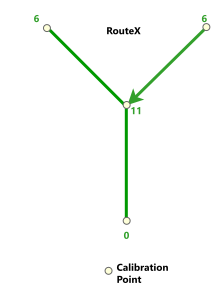
The following shows routes after reassignment:
| Route ID | From Date | To Date |
|---|---|---|
| RouteX | 1/1/2005 | 1/1/2010 |
| RouteY | 1/1/2005 | 1/1/2010 |
| RouteX | 1/1/2010 | <Null> |
Infinity route splits
In the following example, an existing infinity route (Route X) with measures 0 to 24 is split to create an alpha route and a new simple route (RNew):
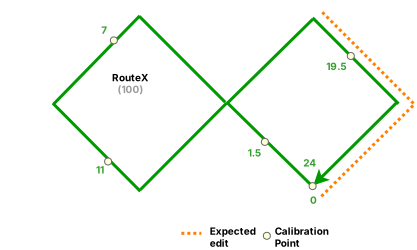
The following shows routes before reassignment:
| Route Name | Line Name | From Date | To Date | Line Order |
|---|---|---|---|---|
| RouteX | Line1 | 1/1/2005 | <Null> | 100 |
The following are the inputs used for the Reassign Route tool:
|
Method |
Form a new route |
|---|---|
|
Source |
|
|
From Route |
RouteX |
|
From Measure |
18 |
|
To Measure |
24 |
|
Recalibrate source route |
Yes |
|
Target |
|
|
To Route |
RNew |
|
From Measure |
0 |
|
To Measure |
6 |
The date of reassignment is 1/1/2010. After reassignment, Route X is an alpha route with measures 0 to 18, and RNew has measures 0 to 6.
The line order for Route X remains 100, and the line order for RNew is 200.
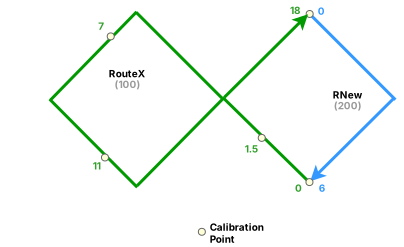
The following shows routes after reassignment:
| Route Name | Line Name | From Date | To Date | Line Order |
|---|---|---|---|---|
| RouteX | Line1 | 1/1/2005 | 1/1/2010 | 100 |
| RouteX | Line1 | 1/1/2010 | <Null> | 100 |
| RNew | Line1 | 1/1/2010 | <Null> | 200 |
In the following example, an existing infinity route (Route X) with measures 0 to 24 is split to create an alpha route and a new simple route (RNew):
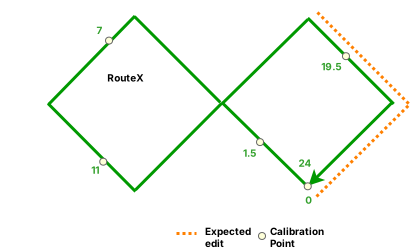
The following shows routes before reassignment:
| Route ID | From Date | To Date |
|---|---|---|
| RouteX | 1/1/2005 | <Null> |
The following are the inputs used for the Reassign Route tool:
|
Method |
Form a new route |
|---|---|
|
Source |
|
|
From Route |
RouteX |
|
From Measure |
18 |
|
To Measure |
24 |
|
Recalibrate source route |
Yes |
|
Target |
|
|
To Route |
RNew |
|
From Measure |
0 |
|
To Measure |
6 |
The date of reassignment is 1/1/2010. After reassignment, Route X is an alpha route with measures 0 to 18, and RNew has measures 0 to 6.
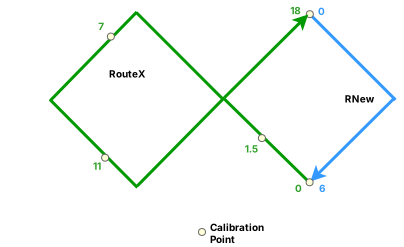
The following shows routes after reassignment:
| Route ID | From Date | To Date |
|---|---|---|
| RouteX | 1/1/2005 | 1/1/2010 |
| RouteX | 1/1/2010 | <Null> |
| RNew | 1/1/2010 | <Null> |