Add a wavelength scheme
In a telecom domain network, a wavelength scheme defines a standardized set of optical wavelengths used to model and trace network features. Each wavelength scheme corresponds to a specific multiplexing standard, such as Coarse Wavelength Division Multiplexing (CWDM), and includes attributes specifying the name and length (nominal center wavelength) for each channel. Wavelength schemes are assigned to applicable network features to support operations such as wavelength propagation with path and circuit traces.
The Add Wavelength Scheme tool allows you to create wavelength schemes that includes the wavelength information needed to perform wavelength based tracing in your network.
Requirements
To add a wavelength scheme, the following requirements must be met:
The Input Utility Network parameter value must reference a utility network version 8 or later.
The utility network dataset provided for the Input Utility Network parameter must include a telecom domain network.
The Wavelength Scheme Name parameter value must be unique in the domain network and cannot exceed 256 characters.
The Wavelengths parameter's Wavelength Name property value must be alphanumeric and cannot exceed 10 characters.
The Wavelengths parameter's Wavelength Length property value must be a positive integer or double.
Each wavelength scheme can represent up to 48 unique wavelengths.
The following requirements must be met when working with an enterprise geodatabase:
The Input Utility Network parameter value must be from a database connection established as the database utility network owner.
The active ArcGIS Enterprise portal account must be the portal utility network owner.
The network topology can be enabled or disabled. When the topology is enabled, restart the feature service to propagate any changes made for wavelength schemes.
License:
The active portal account must be assigned a license with the ArcGIS Advanced Editing user type extension to create, publish, and edit a utility network in an enterprise geodatabase.
Example
A new wavelength scheme is created to model the wavelengths associated with Coarse Wavelength Division Multiplexing (CWDM).
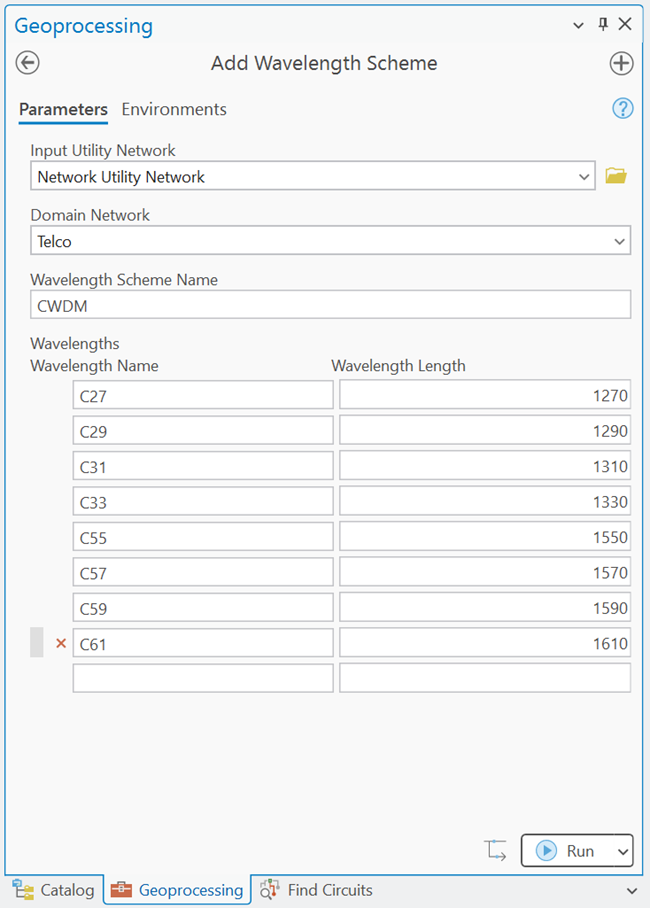
Add a wavelength scheme to a utility network
To add a wavelength scheme to a utility network, complete the following steps:
On the Analysis tab, in the Geoprocessing group, click Tools
 to open the Geoprocessing pane.
In the Geoprocessing pane, search for and select Add Wavelength Scheme.
For the Input Utility Network parameter, specify a utility network.
For the Domain Network parameter, specify a telecom domain network.
For the Wavelength Scheme Name parameter, provide a name for the wavelength scheme.
For the Wavelengths parameter, provide values for the Wavelength Name and Wavelength Length properties to define the wavelength information for the scheme.
For the Wavelength Name property, provide a name for the wavelength in the wavelength scheme. This is a string that represents the wavelength. For example, Channel 1, or 1270nm.
For the Wavelength Length property, provide the length of the wavelength in nanometers. For example, 1270 or 1550.00.
Click Run.
The wavelength scheme is added to the utility network and the
Network_<ID>_WavelengthSchemecoded value domain.