CIMHatchFill Class
In This Topic
Represents a hatch fill which fills polygonal geometry with a uniform series of parallel line symbols.
Object Model
Syntax
Public Class CIMHatchFill
   Inherits CIMFill
   Implements System.ComponentModel.INotifyPropertyChanged, System.Xml.Serialization.IXmlSerializable
public class CIMHatchFill : CIMFill, System.ComponentModel.INotifyPropertyChanged, System.Xml.Serialization.IXmlSerializable
Example
Diagonal cross hatch fill
/// <summary> /// Create a polygon symbol with a diagonal cross hatch fill. <br/> /// 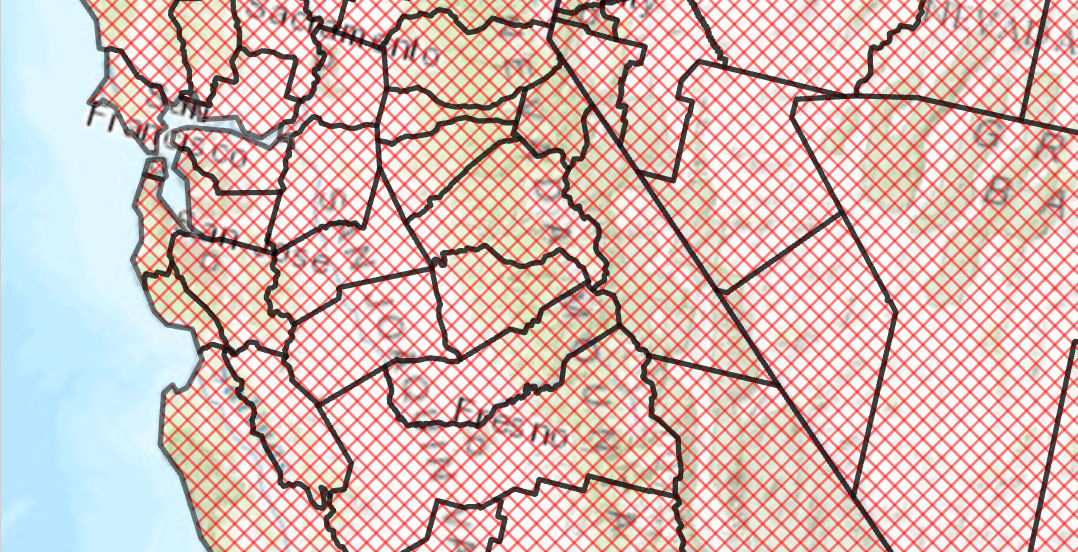 /// </summary> { var trans = 50.0;//semi transparent CIMStroke outline = SymbolFactory.Instance.ConstructStroke(CIMColor.CreateRGBColor(0, 0, 0, trans), 2.0, SimpleLineStyle.Solid); //Stroke for the fill var solid = SymbolFactory.Instance.ConstructStroke(CIMColor.CreateRGBColor(255, 0, 0, trans), 1.0, SimpleLineStyle.Solid); //Mimic cross hatch CIMFill[] diagonalCross = { new CIMHatchFill() { Enable = true, Rotation = 45.0, Separation = 5.0, LineSymbol = new CIMLineSymbol() { SymbolLayers = new CIMSymbolLayer[1] { solid } } }, new CIMHatchFill() { Enable = true, Rotation = -45.0, Separation = 5.0, LineSymbol = new CIMLineSymbol() { SymbolLayers = new CIMSymbolLayer[1] { solid } } } }; List<CIMSymbolLayer> symbolLayers = [ outline, .. diagonalCross ]; //This is the polygon symbol with a diagonal cross hatch fill CIMPolygonSymbol diagonalCrossHatchFillSymbol = new() { SymbolLayers = [.. symbolLayers] }; //To apply the symbol to a polygon feature layer //var renderer = theLayer.GetRenderer() as CIMSimpleRenderer; //renderer.Symbol = diagonalCrossHatchFillSymbol.MakeSymbolReference(); //theLayer.SetRenderer(renderer); }
Dash dot fill
/// <summary> /// Create a polygon symbol with a dash dot fill. <br/> /// 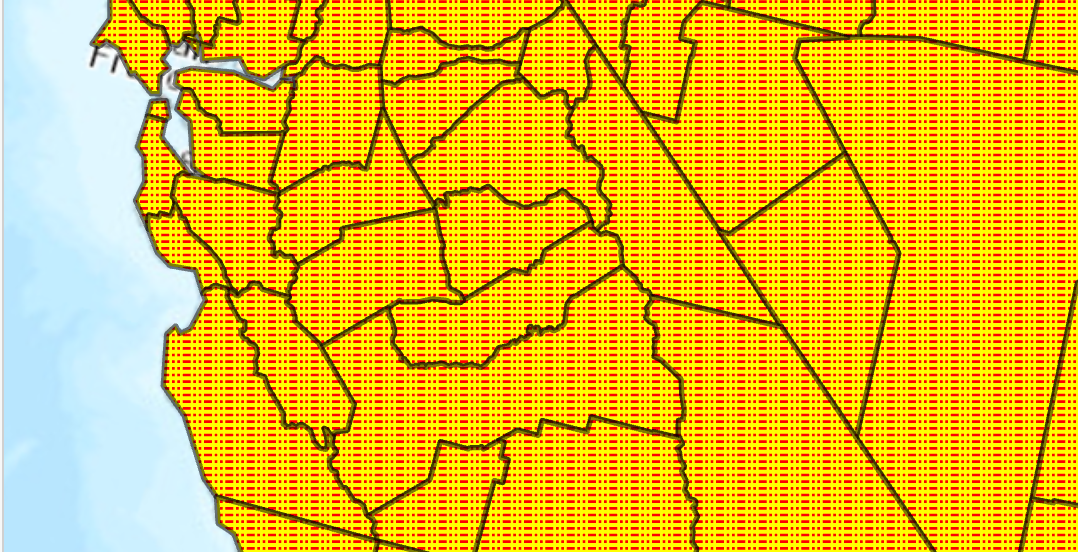 /// </summary> { //Note: Run withing QueuedTask var trans = 50.0;//semi transparent CIMStroke outline = SymbolFactory.Instance.ConstructStroke(CIMColor.CreateRGBColor(0, 0, 0, trans), 2.0, SimpleLineStyle.Solid); //Stroke for the fill var dashDot = SymbolFactory.Instance.ConstructStroke(ColorFactory.Instance.RedRGB, 1.0, SimpleLineStyle.DashDotDot); //Mimic cross hatch CIMFill[] solidColorHatch = { new CIMHatchFill() { Enable = true, Rotation = 0.0, Separation = 2.5, LineSymbol = new CIMLineSymbol(){SymbolLayers = new CIMSymbolLayer[1] {dashDot } } }, new CIMSolidFill() { Enable = true, Color = ColorFactory.Instance.CreateRGBColor(255, 255, 0) }, }; List<CIMSymbolLayer> symbolLayers = [outline, .. solidColorHatch]; //This is the polygon symbol with a dash dot fill CIMPolygonSymbol dashDotFillPolygon = new CIMPolygonSymbol() { SymbolLayers = symbolLayers.ToArray() }; //To apply the symbol to a polygon feature layer //var renderer = theLayer.GetRenderer() as CIMSimpleRenderer; //renderer.Symbol = dashDotFillPolygon.MakeSymbolReference(); //theLayer.SetRenderer(renderer); }
Inheritance Hierarchy
System.Object
ArcGIS.Core.CIM.CIMObject
ArcGIS.Core.CIM.CIMSymbolLayer
ArcGIS.Core.CIM.CIMFill
ArcGIS.Core.CIM.CIMHatchFill
Requirements
Target Platforms: Windows 11 Home, Pro, Enterprise (64 bit)
ArcGIS Pro version: 3.0 or higher.
See Also