ArcGIS Pro 3.7 API Reference Guide
ArcGIS.Core.CIM Namespace / CIMSymbolLayer Class
Members Example

In This Topic
    CIMSymbolLayer Class
    In This Topic
    Represents a symbol layer. Symbol layers are the components that make up a symbol. A symbol layer is represented by a stroke, fill, marker, or procedural symbol layer.
    Syntax
    Example
    How to construct a multilayer line symbol with circle markers on the line ends
    {
        //Note: Needs QueuedTask to run
        var lineStrokeRed = SymbolFactory.Instance.ConstructStroke(ColorFactory.Instance.RedRGB, 4.0);
        var markerCircle = SymbolFactory.Instance.ConstructMarker(ColorFactory.Instance.RedRGB, 12, SimpleMarkerStyle.Circle);
        markerCircle.MarkerPlacement = new CIMMarkerPlacementOnVertices()
        {
            AngleToLine = true,
            PlaceOnEndPoints = true,
            Offset = 0
        };
        var lineSymbolWithCircles = new CIMLineSymbol()
        {
            SymbolLayers = new CIMSymbolLayer[2] { markerCircle, lineStrokeRed }
        };
    }
    How to construct a multilayer line symbol with an arrow head on the end
    {
          var markerTriangle = SymbolFactory.Instance.ConstructMarker(ColorFactory.Instance.RedRGB, 12, SimpleMarkerStyle.Triangle);
          markerTriangle.Rotation = -90; // or -90
          markerTriangle.MarkerPlacement = new CIMMarkerPlacementOnLine() { AngleToLine = true, RelativeTo = PlacementOnLineRelativeTo.LineEnd };
    
          var lineSymbolWithArrow = new CIMLineSymbol()
          {
              SymbolLayers = new CIMSymbolLayer[2] { markerTriangle,
              SymbolFactory.Instance.ConstructStroke(ColorFactory.Instance.RedRGB, 2)
    }
          };
      }
    Mesh procedural texture symbol
    /// <summary>
    /// Creates Mesh procedural symbol with various textures.
    /// ![MeshProceduralTexture](https://ArcGIS.github.io/arcgis-pro-sdk/images/Symbology/mesh-procedural-texture.png)
    /// Note: The rule package used in this method can be obtained from the Sample Data included in the arcgis-pro-sdk-community-samples repository.
    /// </summary>
    {
      //Note: Run withing QueuedTask
      string _rulePkgPath = @"C:\Data\RulePackages\MultipatchTextures.rpk";
      CIMSymbolLayer[] proceduralSymbolLyr =
              {
                  new CIMProceduralSymbolLayer()
                  {
                      PrimitiveName = "Textures",
                      RulePackage = _rulePkgPath,
                      RulePackageName = "Textures",
                  }
              };
      var meshProceduralTextureSymbol = new CIMMeshSymbol()
      {
        SymbolLayers = proceduralSymbolLyr
      };
    }
    Cross hatch
    /// <summary>
    /// Create a polygon symbol using the ConstructHatchFill method . <br/>
    /// ![PolygonSymbolDiagonalCrossHatch](https://ArcGIS.github.io/arcgis-pro-sdk/images/Symbology/ConstructHatchFill.png)
    /// </summary>
    {
      CIMStroke lineStroke = SymbolFactory.Instance.ConstructStroke(CIMColor.CreateRGBColor(51, 51, 51, 60), 4, SimpleLineStyle.Solid);
      //gradient
      var hatchFill = SymbolFactory.Instance.ConstructHatchFill(lineStroke, 45, 6, 0);
    
      List<CIMSymbolLayer> symbolLayers = new()
      {
        hatchFill
      };
      //This is the polygon symbol with a diagonal cross hatch fill
      CIMPolygonSymbol crossHatchPolygonSymbol = new CIMPolygonSymbol() { SymbolLayers = symbolLayers.ToArray() };
      //To apply the symbol to a polygon feature layer
      //var renderer = theLayer.GetRenderer() as CIMSimpleRenderer;
      //renderer.Symbol = crossHatchPolygonSymbol.MakeSymbolReference();
      //theLayer.SetRenderer(renderer);
    }
    Dash dot fill
    /// <summary>
    /// Create a polygon symbol with a dash dot fill. <br/>
    /// ![PolygonSymbolDashDot](https://ArcGIS.github.io/arcgis-pro-sdk/images/Symbology/polygon-dash-dot.png)
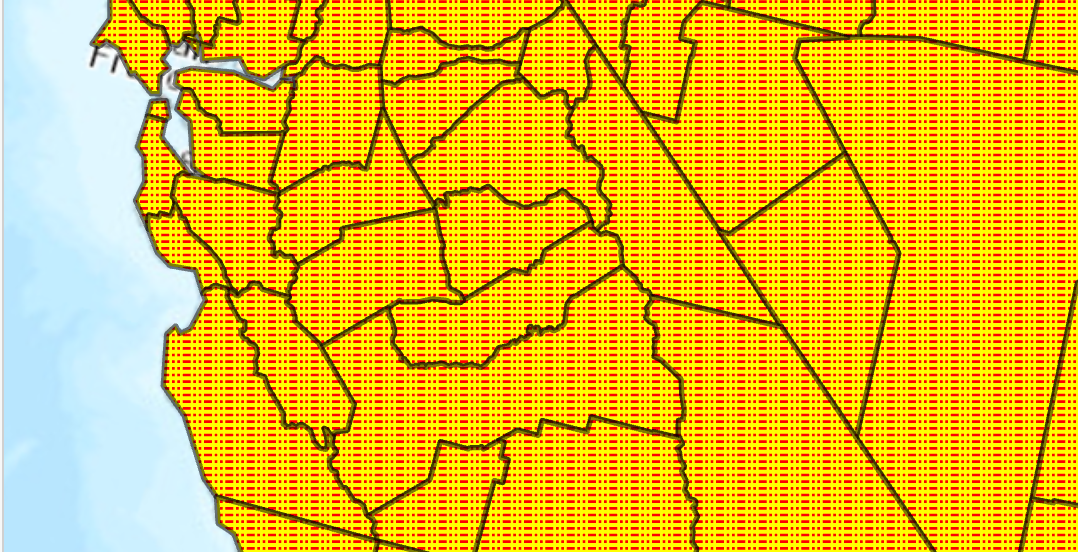
    /// </summary>
    {
      //Note: Run withing QueuedTask
      var trans = 50.0;//semi transparent
      CIMStroke outline = SymbolFactory.Instance.ConstructStroke(CIMColor.CreateRGBColor(0, 0, 0, trans), 2.0, SimpleLineStyle.Solid);
    
      //Stroke for the fill            
      var dashDot = SymbolFactory.Instance.ConstructStroke(ColorFactory.Instance.RedRGB, 1.0, SimpleLineStyle.DashDotDot);
      //Mimic cross hatch
      CIMFill[] solidColorHatch =
            {
    
               new CIMHatchFill()
              {
                  Enable = true,
                  Rotation = 0.0,
                  Separation = 2.5,
                  LineSymbol = new CIMLineSymbol(){SymbolLayers = new CIMSymbolLayer[1] {dashDot } }
              },
               new CIMSolidFill()
              {
                  Enable = true,
                  Color = ColorFactory.Instance.CreateRGBColor(255, 255, 0)
              },
    };
      List<CIMSymbolLayer> symbolLayers = [outline, .. solidColorHatch];
      //This is the polygon symbol with a dash dot fill
      CIMPolygonSymbol dashDotFillPolygon = new CIMPolygonSymbol() { SymbolLayers = symbolLayers.ToArray() };
      //To apply the symbol to a polygon feature layer
      //var renderer = theLayer.GetRenderer() as CIMSimpleRenderer;
      //renderer.Symbol = dashDotFillPolygon.MakeSymbolReference();
      //theLayer.SetRenderer(renderer);
    }
    Gradient color fill using CIMGradientFill
    /// <summary>
    /// Create a polygon symbol with a gradient color fill. <br/>
    /// ![PolygonSymbolGradientColor](https://ArcGIS.github.io/arcgis-pro-sdk/images/Symbology/polygon-gradient-color.png)
    /// 1. Create a solid colored stroke with 50% transparency
    /// 1. Create a fill using gradient colors red through green
    /// 1. Apply both the stroke and fill as a symbol layer array to the new PolygonSymbol
    /// </summary>
    {
      //Note: Run withing QueuedTask
      var trans = 50.0;//semi transparent
      CIMStroke outline = SymbolFactory.Instance.ConstructStroke(CIMColor.CreateRGBColor(0, 0, 0, trans), 2.0, SimpleLineStyle.Solid);
      //Mimic cross hatch
      CIMFill solidColorHatch =
             new CIMGradientFill()
             {
               ColorRamp = ColorFactory.Instance.ConstructColorRamp(ColorRampAlgorithm.LinearContinuous,
                                    ColorFactory.Instance.RedRGB, ColorFactory.Instance.GreenRGB)
             };
      List<CIMSymbolLayer> symbolLayers = new List<CIMSymbolLayer>
        {
                  outline,
                  solidColorHatch
        };
    
      CIMPolygonSymbol gradientColorFillPolygon = new CIMPolygonSymbol() { SymbolLayers = symbolLayers.ToArray() };
      //To apply the symbol to a polygon feature layer
      //var renderer = theLayer.GetRenderer() as CIMSimpleRenderer;
      //renderer.Symbol = gradientColorFillPolygon.MakeSymbolReference();
      //theLayer.SetRenderer(renderer);
    }
    Inheritance Hierarchy

    System.Object
       ArcGIS.Core.CIM.CIMObject
          ArcGIS.Core.CIM.CIMSymbolLayer
             ArcGIS.Core.CIM.CIMFill
             ArcGIS.Core.CIM.CIMMarker
             ArcGIS.Core.CIM.CIMMaterialSymbolLayer
             ArcGIS.Core.CIM.CIMMeshEdge
             ArcGIS.Core.CIM.CIMProceduralSymbolLayer
             ArcGIS.Core.CIM.CIMStroke

    Requirements

    Target Platforms: Windows 11 Home, Pro, Enterprise (64 bit)

    ArcGIS Pro version: 3.0 or higher.
    See Also