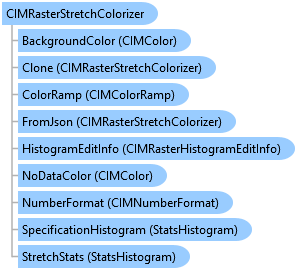
CIMRasterStretchColorizer Class
In This Topic
Represents a raster stretch colorizer.
Object Model
Syntax
public class CIMRasterStretchColorizer : CIMRasterColorizer, System.ComponentModel.INotifyPropertyChanged, System.Xml.Serialization.IXmlSerializable
Public Class CIMRasterStretchColorizer
   Inherits CIMRasterColorizer
   Implements System.ComponentModel.INotifyPropertyChanged, System.Xml.Serialization.IXmlSerializable
Example
Create a new colorizer based on a default colorizer definition and apply it to the raster layer
{
  await QueuedTask.Run(async () =>
  {
    // Check if the Stretch colorizer can be applied to the raster layer.
    if (rasterLayer.GetApplicableColorizers().Contains(RasterColorizerType.StretchColorizer))
    {
      // Create a new Stretch Colorizer Definition using the default constructor.
      StretchColorizerDefinition stretchColorizerDef_default = new StretchColorizerDefinition();
      // Create a new Stretch colorizer using the colorizer definition created above.
      CIMRasterStretchColorizer newStretchColorizer_default =
        await rasterLayer.CreateColorizerAsync(stretchColorizerDef_default) as CIMRasterStretchColorizer;
      // Set the new colorizer on the raster layer.
      rasterLayer.SetColorizer(newStretchColorizer_default);
    }
  });
}
Create a new colorizer based on a custom colorizer definition and apply it to the raster layer
{
  // Check if the Stretch colorizer can be applied to the raster layer.
  //Get a color ramp from a style
  var project = Project.Current;
  StyleProjectItem ArcGISColorsStyleItem =
        project.GetItems<StyleProjectItem>().FirstOrDefault(s => s.Name == "ArcGIS Colors");
  await QueuedTask.Run(async () =>
  {
    var colorRamps = ArcGISColorsStyleItem.SearchColorRamps("Heat Map 4 - Semitransparent");
    CIMColorRamp colorRampToUse = colorRampList[0].ColorRamp;
    if (rasterLayer.GetApplicableColorizers().Contains(RasterColorizerType.StretchColorizer))
    {
      // Create a new Stretch Colorizer Definition specifying parameters
      // for band index, stretch type, gamma and color ramp.
      StretchColorizerDefinition stretchColorizerDef_custom =
        new StretchColorizerDefinition(1, RasterStretchType.ESRI, 2, colorRamp);
      // Create a new stretch colorizer using the colorizer definition created above.
      CIMRasterStretchColorizer newStretchColorizer_custom =
        await rasterLayer.CreateColorizerAsync(stretchColorizerDef_custom) as CIMRasterStretchColorizer;
      // Set the new colorizer on the raster layer.
      rasterLayer.SetColorizer(newStretchColorizer_custom);
    }
  });
}
Create a new colorizer based on a default colorizer definition and apply it to the mosaic layer
{
  await QueuedTask.Run(async () =>
  {
    // Get the image sub-layer from the mosaic layer.
    ImageMosaicSubLayer mosaicImageSubLayer = mosaicLayer.GetImageLayer();
    // Check if the Stretch colorizer can be applied to the image sub-layer.
    if (mosaicImageSubLayer.GetApplicableColorizers().Contains(RasterColorizerType.StretchColorizer))
    {
      // Create a new Stretch Colorizer Definition using the default constructor.
      StretchColorizerDefinition stretchColorizerDef_default = new StretchColorizerDefinition();
      // Create a new Stretch colorizer using the colorizer definition created above.
      CIMRasterStretchColorizer newStretchColorizer_default =
        await mosaicImageSubLayer.CreateColorizerAsync(stretchColorizerDef_default) as CIMRasterStretchColorizer;
      // Set the new colorizer on the image sub-layer.
      mosaicImageSubLayer.SetColorizer(newStretchColorizer_default);
    }
  });
}
Create a new colorizer based on a custom colorizer definition and apply it to the mosaic layer
{
  await QueuedTask.Run(async () =>
  {
    // Get the image sub-layer from the mosaic layer.
    ImageMosaicSubLayer mosaicImageSubLayer = mosaicLayer.GetImageLayer();
    // Check if the Stretch colorizer can be applied to the image sub-layer.
    if (mosaicImageSubLayer.GetApplicableColorizers().Contains(RasterColorizerType.StretchColorizer))
    {
      // Create a new Stretch colorizer definition specifying parameters
      // for band index, stretch type, gamma and color ramp.
      StretchColorizerDefinition stretchColorizerDef_custom =
        new StretchColorizerDefinition(1, RasterStretchType.ESRI, 2, colorRamp);
      // Create a new stretch colorizer using the colorizer definition created above.
      CIMRasterStretchColorizer newStretchColorizer_custom =
        await mosaicImageSubLayer.CreateColorizerAsync(stretchColorizerDef_custom) as CIMRasterStretchColorizer;
      // Set the new colorizer on the image sub-layer.
      mosaicImageSubLayer.SetColorizer(newStretchColorizer_custom);
    }
  });
}
Create a new colorizer based on a default colorizer definition and apply it to the image service layer
{
  await QueuedTask.Run(async () =>
  {
    // Check if the Stretch colorizer can be applied to the image service layer.
    if (imageServiceLayer.GetApplicableColorizers().Contains(RasterColorizerType.StretchColorizer))
    {
      // Create a new Stretch Colorizer Definition using the default constructor.
      StretchColorizerDefinition stretchColorizerDef_default = new StretchColorizerDefinition();
      // Create a new Stretch colorizer using the colorizer definition created above.
      CIMRasterStretchColorizer newStretchColorizer_default =
        await imageServiceLayer.CreateColorizerAsync(stretchColorizerDef_default) as CIMRasterStretchColorizer;
      // Set the new colorizer on the image service layer.
      imageServiceLayer.SetColorizer(newStretchColorizer_default);
    }
  });
}
Create a new colorizer based on a custom colorizer definition and apply it to the image service layer
{
  await QueuedTask.Run(async () =>
  {
    // Check if the Stretch colorizer can be applied to the image service layer.
    if (imageServiceLayer.GetApplicableColorizers().Contains(RasterColorizerType.StretchColorizer))
    {
      // Create a new Stretch Colorizer Definition specifying parameters
      // for band index, stretch type, gamma and color ramp.
      StretchColorizerDefinition stretchColorizerDef_custom =
        new StretchColorizerDefinition(1, RasterStretchType.ESRI, 2, colorRamp);
      // Create a new stretch colorizer using the colorizer definition created above.
      CIMRasterStretchColorizer newStretchColorizer_custom =
        await imageServiceLayer.CreateColorizerAsync(stretchColorizerDef_custom) as CIMRasterStretchColorizer;
      // Set the new colorizer on the image service layer.
      imageServiceLayer.SetColorizer(newStretchColorizer_custom);
    }
  });
}
Calculate Raster statistics
//If a raster dataset has statistics, you can create a raster layer and get these statistics by accessing the colorizer.
var rasterStatisticsMapView = MapView.Active;
if (rasterStatisticsMapView == null)
  return;

await QueuedTask.Run(() =>
{
  //Accessing the raster layer
  var lyr = rasterStatisticsMapView.Map.GetLayersAsFlattenedList().OfType<BasicRasterLayer>().FirstOrDefault();
  //Getting the colorizer
  var colorizer = lyr.GetColorizer() as CIMRasterStretchColorizer;
  //Accessing the statistics
  var stats = colorizer.StretchStats;
  var max = stats.max;
  var min = stats.min;
});
Inheritance Hierarchy
System.Object
ArcGIS.Core.CIM.CIMObject
ArcGIS.Core.CIM.CIMRasterColorizer
ArcGIS.Core.CIM.CIMRasterStretchColorizer
Requirements
Target Platforms: Windows 11 Home, Pro, Enterprise (64 bit)
ArcGIS Pro version: 3.0 or higher.
See Also