Eliminate (Data Management Tools)
Summary
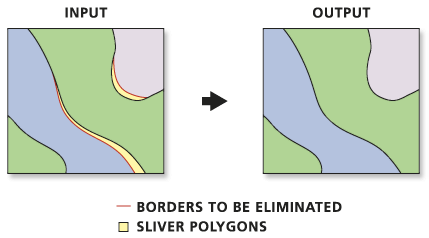
Eliminates polygons by merging them with neighboring polygons that have the largest area or the longest shared border. This tool is often used to remove small sliver polygons that are the result of overlay operations, such as those performed by Intersect and Union tools.
Illustration
Usage
Features that will be eliminated are determined by a selection applied to a polygon layer. The selection must be determined in a previous step using the Select Layer by Attribute tool or the Select Layer by Location tool, or by querying a layer in a map.
This tool may not eliminate all selected features, depending on your dataset. Selected features cannot be merged with a neighboring selected feature. For example, a selected feature that is surrounded by other selected features, or only borders on other selected features cannot be merged. To eliminate the selected features that were not merged, select the features again and run the tool again.
A selected feature that has no neighboring features with a common boundary cannot be merged.
The Input Layer parameter must include a selection; otherwise, the tool will fail.
The Exclusion Expression and Exclusion Layer parameters are not mutually exclusive and can be used together to give full control over what is eliminated.
Parameters
| Label | Explanation | Data type |
|---|---|---|
|
Input Layer |
The layer with the polygons that will be merged with neighboring polygons. |
Feature Layer |
|
Output Feature Class |
The feature class to be created. |
Feature Class |
|
Eliminating polygon by border (Optional) |
Specifies whether the selected polygon will be merged with a polygon with the longest shared border or the largest area.
|
Boolean |
|
Exclusion Expression (Optional) |
An SQL expression that will be used to identify features that will not be altered. |
SQL Expression |
|
Exclusion Layer (Optional) |
An input polyline or polygon feature class or layer that defines polygon boundaries, or portions thereof, that will not be eliminated. |
Feature Layer |
Environments
Current Workspace, Scratch Workspace, Output Coordinate System, Extent, XY Resolution, XY Tolerance, Output has M values, M Resolution, M Tolerance, Output has Z values, Default Output Z Value, Z Resolution, Z Tolerance, Maintain fully qualified field names, Output CONFIG Keyword, Auto Commit, Output XY Domain, Output M Domain, Output Z Domain
Licensing information
- Basic: No
- Standard: No
- Advanced: Yes