Polygon To Line (Data Management Tools)
Summary
Creates a line feature class converted from polygon boundaries. You can set the tool parameters so shared segments and their neighboring polygon feature IDs will be analyzed. Alternatively, you can set the tool parameters so an enclosed line feature will be created for each input polygon.
Illustration
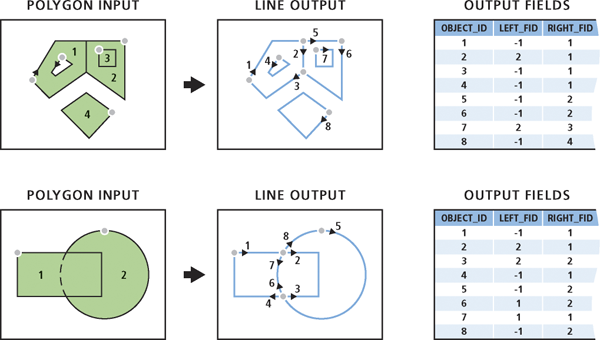
Usage
If the Identify and store polygon neighboring information parameter is checked, the polygon neighboring relationship will be analyzed. The boundaries are converted to lines, taking into account crossing or shared segments. The following fields will be added to the output:
LEFT_FID—The feature ID of the input polygon to the left of the output line.RIGHT_FID—The feature ID of the input polygon to the right of the output line.
The attributes of the input features will not be maintained in the output.
The following scenarios describe the process and output in more detail:
In a polygon geometry, the outer boundary is always stored in a clockwise direction. If the polygon has a hole, the hole (or inner) boundary is always stored in a counterclockwise direction. Therefore, for a polygon with no neighbors to the left side (outside) of its outer boundary and the left side (inside) of the hole boundary, the resulting lines will have a value of -1 for the
LEFT_FIDfield value and the polygon feature ID as theRIGHT_FIDfield value.When a polygon contains another polygon, one output line in the clockwise direction will be generated representing the shared boundary, and its
LEFT_FIDfield value will be the outer polygon feature ID and theRIGHT_FIDfield value will be the inner polygon feature ID.When two polygons share a portion of their boundaries, one output line will be generated representing the shared segment. The line direction will be arbitrary, and the
LEFT_FIDandRIGHT_FIDfield values will be the left or right polygon feature ID accordingly.When a polygon overlaps another polygon, two output lines will be generated representing each crossing boundary twice. The first line will represent the outer boundary of one of the overlapping polygons, and its
LEFT_FIDfield value will be the feature ID of the polygon it crosses, and itsRIGHT_FIDfield value will be its own polygon feature ID. The second line will be in the opposite direction, splitting the other polygon, and itsLEFT_FIDandRIGHT_FIDfield values will be the same as the other polygon feature ID.Input multipart features are not maintained; the output lines will all be single part.
For any input feature that is a parametric (true) curve, the output line will remain true curves, even if they are split.
This parameter uses a tiling process to handle very large datasets for better performance and scalability.
When the Identify and store polygon neighboring information parameter is unchecked, each input polygon will be converted to an enclosed line feature. Any multipart polygons will be converted to a multipart line.
An
ORIG_FIDfield will be added to the output with the feature ID of each input line. The attributes of the input features will be maintained in the output.
Parameters
| Label | Explanation | Data type |
|---|---|---|
|
Input Features |
The input polygon features. |
Feature Layer |
|
Output Feature Class |
The output line feature class. |
Feature Class |
|
Identify and store polygon neighboring information (Optional) |
Specifies whether polygon neighboring relationships will be identified and stored in the output.
|
Boolean |
Environments
Current Workspace, Scratch Workspace, Default Output Z Value, M Resolution, M Tolerance, Output M Domain, Output Z Domain, Output Coordinate System, Extent, Output has M values, Output has Z values, XY Resolution, XY Tolerance, Z Resolution, Z Tolerance
Licensing information
- Basic: No
- Standard: No
- Advanced: Yes