Extract Embedding To Fields (GeoAI Tools)
Summary
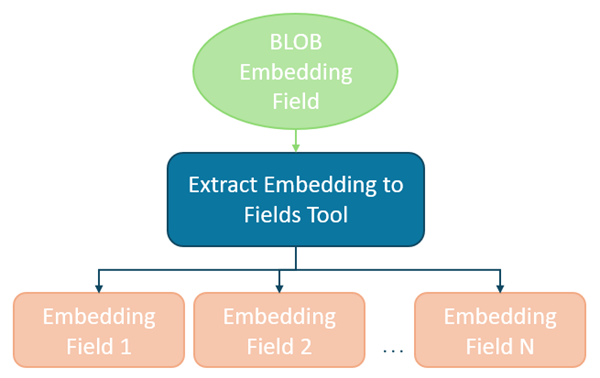
Extracts vector embeddings stored as binary large object (BLOB) fields into individual numeric fields in a new output feature class.
This process allows embedding dimensions to be used directly in ArcGIS Pro tools which do not support the BLOB field type.
Illustration
Usage
You will provide a feature layer with an embedding field stored as a binary large object (BLOB) as the Input Features parameter value and a geodatabase feature class location for the Output Features parameter value.
The tool will extract the field values for Embedding Field the parameter value into individual float values with field names starting with the Output Field Prefix parameter value.
For example, if you have a feature layer containing satellite image footprints with deep learning-generated embeddings and you want to group those features using the Multivariate Clustering tool or locate similar footprints in the embedding space using Similarity Search, do the following:
Use the layer containing the embedding BLOB field as the Input Features parameter value.
Select the BLOB field that stores the serialized embedding vectors for the Embedding Field parameter value.
Specify a valid geodatabase feature class location for the Output Features parameter value.
Provide a meaningful prefix for the Output Field Prefix parameter value to name the new embedding dimension fields. For example, if the Output Field Prefix parameter value is embed_, the output embedding dimension field names will begin as embed_1, embed_2, etc.
The tool copies the Input Features parameter value to the Output Features parameter value and retains the original BLOB field. It then extracts each embedding into a series of Float32 fields, one field per embedding dimension, using the Output Field Prefix parameter value.
Note:
The Output Features parameter value must reference a feature class stored in a file, mobile, or enterprise geodatabase. Folder-based outputs such as shapefiles or GeoPackages are not supported. The Output Field Prefix parameter value must conform to geodatabase field naming rules. The prefix cannot begin with a number and may only contain alphanumeric characters and underscores.
- The dimensionality of the embeddings is determined by deserializing the first valid BLOB record encountered. This dimensionality is used to define the number of output fields that will be created. For example, if the embedding contains 256 dimensions, the tool will create 256 new Float32 fields.
Note:
All features must contain valid embedding values. If a null value is encountered in the embedding field, the tool will fail and return an error. In addition, all embeddings must have the same dimensionality. If an embedding BLOB is encountered whose length does not match the established dimension, the tool will stop processing and report the ObjectID of the invalid feature.
The output feature class always contains the same geometry type as the input features. No geometric modification or spatial transformation is performed by the tool.
The extracted numeric fields can be used directly as input to tools such as Multivariate Clustering, Similarity Search, and other Spatial Analyst and Spatial Statistics tools that require numeric attributes. Because embedding dimensions are numeric but not inherently descriptive, it is often helpful to retain identifiers or categorical fields from the original Input Features for interpretation and decision-making.
All original attributes, including the embedding BLOB field, are preserved in the output feature class along with the newly created Float32 embedding dimension fields.
Parameters
| Label | Explanation | Data type |
|---|---|---|
|
Input Features |
The feature layer containing the embedding field stored as BLOB. All features must contain valid embedding values. |
Feature Layer |
|
Output Features |
The output feature class that will contain the extracted embedding fields. It must be a feature class within a file, mobile, or enterprise geodatabase. The original BLOB field is retained. |
Feature Class |
|
Embedding Field |
The BLOB field from the Input Features parameter value containing serialized embedding vectors. |
Field |
|
Output Field Prefix |
The prefix used to name the newly created embedding dimension fields. Tip:Use a short, meaningful prefix to keep field names readable and manageable. For example, a value of embed_ will create fields named embed_1, embed_2, …, embed_n, where each field represents a single embedding dimension. A clear prefix is especially important when working with high-dimensional embeddings, as it makes downstream analysis, field selection, and interpretation easier. |
String |
Environments
Licensing information
- Basic: Yes
- Standard: Yes
- Advanced: Yes