How Extract Embedding to Fields works
ArcGIS Pro workflows increasingly incorporate foundation models that generate numerical representations, called embeddings, to describe complex spatial features such as imagery, text, or other high-dimensional data. These embeddings capture latent patterns learned by the model and are commonly used for similarity analysis, clustering, classification, and exploratory analytics.
When embeddings are generated in ArcGIS Pro using the Generate Embeddings Using AI Models tool, they are packaged by default into a binary large object (BLOB) field. This format enables efficient storage and transport of high-dimensional numeric vectors but cannot be directly consumed by many geoprocessing tools. The Extract Embedding To Fields tool converts these binary representations into individual numeric fields so that the embedding dimensions can be used directly in ArcGIS Pro workflows.
Potential applications
You might use the Extract Embedding To Fields tool in the following scenarios:
Running principal components or other reduction techniques on extracted fields to create compact, decorrelated features suitable for tools that assume smaller, stable predictor sets using the Dimension Reduction tool. This is a common preparatory step before clustering or regression.
Preparing deep learning–generated feature embeddings for tools like Multivariate Clustering, Spatially Constrained Multivariate Clustering, or Similarity Search.
Enabling exploratory analysis of embedding dimensions using charts, statistics, or symbology.
Supporting downstream modelling workflows like regression or classification that require numeric attributes rather than binary fields. For example, the Forest Based Classification and Regression, Geographically Weighted Regression (GWR), Spatial Autoregression tools.
Making embedding data accessible to others who are unfamiliar with binary or serialized formats.
For example, a data scientist may generate embeddings from satellite imagery using a vision foundational model. These embeddings encode texture, shape, and contextual information learned by the model. Expanding the embeddings allows GIS analysts to cluster imagery footprints or identify spatial patterns using familiar ArcGIS Pro tools.
Embedding Field
Embeddings generated by foundation models are stored in a BLOB. For more information about how embeddings are represented in ArcGIS Pro, see Embeddings as BLOB fields.
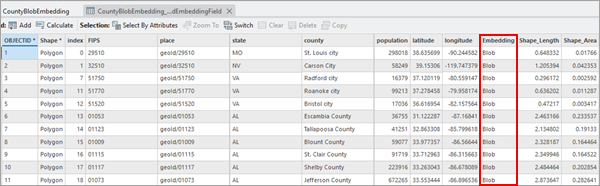
This approach minimizes storage overhead and improves read and write performance, especially for large datasets with high-dimensional embeddings. While efficient, this binary format prevents direct use of embedding values in tools that expect numeric fields.
Output Field Prefix
The Extract Embedding To Fields tool reverses the embedding packaging process and exposes each embedding dimension as a numeric attribute.
The tool performs the following operations:
Reads the Input Features and validates the selected
EmbeddingField.Copies the Input Features parameter value to the Output Features parameter value.
Deserializes the first valid BLOB record to determine the embedding dimensionality.
Creates one Float32 field for each embedding dimension using the Output Field Prefix parameter value.
Iterates through all features, unpacking the binary data and writing each float value to its corresponding field.
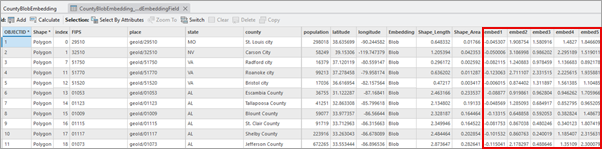
For example, with Output Field Prefix parameter value of embed an embedding with 256 dimensions will result in 256 new numeric fields with deserialized BLOB records. The attribute table of the output would look like the following:
Best practices
Use the Extract Embedding to Fields tool when you need embedding dimensions as numeric fields for analysis, visualization, joins, or tools that do not support compact (BLOB/vector) embeddings. Consider the following when extracting the embeddings into individual dimensions to ensure stable, efficient workflows.
Some databases have strict column limits—for example, PostgreSQL supports up to ~1600 fields per table. Expanding large embeddings can exceed these limits or degrade performance due to oversized system tables. Reduce the number of extracted fields when working in enterprise databases.
Very wide tables can cause long processing times or memory exhaustion—even on high memory machines. Test workflows on smaller subsets, reduce dimensions when needed, and avoid unnecessarily expanding very high dimensional embeddings.
Many regression and clustering tools like the Generalized Linear Regression tool are not suited for high-dimensional inputs. Use the Dimension Reduction tool to condense embeddings into a smaller set of components before downstream analysis. This improves performance, avoids multicollinearity, and increases interpretability.
High-dimensional embeddings can create large numbers of fields. Use a clear, concise Output Field Prefix and retain identifier or categorical fields from the original dataset to help interpret analysis results.
The output feature class retains the original BLOB
Embeddingfield alongside the extracted numeric fields. This allows you to preserve the original serialized embedding while enabling numeric analysis workflows within ArcGIS Pro. Also, the serialized embedding field is used for embedding-based analysis tools, such as the Find Similar Features Using Embeddings.